

10 min read

Growing companies often reach a point where QuickBooks no longer provides the visibility, automation, and scalability needed to support continued growth.
While QuickBooks is an effective accounting solution for small businesses, finance teams often begin experiencing challenges as operations become more complex. Multiple entities, expanding product lines, inventory requirements, manual reporting processes, disconnected applications, and increasing transaction volume can make it difficult to get accurate information quickly.
For companies experiencing these challenges, switching from QuickBooks to NetSuite provides a path toward a unified cloud ERP platform designed to support financial management, operations, reporting, and business growth.
This guide explains everything CFOs, Controllers, and business leaders should know before making the move from QuickBooks to NetSuite, including:
- Signs your business has outgrown QuickBooks
- How to determine if your organization is ready for NetSuite
- The QuickBooks-to-NetSuite migration process
- Data migration considerations
- Implementation timelines and costs
- Common challenges and best practices for success
QuickBooks vs NetSuite: Why Growing Companies Make the Switch
QuickBooks is a popular accounting solution for small businesses because it provides essential bookkeeping and financial management capabilities. However, as companies grow, they often require more advanced functionality, automation, and visibility than QuickBooks can provide.
Many growing organizations begin adding spreadsheets, third-party applications, and manual processes to manage increasing complexity. Over time, disconnected systems can make it difficult for finance teams to access accurate information, streamline operations, and support strategic decision-making.
NetSuite is a complete cloud ERP platform designed for growing and mid-sized organizations. It combines financial management, CRM, inventory, order management, reporting, and business operations into one unified system.
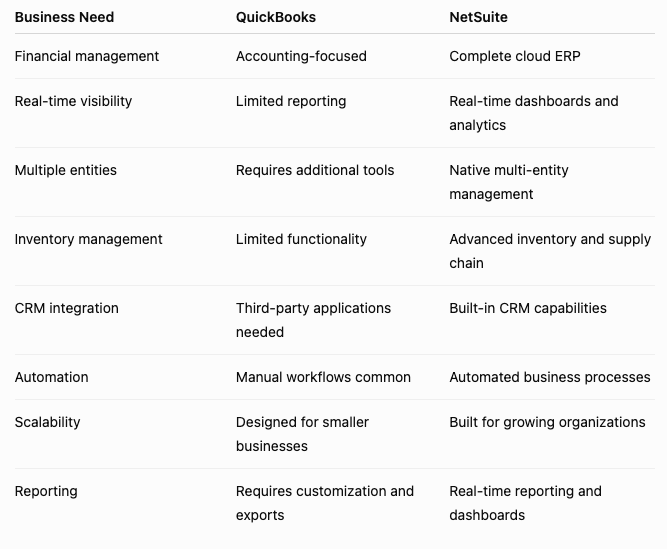
Why Growing Companies Move From QuickBooks to NetSuite
Companies typically evaluate NetSuite when they need to:
- Replace manual spreadsheet-based processes
- Improve financial reporting accuracy
- Gain real-time visibility across departments
- Manage multiple entities or locations
- Support larger transaction volumes
- Integrate financials with operations, CRM, and inventory
- Create a scalable foundation for future growth
What are the signs that it’s time to switch from QuickBooks to NetSuite?
Companies typically begin evaluating a QuickBooks replacement when they experience:
1. Limited Real-Time Visibility
Finance leaders need accurate information to make strategic decisions. When reporting requires exporting spreadsheets, combining multiple files, or waiting for manual updates, decision-making slows down.
Common challenges include:
- Limited visibility into cash flow
- Difficulty creating accurate forecasts
- Delayed financial reporting
- Multiple versions of financial data
NetSuite provides centralized dashboards and real-time reporting across financial and operational data.
2. Too Many Manual Processes
Many organizations begin adding spreadsheets and disconnected applications as QuickBooks limitations appear.
Common warning signs include:
- Manual invoice processing
- Spreadsheet-based forecasting
- Duplicate data entry
- Manual approvals
- Time-consuming financial closes
- Manual inventory tracking
As processes become more complex, automation becomes essential for improving efficiency and reducing errors.
3. Growing Complexity
QuickBooks limitations often become more noticeable as companies add:
- Multiple locations
- Multiple subsidiaries
- International operations
- Larger inventory requirements
- More customers and transactions
- Additional reporting requirements
Growing organizations need systems that can scale without adding unnecessary complexity.
QuickBooks to NetSuite Migration Readiness Checklist
Before beginning an ERP implementation, organizations should evaluate whether they are prepared for the transition.
A successful migration starts with:
✓ Clearly defined business goals
✓ Executive sponsorship
✓ Identified process improvements
✓ Clean and organized data
✓ Defined reporting requirements
✓ Understanding of integration needs
✓ Internal project ownership
How to Switch from QuickBooks to NetSuite: The Migration Process
Moving from QuickBooks to NetSuite is more than replacing accounting software. A successful migration requires planning, data preparation, process review, testing, and employee adoption.
Step 1: Evaluate Your Business Requirements
Before selecting NetSuite, organizations should document:
- Current accounting processes
- Reporting requirements
- Operational challenges
- Required integrations
- Future growth plans
- Areas where automation is needed
The goal is not simply to recreate QuickBooks inside NetSuite. The goal is to improve the way your business operates.
Step 2: Build Your ERP Implementation Team
Successful QuickBooks-to-NetSuite migrations require involvement from leadership, finance, operations, and technology teams.
Typical project roles include:
Executive Sponsor: Defines goals and approves investment
CFO/Controller: Owns financial requirements
Project Manager: Coordinates implementation
Accounting Team: Validates processes and reporting
Operations Leaders: Defines workflow requirements
IT Team: Manages integrations and security
NetSuite Partner: Guides configuration, implementation, and ongoing optimization
Step 3: Prepare and Migrate Your QuickBooks Data
Data migration is one of the most important parts of moving from QuickBooks to NetSuite. Organizations must determine what information should be transferred and what should be cleaned before migration. Learn about our NetSuite Data Migration Services
Chart of Accounts:
Your QuickBooks chart of accounts should be reviewed and mapped to NetSuite.
This often includes:
- Removing outdated accounts
- Consolidating duplicate accounts
- Creating reporting segments
- Aligning financial structure with future needs
Historical Transactions:
Companies must decide how much historical information should move into NetSuite.
Common options include:
- Full transaction history
- Summary balances
- Open transactions only
- Customer and vendor history
The right approach depends on reporting needs, compliance requirements, and business goals.
Customer and Vendor Data:
Clean data improves implementation success.
Before migration, review:
- Duplicate records
- Incorrect addresses
- Outdated contacts
- Inactive accounts
Step 4: Review Inventory Requirements
For product-based companies, inventory migration requires additional planning.
Important considerations include:
- Item records
- Inventory locations
- Units of measure
- Pricing
- Vendors
- Purchasing history
- Stock levels
- Warehouse processes
Companies using QuickBooks with inventory applications such as Fishbowl should evaluate whether NetSuite can replace disconnected systems with a unified ERP platform.
Learn More:
QuickBooks Inventory Management Solutions
Step 5: Evaluate Existing Integrations
Before switching systems, identify applications currently connected to QuickBooks.
Common integrations include:
- CRM systems
- Ecommerce platforms
- Payroll systems
- Payment processors
- Inventory applications
- Reporting tools
Your NetSuite implementation plan should determine which systems should integrate, be replaced, or be retired.
Step 6: Testing, Training, and Go-Live
Before moving from QuickBooks to NetSuite, organizations should validate:
✓ Financial reports
✓ User permissions
✓ Data accuracy
✓ Workflows
✓ Integrations
✓ Inventory balances
✓ Transaction processes
Employee training is also critical to adoption.
A successful go-live depends on both technical readiness and user confidence.
How Long Does it Take to Switch from QuickBooks to NetSuite?
A typical QuickBooks-to-NetSuite migration can take approximately:
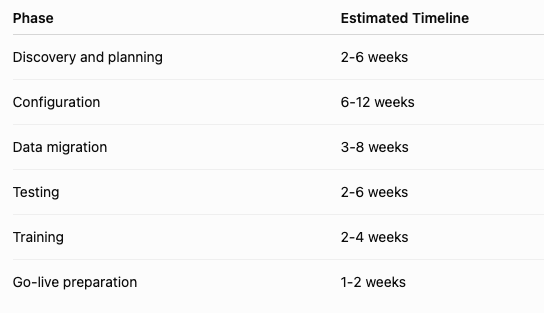
A typical implementation may take several months from planning through stabilization. Actual timelines vary depending on:
- Company size
- Number of entities
- Data complexity
- Customizations
- Integrations
How Much Does it Cost to Move From QuickBooks to NetSuite?
The cost of switching from QuickBooks to NetSuite depends on the complexity of your business and the level of functionality required.
Key cost factors include:
NetSuite Software Costs
Factors include:
- Number of users
- Required modules
- Industry requirements
- Advanced functionality
Implementation Costs
Project costs are influenced by:
- Data migration requirements
- System configuration
- Custom workflows
- Integrations
- Training
- Ongoing support needs
Working with an experienced NetSuite partner helps organizations create a realistic implementation plan and avoid unexpected costs.
Common Challenges When Switching From QuickBooks to NetSuite
A successful ERP migration requires careful planning. Companies should prepare for common challenges, including:
Data Quality Issues: Incomplete, outdated, or duplicate QuickBooks records can create challenges during migration.
Process Changes: NetSuite often enables companies to improve existing workflows instead of simply recreating manual QuickBooks processes.
User Adoption: Training and communication help employees understand new processes and maximize adoption.
Integration Planning: Existing applications should be reviewed to determine whether they should integrate with NetSuite, be replaced, or be retired.
What Happens After Switching to NetSuite?
The ERP journey does not end at go-live.
Post-launch activities include:
- User support
- Process optimization
- Additional automation
- Reporting improvements
- System enhancements
A strong NetSuite partner provides ongoing guidance to help companies maximize their investment. Learn about our NetSuite support services and how we can help tailor NetSuite to meet your unique business needs.

Benefits of Switching From QuickBooks to NetSuite
1. Gain Real-Time Visibility Across Your Business
NetSuite provides finance leaders with dashboards and reporting that connect financial and operational data in one system. Instead of relying on spreadsheets and manual reporting, teams can access accurate information to make faster decisions.
2. Improve Financial Close and Reporting
Automated workflows and centralized financial data help finance teams streamline the close process and improve reporting accuracy.
3. Connect Your Entire Business
NetSuite connects financials, CRM, inventory, ecommerce, and operations, reducing disconnected systems and manual processes.
4. Build a Scalable Foundation for Growth
As companies add customers, employees, locations, and complexity, NetSuite provides the flexibility needed to support continued expansion.
RELATED RESOURCES:
- Customer Success Story
How Trinity Solar Moved off QuickBooks to NetSuite with Protelo - 7 Signs Your Company Has Outgrown QuickBooks
- ERP Selection Guide: How to Choose the Right ERP System
Compare ERP systems and build your evaluation checklist. - NetSuite Buyers Guide
Explore key features, benefits, costs, and considerations to help determine whether NetSuite is the right ERP solution for your organization.
Why work with a partner to buy NetSuite?
A successful QuickBooks-to-NetSuite transition requires more than software selection. Experienced NetSuite partners help organizations:
- Define requirements
- Plan migration strategy
- Configure NetSuite
- Clean and migrate data
- Train users
- Optimize business processes
- Provide ongoing support
Partnering with the right implementation team can help reduce risk and maximize your ERP investment.
Successfully Move From QuickBooks to NetSuite With Protelo
Protelo helps growing organizations evaluate, implement, customize, and optimize NetSuite ERP solutions. Our experienced NetSuite consultants work with finance leaders and business teams to design solutions aligned with their operational goals, reporting needs, and growth plans.
Get NetSuite Pricing for Your Business
Meet Protelo's NetSuite Team
Customer Testimonials & Success Stories
CUSTOMER SUCCESS STORY: MOVING OFF QUICKBOOKS
Trinity Solar was operating on QuickBooks Enterprise, which began to show limitations as the company scaled. They faced challenges managing high transaction volumes, lacked visibility into job costing and operational data, and worked across fragmented systems. As the business continued to grow, it became clear they needed a modern ERP solution to support their expanding operations.
Results
* Reduced close cycle from 30 days down to 10–12 days
* Enabled quicker reporting and better decision-making
* Custom dashboards by geography, department, and project level
* Clear visibility into gross margin, profitability, and enhanced reporting
Moving from QuickBooks to NetSuite Customer Case Study with Protelo