

24 min read


Switching from Sage X3 to NetSuite starts with defining how the business should operate in NetSuite, then determining what needs to change across data, processes, integrations, reporting, and customizations. Before configuration begins, the migration team should document how Sage X3 supports the business today and decide which requirements should be retained in the new ERP.
For manufacturers and distributors, that assessment often extends well beyond Sage X3 itself. According to PMMI’s 2025 ERP Usage Quickie Survey of packaging and processing equipment manufacturers, 76% of companies use key software platforms outside their ERP, including systems for CRM, engineering, payroll, and other business functions. During a Sage X3-to-NetSuite migration, each connected application needs a clear future-state decision: retain it, replace it, retire it, or integrate it with NetSuite.
The same review should apply to existing workflows, reports, data, and customizations. Each major requirement should be evaluated based on how the business needs to operate going forward rather than automatically recreated in NetSuite. This guide explains how to make those decisions and plan the data migration, process mapping, integrations, testing, and cutover that follow.
What Makes a Sage X3-to-NetSuite Migration Different?
Sage X3 can support finance, manufacturing, inventory, purchasing, sales, and supply chain operations across multiple entities, sites, and currencies. Moving to NetSuite can therefore affect several connected processes at once, including reporting, integrations, inventory, user access, and historical data.
Manufacturers and distributors may face additional complexity around bills of materials, routings, work orders, costing, warehouse activity, fulfillment, and lot or serial tracking. Multi-entity organizations also need to account for legal structures, intercompany activity, currencies, tax requirements, and consolidated reporting.
Manufacturers with significant production requirements can review NetSuite for Manufacturing to understand how NetSuite addresses production, inventory, supply chain, and related manufacturing processes. Distributors can also review NetSuite for Wholesale Distribution for distribution-specific requirements around inventory, order management, fulfillment, and warehouse operations.
The migration team should also review the data, customizations, reports, and connected applications surrounding Sage X3. Some will need to move into NetSuite, while others should be redesigned, replaced, archived, or retired.
Early discovery helps define that scope before configuration begins and shows the project team what needs to carry forward, what should change, and where legacy complexity can be removed.
Read More: Oracle NetSuite vs Sage X3: A Side-by-Side ERP Comparison You Can’t Miss
How to Switch From Sage X3 to NetSuite
A successful Sage X3-to-NetSuite migration should leave the business with accurate data, working integrations, defined processes, trained users, and stable operations after go-live. Reaching that point requires more than completing configuration tasks. Each phase should produce a clear output that the next phase can build on.
The exact scope will vary by organization, but most Sage X3-to-NetSuite migrations should follow these ten steps:
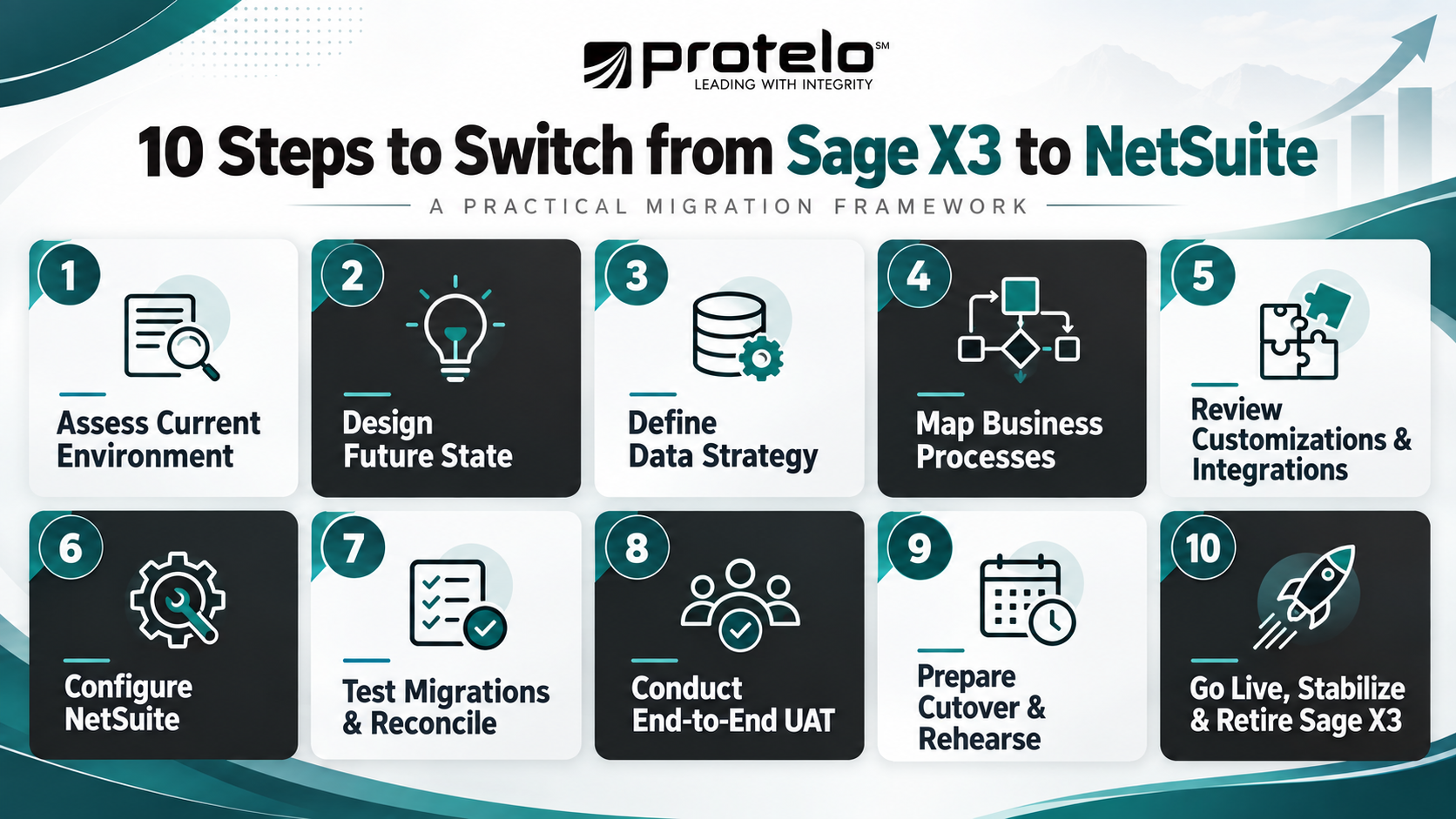
Step 1: Assess the Current Sage X3 Environment
Start by documenting how Sage X3 supports the business today. Review core processes, data, reports, integrations, customizations, approval rules, security, and any spreadsheets or manual workarounds that sit around the ERP.
For each major requirement, determine whether it should be retained, redesigned, replaced, or retired. Also identify business owners for critical processes so decisions are not left entirely to the implementation team.
The output of this stage should be a documented current-state environment, an initial migration scope, and a list of issues that need to be resolved during design.
Step 2: Design the Future NetSuite Environment
Define how the organization should operate in NetSuite before detailed configuration begins.
This includes subsidiaries, locations, chart of accounts, reporting dimensions, approval structures, user roles, inventory design, manufacturing processes, and system ownership. Companies with multiple entities should also determine how intercompany activity, consolidation, currencies, and local requirements will work.
Organizations with multi-subsidiary or international requirements can also review NetSuite OneWorld when designing how subsidiaries, currencies, intercompany activity, and consolidated reporting will operate in the future environment.
The future-state design should reflect current business needs rather than reproduce the Sage X3 structure by default. Major design decisions should be approved before configuration progresses too far.
Read More: Switching from Sage 300 to NetSuite ERP for Multi-Company Growth
Step 3: Define the Data Migration Strategy
Determine which Sage X3 data needs to move into NetSuite, how much history is required, and how each record type will be validated.
Migration scope commonly includes master data, open transactions, inventory, manufacturing records, financial balances, and selected historical information. Older data may be better retained in an archive or read-only Sage X3 environment when users only need occasional reference access.
Define source-to-target mappings, ownership of data cleanup, conversion rules, and reconciliation requirements before full migration testing begins.
Step 4: Map Sage X3 Processes to NetSuite
Translate each critical Sage X3 process into its future NetSuite workflow. Focus on end-to-end processes such as order-to-cash, procure-to-pay, inventory management, warehouse operations, manufacturing, intercompany activity, and financial close. Identify where responsibilities, approvals, system steps, or controls will change.
Process maps should be detailed enough that configuration teams know what to build and users know what they need to test.
Step 5: Review Customizations and Integrations
Inventory custom fields, workflows, reports, scripts, extensions, add-ons, and integrations connected to Sage X3. For each one, document the business requirement it supports and determine whether NetSuite can address it through standard functionality, configuration, customization, or an integration. Some components may no longer be necessary.
For integrations that remain, define the system of record, data ownership, direction of data flow, frequency, error handling, and reconciliation method. This helps prevent duplicate ownership or conflicting data after go-live.
Where specialized integrations or custom workflows still serve a valid business requirement, Protelo's NetSuite Integrations and Customizations Services can help design those connections around the future-state NetSuite process rather than recreating the Sage X3 architecture.
Step 6: Configure NetSuite and Build Required Integrations
Configure NetSuite around the approved future-state design. Financials, inventory, manufacturing, reporting, security, approvals, and other functionality should trace back to documented requirements. Integrations and approved customizations should be developed in parallel with configuration so dependent processes can be tested together.
Changes introduced during this stage should go through formal scope control. Late configuration requests can affect data mappings, testing, training, and the cutover schedule.
Step 7: Run Test Migrations and Reconcile the Results
Do not wait until the final cutover to execute the full conversion process. Perform multiple migration cycles using increasingly complete data sets. Each cycle should improve extraction, cleansing, transformation, mapping, load sequencing, and validation.
Finance should reconcile areas such as the general ledger, receivables, payables, inventory value, and intercompany balances. Operations should validate inventory quantities, open orders, lots, serial numbers, manufacturing records, customers, vendors, and other critical records. A test migration is complete only when the business can explain and resolve material differences.
Step 8: Conduct End-to-End User Acceptance Testing
User acceptance testing should prove that complete business processes work across NetSuite, integrations, and operational teams. Rather than testing isolated transactions, run realistic scenarios such as:
Sales Order → Fulfillment → Shipment → Invoice → Payment → Financial Reporting
Manufacturers should also test purchasing, material issue, production, inventory movement, costing, traceability, and completion processes where applicable. Include normal transactions as well as common exceptions. Users should confirm that each process works correctly and is practical for daily use.
Step 9: Prepare Users and Rehearse the Cutover
Training should be role-specific and based on the processes users will perform after go-live. At the same time, create a detailed cutover runbook covering transaction freezes, final data extraction, migration, reconciliation, integration activation, user access, communications, issue escalation, and go/no-go criteria.
For complex migrations, conduct at least one mock cutover. A rehearsal helps identify timing problems, missing dependencies, unclear ownership, and reconciliation issues before go-live.
Step 10: Go Live, Stabilize NetSuite, and Retire Sage X3 Carefully
After launch, focus first on keeping critical business processes running and confirming that transactions and financial results remain accurate. Closely monitor high-volume workflows, integrations, inventory, manufacturing activity, financial reporting, and user issues. Assign clear ownership for issue triage so critical defects are separated from training questions and lower-priority enhancements.
Do not switch off Sage X3 immediately after go-live. Define a retention plan first. Determine how long the legacy system must remain available for audit support, historical reporting, reconciliation, or reference, and when you can safely retire integrations, infrastructure, licenses, and access.
Once the new environment is stable, move deferred improvements into a controlled optimization backlog rather than continuing implementation informally. A well-executed migration should result in more than a working NetSuite instance. It should also produce cleaner data, clearer ownership, supportable integrations, practical workflows, and a defined path away from Sage X3.
Read Next: How to Switch from Sage 500 to NetSuite
Should You Use a Phased or Single Go-Live Migration?
The right go-live approach depends on how tightly connected the company’s entities, locations, processes, and systems are. Some organizations can move from Sage X3 to NetSuite in one coordinated cutover, while others may benefit from a phased rollout.
A single go-live can simplify ownership because users, integrations, and transactions move to NetSuite at the same time. It can also reduce the need for temporary interfaces and cross-system reporting. The tradeoff is that data migration, testing, training, integrations, and cutover readiness all need to reach an acceptable level across the full scope at once.
A phased migration spreads change across multiple deployment events and allows the project team to apply lessons from earlier phases. It does not necessarily reduce total implementation risk. Running Sage X3 and NetSuite in parallel may require temporary integrations, additional reconciliation, duplicate reporting processes, and clear rules for where shared data and transactions are maintained.
Go-Live Decision Criteria
Before choosing an approach, confirm four areas of readiness:
-
Process Readiness: Critical business workflows have been tested successfully in NetSuite, including common exceptions.
-
Data and Integration Readiness: Financial and operational data reconcile, and required integrations are ready for production.
-
User and Support Readiness: Users are trained, critical issues have a workable resolution, and post-go-live support responsibilities are clear.
-
Cutover Readiness: Transaction cutoff rules, task ownership, escalation procedures, and final go/no-go authority are established.
For a phased rollout, also confirm that the selected entities or sites can operate independently enough to support temporary coexistence. Extensive shared inventory, customers, procurement, manufacturing, or intercompany activity can make a phased approach considerably harder to manage.
The chosen go-live model should support business continuity while keeping temporary system and process complexity at a manageable level.
Read More: Sage 300 to NetSuite ERP Migration: When and How to Make the Switch
How Do You Plan the Sage X3-to-NetSuite Cutover?
The cutover plan should define when the business will stop transacting in Sage X3, how the final migration will be completed, and when users can begin operating in NetSuite. For a complex environment, manage this through a detailed runbook with task owners, dependencies, completion criteria, and escalation procedures. A practical cutover plan should cover five areas:
-
Set transaction cutoff rules: Define when teams will stop entering sales orders, purchase orders, inventory movements, manufacturing transactions, journal entries, and other activity in Sage X3.
-
Complete the final data conversion: Use the conversion process already proven during test migrations. Avoid introducing new mapping logic or migration methods during cutover unless a critical issue requires it.
-
Reconcile financial and operational data: Finance should validate the general ledger, receivables, payables, inventory value, and other material balances. Operations should confirm inventory quantities, open orders, manufacturing records, lots, serial numbers, and other critical records.
-
Activate integrations and verify access: Bring production integrations online in the correct sequence and confirm that users have the roles and permissions they need.
-
Make a formal go/no-go decision: Before releasing NetSuite for production use, confirm that critical data has reconciled, required workflows and integrations are functioning, and no unresolved issue would prevent normal operations.
Example Cutover Timeline
The exact schedule will vary by data volume, integrations, operating hours, and how long the business can tolerate a transaction freeze.
A smaller environment may complete final migration and validation within a weekend, while a complex manufacturer or multi-entity organization may need a longer freeze and reconciliation window.
Plan for Rollback and Contingencies
The cutover plan should also define what happens if critical conditions are not met. A rollback may be practical before NetSuite is opened for production use. Once users begin creating live transactions, reversing the migration becomes much more difficult because activity may exist across both systems.
Before cutover, define the conditions that would delay go-live, who has authority to make that decision, how Sage X3 would be reopened if necessary, and how critical processes would continue during a system or integration outage.
Not every issue should stop the migration. A delayed low-priority report may be manageable after go-live, while unreconciled inventory, inaccessible financial data, or a failed fulfillment integration may justify delaying production release. Post-go-live support, reconciliation, issue prioritization, and escalation procedures should also be established before the cutover window begins.
Read Next: Sage 100 to NetSuite Migration Checklist for a Successful Go-Live
Common Risks When Moving From Sage X3 to Oracle NetSuite
Moving from Sage X3 to Oracle NetSuite introduces different risks at each stage of the ERP migration. Because both systems may support financial management, manufacturing, warehouse operations, reporting, and third-party software, problems often arise when business processes and data are translated from the current environment into the future NetSuite design.
Each risk should be addressed before it affects the next phase of the project.
Discovery: Recreating Sage X3 Too Closely
One of the earliest risks is treating the migration as a direct rebuild of the existing Sage X3 environment. Before future-state design begins, business process owners and project leadership should separate genuine business requirements from legacy software setups and configurations. Use built-in NetSuite functionality where it fits and customize only when the requirement justifies it.
Data Preparation: Poor or Inconsistent Business Data
Data quality problems can undermine migration testing and reconciliation later in the project. Finance, data owners, and functional leads should clean, standardize, deduplicate, and validate financial, customer, vendor, item, inventory, and other ERP data before full migration testing begins.
Future State Design: Missing Process or System Dependencies
Critical workflows often extend beyond the ERP itself. During design workshops, functional leads and the solution architect should identify spreadsheets, business intelligence tools, CRM, third-party software, and other external applications that support important business processes.
Configuration and Migration: Incorrect Mappings
Financial, manufacturing, and warehouse mappings should be validated before user acceptance testing. The implementation team and operational subject-matter experts should review the chart of accounts, inventory structures, BOMs, routings, locations, units of measure, integrations, and related workflows against the approved future-state design.
Testing: Validating Transactions Without Testing the Full Process
Testing isolated ERP functions can miss problems that only appear when processes cross systems or departments. Before UAT sign-off, the test lead and business users should validate complete workflows across NetSuite, integrations, approvals, automation, operations, accounting, and reporting.
Cutover: Letting the Target Date Drive the Decision
A planned go-live date should not override unresolved readiness issues. Before the final go/no-go decision, the cutover lead and steering committee should use documented criteria for data reconciliation, integrations, critical workflows, user readiness, and operational continuity to determine whether NetSuite is ready for production.
Post-Go-Live: Treating Recurring Problems as Isolated Support Issues
During stabilization, repeated problems should be evaluated for patterns rather than handled as unrelated tickets. The support lead and functional owners should monitor transactions, integrations, reporting, user adoption, and system performance so underlying issues can be corrected instead of repeatedly patched.
Ownership does not mean one person or team resolves every issue alone. A financial mapping problem may involve finance, implementation consultants, and data owners, while an integration issue may require both IT and the business team that depends on the connected application.
Timing also matters. Problems identified during discovery and design leave more room to adjust the NetSuite configuration or implementation approach. The same issues found during cutover or after deployment leave the business with fewer options and greater operational exposure.
What Drives the Timeline for a Sage X3-to-NetSuite Migration?
The Sage X3-to-NetSuite migration timeline depends primarily on scope, complexity, and the speed of business decision-making. The same ERP migration can look very different for a single-entity distributor than for a multi-site manufacturer with global subsidiaries and several connected systems.
The factors that tend to affect the schedule most are:
-
Number of Entities and Locations. More subsidiaries, plants, warehouses, currencies, and intercompany relationships create additional configuration, migration, and validation work.
-
Manufacturing and Operational Complexity. Advanced manufacturing, process manufacturing, lot or serial traceability, specialized warehouse processes, and complex costing generally require more design and testing than simpler operating models.
-
Historical Data Requirements. Migrating several years of detailed transactions takes longer than moving active master data, open transactions, and approved opening balances. Historical scope should therefore be agreed early.
-
Integration and Customization Scope. CRM, ecommerce, business intelligence, warehouse systems, EDI, tax applications, and other third-party software add development and testing dependencies. Custom NetSuite functionality can have a similar effect.
-
Decision-Making Speed. Delays are often caused by unresolved business decisions rather than the ERP software itself. Chart of accounts design, process ownership, approval structures, reporting requirements, and scope changes can hold up configuration and testing if decisions remain open.
-
Internal Resource Availability. Finance, operations, IT, and other subject-matter experts need time for workshops, data validation, user acceptance testing, and cutover preparation. Limited availability can extend the project timeline.
For that reason, the migration schedule should be built around measurable project milestones rather than a predetermined go-live date. Design approval, reconciled data, completed testing, and business readiness provide a more reliable basis for planning deployment than a generic ERP implementation timeline.
Read Next: NetSuite Implementation Timeline & Milestones: From Planning to Go-Live
How to Build the Business Case For Moving From Sage X3 to NetSuite
The business case should explain why moving from Sage X3 to NetSuite is worth the disruption, investment, and internal effort required to make the transition. It should also make clear what the organization gives up by delaying the decision.
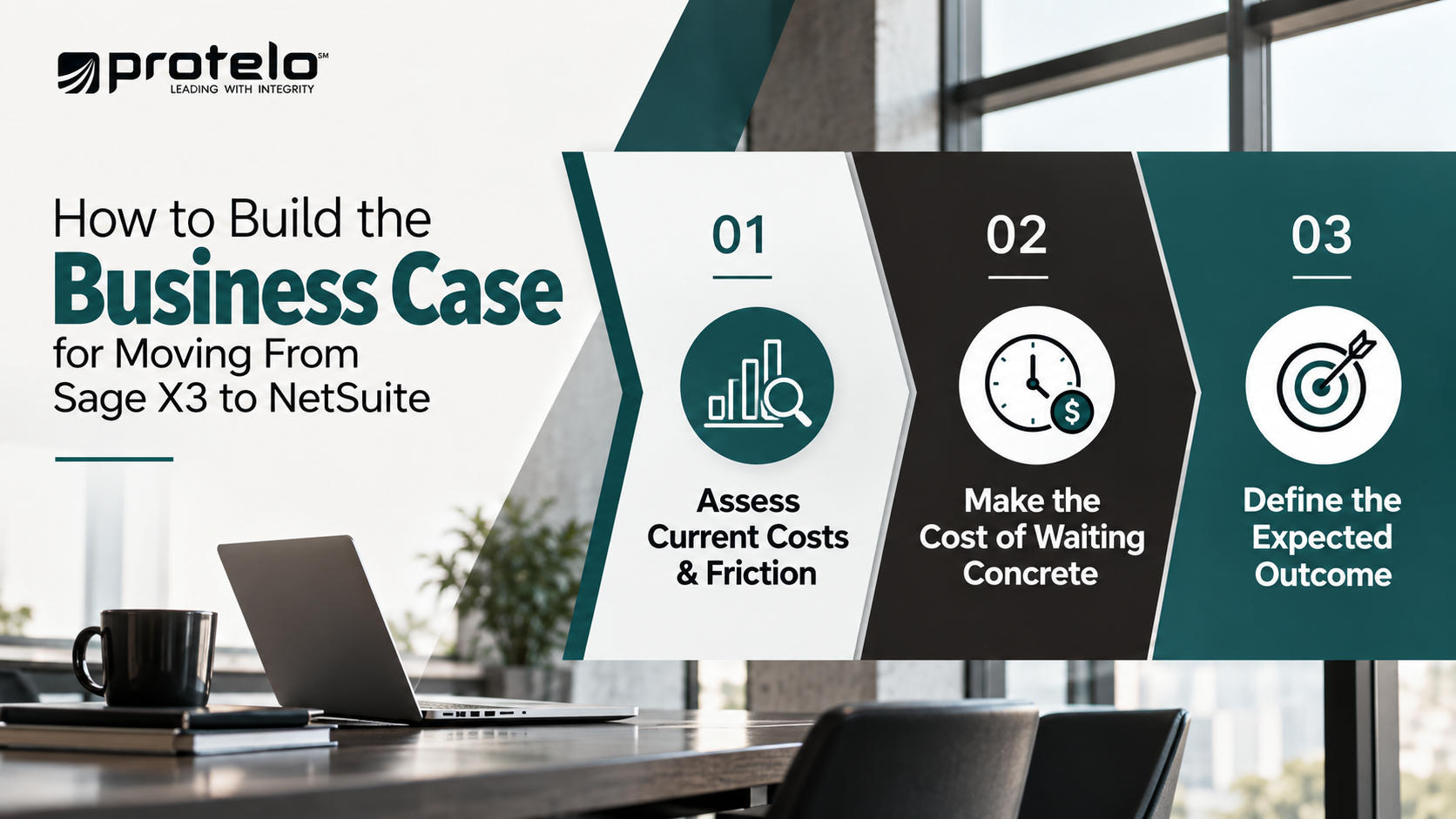
Establish the Current Cost and Friction
Start with the problems the business is already experiencing. These may include manual consolidation, duplicate data entry, disconnected applications, difficult reporting, heavy customization, or growing administrative effort across multiple entities and locations.
Make those costs as specific as possible. For example, if the finance team spends several days each month consolidating reports manually, that recurring effort should be documented. The same applies to time spent reconciling data between systems, maintaining custom integrations, correcting inventory records, or supporting workarounds outside Sage X3.
Make the Cost of Waiting Concrete
The cost of delay should reflect what is likely to happen if the organization stays on the current path. For example, waiting another year could mean:
- Another twelve months of manual reporting and reconciliation
- Additional integrations or customizations added to an already complex environment
- A new subsidiary, warehouse, or acquisition being absorbed into the current setup before migration
- Continued support effort for legacy processes and workarounds
- More data and historical records that eventually need to be cleaned, mapped, and migrated
The point is not to manufacture urgency. It is to show how postponing the project can increase workload, support burden, and future migration complexity.
Define the Expected Outcome
Next, define what should improve after the migration. The finance team may expect faster reporting or a simpler close process. A distributor may prioritize inventory visibility and fulfillment. A manufacturer may focus on production planning, traceability, or greater consistency across sites.
Those outcomes should be compared with the full cost of the transition, including implementation, data migration, integrations, internal resources, training, ongoing administration, and support.
A credible business case should answer three questions clearly:
What is the current environment costing the business? What does delaying the migration add to that cost? What measurable improvements should NetSuite deliver after go-live?
Planning Your Move From Sage X3 to NetSuite
The decision to move from Sage X3 to NetSuite should be tied to measurable business outcomes, such as a faster monthly close, fewer manual reporting hours, better inventory accuracy, shorter order cycle times, or more consistent processes across entities and locations. Before moving forward, leadership should be able to answer three questions clearly:
-
What is the current cost of staying on Sage X3? Establish baselines such as monthly close time, reporting hours, number of manual reconciliations, integration support effort, inventory adjustments, or order-processing exceptions.
-
What measurable improvement should NetSuite deliver? Set target outcomes for those same areas, such as reducing close time, lowering manual effort, improving inventory accuracy, or standardizing processes across additional entities or sites.
-
What resources are required to achieve those targets? Define the internal owners, data cleanup effort, implementation support, testing capacity, and post-go-live resources needed to reach the expected results.
These baseline and target metrics give leadership a practical way to evaluate post-go-live performance against the outcomes the migration was intended to achieve.
Protelo's NetSuite Implementation Services help organizations design and deploy NetSuite around their business process requirements and long-term goals. If your organization is preparing to move from Sage X3, speak with a Protelo advisor about the requirements, risks, and business outcomes that should shape your NetSuite implementation.
Frequently Asked Questions
What is the difference between a Sage X3-to-NetSuite migration and a NetSuite vs Sage X3 evaluation?
A NetSuite vs Sage X3 evaluation focuses on which ERP better fits the organization’s needs. A migration assumes the business has already decided, or is close to deciding, to move from Sage X3 to NetSuite.
At that point, the focus shifts to deployment planning, data conversion, process design, integrations, testing, training, and cutover. Organizations still comparing the capabilities and features of NetSuite and Sage X3 should complete that evaluation before building a detailed migration plan.
Read Next: Top 14 NetSuite Competitors for ERP Buyers in 2026
Can NetSuite support manufacturing, warehouse, and supply chain management after Sage X3?
NetSuite supports financial management, inventory, warehouse operations, manufacturing, order management, and supply chain management through its ERP platform and modules. Whether the functionality fits a particular Sage X3 environment depends on the company’s operating model, production requirements, warehouse processes, integrations, and reporting needs.
Manufacturers should validate requirements such as BOMs, routings, work orders, costing, traceability, and process manufacturing before configuration is finalized.
How much Sage X3 historical data should be moved into NetSuite?
There is no requirement to recreate every historical Sage X3 transaction in NetSuite. Most organizations should determine what history is needed for financial reporting, customer service, audit trails, compliance, or ongoing operations and migrate data accordingly.
Older records that are used only occasionally may remain in a controlled archive or read-only Sage X3 environment. Reducing unnecessary history can simplify conversion, reconciliation, and testing while still preserving access to important business data.
What happens to CRM, business intelligence, and other software connected to Sage X3?
Each connected application should be evaluated as part of the future-state architecture. CRM, business intelligence, ecommerce, warehouse, EDI, payroll, planning, and other third-party software may be retained, replaced, retired, or integrated with NetSuite as part of the future-state environment.
Because NetSuite is a cloud-based ERP platform, integration design should reflect the systems the business intends to keep rather than simply recreating every existing Sage X3 connection. The goal is to establish clear system ownership and reduce unnecessary duplication.
Does SuiteSuccess change how a Sage X3-to-NetSuite deployment should be planned?
SuiteSuccess can provide predefined processes, configurations, roles, dashboards, and implementation practices for certain NetSuite deployments, but it does not remove the need to assess the existing Sage X3 environment.
Companies with complex manufacturing, multi-currency operations, multiple entities, custom integrations, or specialized business processes still need to validate how those requirements fit the proposed NetSuite design. The implementation approach should be shaped by the migration scope, not the other way around. Organizations using SuiteSuccess that need additional configuration, go-live readiness assistance, or technical support can also review Protelo’s Enhanced SuiteSuccess Support.