

19 min read


A Sage 100 to NetSuite migration checklist gives your team a structured way to plan and manage the implementation from start to finish. Instead of tracking dozens of tasks across meetings, spreadsheets, and project plans, you can use a single checklist to monitor progress, identify outstanding work, and keep the project moving forward.
Most ERP implementations involve finance, operations, IT, and department leaders, each responsible for different parts of the project. While one team reviews financial data, another may be testing workflows, confirming integration requirements, or preparing users for training. Without a shared view of those activities, important tasks can easily be delayed or overlooked.
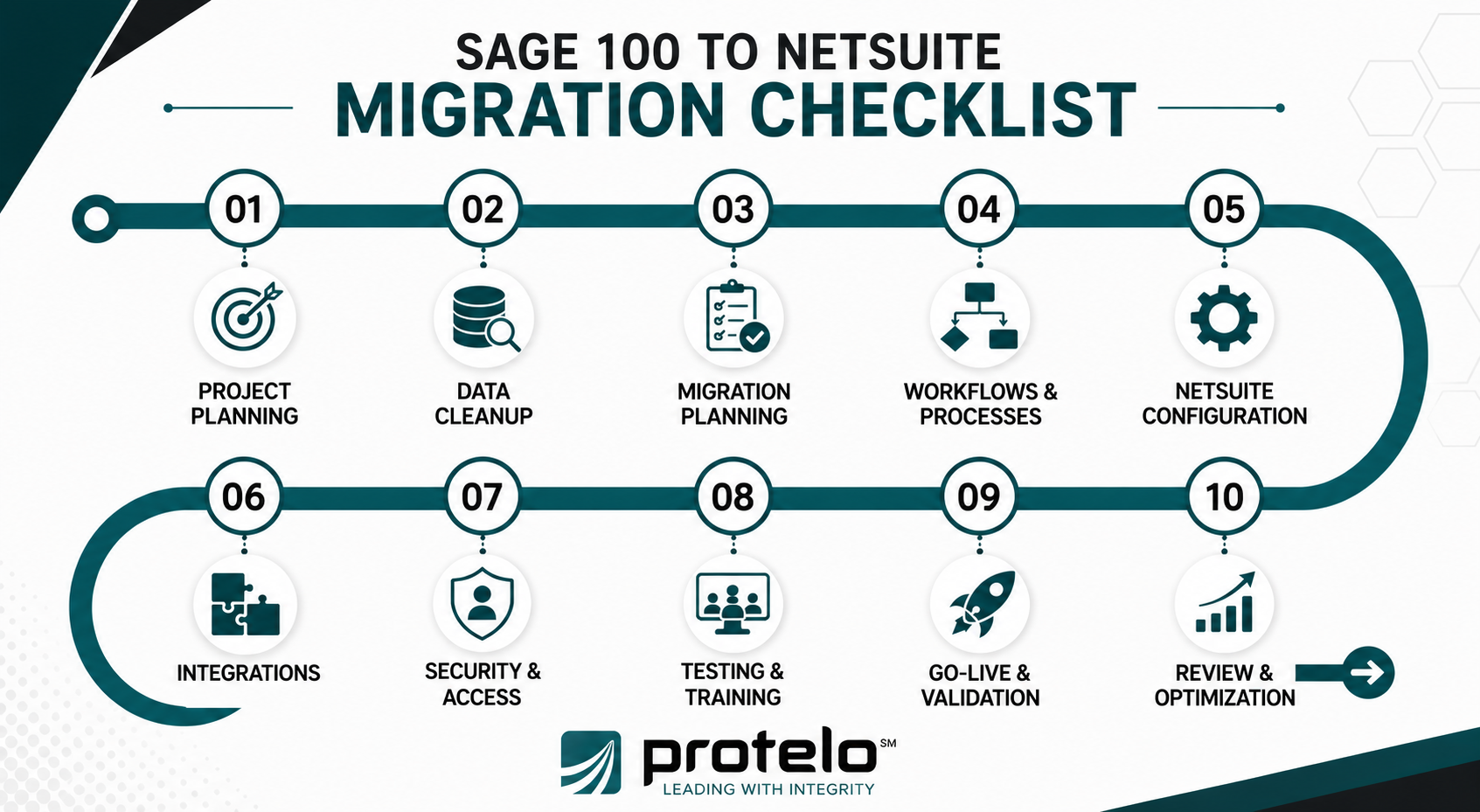
The checklist below organizes the work into the major stages of a Sage 100 to NetSuite migration, from initial planning through post-go-live validation. Use it as a practical reference to keep stakeholders aligned and verify that each phase is complete before moving to the next.
Sage 100 to NetSuite Migration Checklist
The checklist below is organized into the major phases of a Sage 100 to NetSuite migration. Use it to verify that critical tasks, decisions, and milestones have been completed before progressing to the next stage of the implementation. Depending on your project, some activities may overlap, but reviewing each phase helps reduce oversights and keeps the migration moving forward.
1. Project Scope and Planning
Before implementation begins, confirm that the project's objectives, scope, stakeholders, and governance have been established. Completing these foundational activities creates alignment across teams and provides a framework for managing the rest of the migration.
☐ Business objectives and expected outcomes have been documented.
☐ Project scope has been defined, including the business units, locations, and processes included in the implementation.
☐ Executive sponsors, project stakeholders, and implementation responsibilities have been identified.
☐ Project timeline, milestones, and target go-live date have been established.
☐ Success criteria, project risks, and governance processes have been documented.
Why this phase matters:
Clear project planning establishes the foundation for every stage that follows. When objectives, ownership, and expectations are defined early, teams can make decisions more efficiently, reduce scope changes, and keep the implementation moving toward a successful go-live.
Common Mistake: Beginning configuration or data migration before the project scope and decision-making process have been finalized often results in rework and competing priorities.
Key deliverables:
- Approved project charter
- Project timeline
- Stakeholder matrix
- Governance plan
- Success criteria
Read More: ERP Selection Criteria: An Expert Guide (Including Checklist)
2. Data Assessment and Cleanup
Before migrating data into NetSuite, evaluate the quality of the information stored in Sage 100. This phase focuses on identifying records that should be corrected, consolidated, or archived so the migration begins with accurate, reliable business data.
☐ Customer, vendor, inventory, and item records have been reviewed for accuracy, completeness, and duplicates.
☐ The chart of accounts, financial records, and open transactions have been validated.
☐ Obsolete, inactive, or unnecessary records have been identified for archival or removal.
☐ Data inconsistencies, formatting issues, and missing values have been reviewed and corrected.
☐ Business stakeholders have approved the data set that will be used for migration planning.
Why this phase matters:
NetSuite will only be as reliable as the data migrated into it. Assessing and cleaning data before migration improves reporting accuracy, reduces post-go-live corrections, and helps ensure teams begin using the new system with trusted information.
Common Mistake: Treating data cleanup as something that can wait until after go-live. Migrating duplicate, outdated, or inaccurate records often creates avoidable reporting issues and increases the amount of cleanup required in the new ERP.
Key deliverables:
- Validated master data
- Reviewed financial records
- Archived obsolete data
- Corrected data quality issues
- Approved migration dataset
3. Data Migration Planning
With your data reviewed and cleaned, the next step is determining what will migrate to NetSuite and how it will be transferred. This phase establishes the migration scope, defines the migration approach, and confirms that critical business data will be available when users begin working in the new system.
☐ The migration scope has been approved, including the master data, historical records, and transactional data that will migrate to NetSuite.
☐ Data mapping between Sage 100 and NetSuite has been documented and validated.
☐ The migration method, including CSV imports, APIs, or middleware, has been selected based on business and technical requirements.
☐ Critical operational and financial data, including the GL, open sales orders, and open purchase orders, has been identified and prepared for migration.
☐ The migration schedule, validation process, and rollback plan have been reviewed with the implementation partner and key project stakeholders, if applicable. Organizations with complex historical records, multiple data sources, or extensive open transactions may benefit from involving a NetSuite Data Extraction and Migration Services team before finalizing the migration schedule and validation process.
Why this phase matters:
Migration planning determines what information will be available when the business begins operating in NetSuite. Decisions made during this phase affect financial reporting, inventory availability, open transactions, and day-to-day operations immediately after go-live. Defining the migration approach before data is moved also reduces unnecessary rework during testing and validation.
Common Mistake: Expanding the migration scope as the project progresses. Adding historical records, additional modules, or new data requirements late in the implementation often increases testing time and introduces avoidable project delays.
Key deliverables:
- Approved migration scope
- Data mapping documentation
- Migration strategy
- Migration schedule
- Rollback and validation plan
Read More: NetSuite Data Imports Tips and Tricks
4. Business Processes, Workflows, and Customizations
Before configuring NetSuite, review how your business operates today and determine which processes should be carried forward, improved, or replaced. This phase focuses on documenting your operational requirements so the new ERP supports the way your business actually works.
☐ Core business processes, including financial management, inventory management, purchasing, sales, and fulfillment, have been reviewed and documented.
☐ Existing workflows, approvals, and automation requirements have been evaluated for redesign or recreation in NetSuite.
☐ Current customizations, reports, and custom development have been assessed to determine whether they are still required.
☐ Department-specific requirements, including manufacturing workflows, work orders, CRM, or other operational processes, have been documented where applicable.
☐ Opportunities to replace legacy customizations with standard NetSuite functionality or SuiteFlow have been identified.
Why this phase matters:
Many organizations discover that long-standing processes were designed to work around the limitations of their previous ERP rather than support the business itself. Reviewing workflows before configuration helps teams eliminate unnecessary complexity, reduce future maintenance, and make better use of NetSuite's built-in capabilities.
Common Mistake: Recreating every customization from Sage 100 without first determining whether the same business requirement can be addressed through standard NetSuite functionality or configuration.
Key deliverables:
- Documented business process requirements
- Workflow and automation requirements
- Customization assessment
- Functional requirements by department
- Approved future-state process design
Read More: The Ultimate Guide to NetSuite Add-On Modules and Resources
5. NetSuite Configuration
Once business requirements have been finalized, configure Oracle NetSuite to support your organization's operational and financial processes. This phase focuses on translating approved requirements into a working cloud ERP environment before testing begins.
☐ Core system settings, including financials, accounting periods, tax settings, and company preferences, have been configured.
☐ Organizational structures, including subsidiaries, multiple entities, and multi-location operations, have been configured where applicable.
☐ User roles, permissions, and approval workflows have been configured to support day-to-day responsibilities.
☐ Standard forms, dashboards, reports, and system preferences have been configured to support business operations.
☐ The NetSuite implementation environment has been reviewed and approved before deployment to testing.
Why this phase matters:
Configuration determines how users interact with NetSuite every day. Decisions made during this phase affect financial processing, operational workflows, reporting, and the overall user experience. Completing configuration before formal testing also helps ensure issues identified later are related to business processes rather than incomplete system setup.
Common Mistake: Beginning user testing before configuration is complete. When required settings, workflows, or user permissions are still changing, test results become less reliable and often need to be repeated.
Key deliverables:
- Configured NetSuite environment
- User roles and permissions
- Configured reports and dashboards
- Approved system configuration
- Testing-ready deployment
Read Next: A July 2026 NetSuite ERP Implementation Guide for Success
6. Integrations and Corrected Systems
Most ERP environments exchange data with other business applications. Before go-live, confirm that every system connecting to NetSuite has been identified, documented, and tested so operational data continues to flow between applications without disrupting day-to-day business activities.
Reviewing your NetSuite Integrations and Customizations requirements during planning can help the project team determine which connections should use native functionality, APIs, middleware, or custom development before configuration and testing begin.
☐ All systems that integrate with NetSuite, including CRM, payroll, e-commerce platforms, shipping solutions, and other business applications, have been identified.
☐ Integration requirements, data flows, and synchronization frequency have been documented for each connected system.
☐ The integration approach, including APIs, middleware, or other supported methods, has been approved.
☐ Data exchanged between systems has been validated for accuracy, completeness, and real-time or scheduled synchronization requirements.
☐ Integration testing has been completed, and critical business processes have been verified across connected systems.
Why this phase matters:
Many business processes depend on information moving between systems. Sales orders, inventory updates, customer records, and payroll data often originate outside the ERP or are shared with other applications. Confirming integrations before go-live helps maintain inventory visibility, reduces manual data entry, and minimizes operational disruption after the migration.
Common Mistake: Focusing on whether integrations connect successfully without verifying the quality of the data being exchanged. A working connection doesn't guarantee that records are synchronized correctly or that downstream business processes will function as expected.
Key deliverables:
- Integration inventory
- Approved integration architecture
- Validated data flows
- Completed integration testing
- Production-ready integrations
Read More: The Benefits of NetSuite Inventory Management
7. Security, Roles, and User Access
Before business users begin testing the ERP platform, verify that roles and permissions have been configured to support day-to-day responsibilities. Access should reflect each user's job function while protecting financial and operational data across the organization.
☐ User roles and permissions have been configured based on business responsibilities and department requirements.
☐ Access to financial management, purchasing, inventory, and other sensitive functions has been reviewed and approved.
☐ Role assignments have been validated for subsidiaries, multiple entities, and multi-location operations, where applicable.
☐ Segregation of duties has been reviewed to reduce the risk of conflicting responsibilities or unauthorized access.
☐ Sample users have verified that they can complete their daily tasks without unnecessary permission issues.
Why this phase matters:
User access affects nearly every interaction with NetSuite. Incorrect permissions can prevent employees from completing routine work, while excessive access can introduce compliance and security risks. Reviewing roles before testing helps identify permission issues early, when they're easier to correct and less disruptive to the implementation.
Common Mistake: Assigning broad administrative permissions to speed up testing and postponing role reviews until after go-live. This often masks access issues that only become apparent once users begin working with their actual permissions.
Key deliverables:
- Approved role and permission matrix
- Validated user access
- Segregation of duties review
- Approved security configuration
- User access testing results
8. Testing, User Acceptance, and Training
Before go-live, confirm that NetSuite has been thoroughly tested and that end users are prepared to perform their day-to-day responsibilities. This phase validates that the system meets business requirements while giving users the opportunity to work through real business scenarios before the new ERP becomes the system of record.
☐ System testing has confirmed that core business processes, integrations, and reporting function as expected.
☐ User acceptance testing (UAT) has been completed by representatives from finance, operations, sales, and other business departments.
☐ Business scenarios, including inventory transactions, financial processes, and department-specific workflows, have been tested and approved.
☐ End users have completed role-based training and have access to the resources needed after go-live. When internal resources cannot create or deliver role-specific instruction, structured NetSuite Training can help finance, operations, sales, and other teams practice the transactions they will be responsible for after go-live.
☐ Testing issues have been documented, prioritized, and resolved or approved before deployment.
Why this phase matters:
Testing confirms that the system performs as expected under real operating conditions, while user acceptance validates that employees can complete their daily responsibilities using the configured ERP. Involving the people who will use NetSuite every day often uncovers process gaps, reporting issues, or department-specific requirements that aren't always identified during technical testing alone.
Common Mistake: Treating user acceptance testing as a technical exercise. When business users aren't involved in validating everyday tasks, issues often surface only after go-live, when they're more disruptive to resolve.
Key deliverables:
- Completed system testing
- Approved UAT results
- Resolved testing issues
- User training completion records
- Go-live readiness approval
Read Next: Top NetSuite Partners in 2026
9. Go-Live and System Validation
Go-live marks the transition from planning and testing to daily business operations. During the first several days, verify that critical processes are functioning as expected and confirm that users can complete routine work without disrupting financial or operational activities.
☐ Financials, inventory, purchasing, sales, and other core business processes have been validated in the production environment.
☐ Open sales orders, purchase orders, inventory balances, and fixed asset records have been reviewed for accuracy after migration.
☐ Integrations, reports, and dashboards have been verified using live operational data.
☐ Users have confirmed they can complete day-to-day tasks and any critical issues have been documented and addressed.
☐ Project stakeholders have completed a formal go-live review and approved the transition to ongoing business operations.
Why this phase matters:
Go-live validation confirms that the business can operate as expected using live data. Early reviews often identify issues that weren't apparent during testing, such as reporting discrepancies, inventory visibility concerns, or workflow adjustments needed after users begin processing real transactions. Addressing these items quickly helps reduce disruption while building confidence in the new ERP.
Common Mistake: Assuming the project is complete as soon as the system goes live. The first few days often reveal configuration, reporting, or process issues that only become visible when employees begin working with live operational data.
Key deliverables:
- Production system validation
- Confirmed financial and operational data
- Verified user readiness
- Issue resolution log
- Go-live approval
10. Post Go-Live Review and Optimization
After the system has stabilized, review the implementation against the original project objectives and identify opportunities for improvement. This phase focuses on confirming that the migration delivered the expected business outcomes while documenting enhancements that can be addressed after the initial deployment.
☐ Project objectives, success metrics, and implementation outcomes have been reviewed with key stakeholders.
☐ User feedback, support requests, and enhancement opportunities have been documented and prioritized.
☐ System performance, reporting, and operational processes have been evaluated to identify areas for improvement.
☐ Additional NetSuite functionality, automation opportunities, and future configuration enhancements have been assessed based on evolving business requirements.
☐ A long-term support plan has been established with internal teams or the implementation partner, where applicable.
Why this phase matters:
The first production deployment is rarely the final stage of a NetSuite implementation. As users become more familiar with the platform, they often identify opportunities to simplify processes, improve reporting, or adopt functionality that wasn't included in the initial project. Reviewing those opportunities after go-live helps organizations continue getting value from their cloud ERP without disrupting day-to-day operations.
Common Mistake: Treating go-live as the end of the project and postponing enhancement discussions indefinitely. Capturing feedback while the implementation is still fresh helps teams prioritize future improvements based on real operational experience rather than assumptions.
Key deliverables:
- Post-implementation review
- Prioritized enhancement backlog
- User feedback summary
- Long-term support plan
- Future enhancement roadmap
Sage 100 to NetSuite Migration Checklist at a Glance
Use the table below as a quick reference to track each phase of your migration and the primary deliverable needed before moving to the next stage.
Complete Your Sage 100 to NetSuite Migration With Confidence
Migrating from Sage 100 to NetSuite requires careful planning, accurate data, coordinated execution, and thorough validation before and after go-live. Following a structured migration checklist helps project teams stay organized, complete critical tasks in the right sequence, and reduce unnecessary risks throughout the implementation.
Key Takeaways:
-
Plan the Project: Define the migration scope, assign stakeholders, establish project governance, and document success criteria before implementation begins.
-
Prepare Your Data and System: Clean and validate Sage 100 data, confirm the migration strategy, configure NetSuite, and verify integrations before testing and go-live.
-
Validate Every Phase: Test business processes, train end users, confirm production data, and complete post-go-live reviews to ensure the implementation supports your operational and financial requirements.
Protelo provides NetSuite Implementation Services for organizations migrating from Sage 100 to Oracle NetSuite. From project planning and data migration to testing and go-live, our experienced consultants help businesses execute implementations that align with their operational requirements and long-term goals.
Book a consultation to discuss your Sage 100 to NetSuite migration, review your implementation requirements, and build a migration plan that supports a successful go-live.
Frequently Asked Questions
Is moving from Sage 100 to NetSuite the same as upgrading Sage 100?
No. Upgrading Sage 100 typically means moving to a newer version of the same on-premise ERP. Migrating to Oracle NetSuite involves moving to a cloud-native ERP platform with a different architecture, data model, and feature set. Because the implementation requires data migration, configuration, testing, and user adoption, it should be planned as a new ERP deployment rather than a standard software upgrade.
Read More: NetSuite vs On-Premise Software Comparison
How do I know if it's time to migrate from Sage 100 to NetSuite?
Many organizations decide to migrate to NetSuite when their current ERP no longer supports their operational or growth requirements. Common signs include increasing infrastructure costs, limited scalability, growing customization requirements, difficulty supporting multiple entities or locations, and the need to unify financials, inventory, and operational data within a single cloud ERP platform.
Can Sage 100 and NetSuite run at the same time during implementation?
Yes. Many organizations operate Sage 100 alongside NetSuite during portions of the implementation while data is validated, users complete training, and business processes are tested. Running both systems temporarily can reduce disruption, but it also requires careful planning to prevent inconsistencies between transactions entered in each system before the final cutover.
How does NetSuite compare to Sage 100?
NetSuite and Sage 100 serve different business needs. Sage 100 is an on-premise ERP that has supported many small and mid-market organizations for years, while Oracle NetSuite is a cloud ERP designed to support broader automation, scalability, and multi-entity operations. Organizations evaluating both platforms should consider deployment preferences, business complexity, long-term growth plans, and specific operational requirements rather than focusing on feature comparisons alone.
Should I Work With an Experienced NetSuite Implementation Partner?
For many organizations, yes. An experienced implementation partner can help define the migration scope, identify potential risks, configure the system based on your specific requirements, and guide testing through go-live. This can be especially valuable for distributors, manufacturers, and businesses with multiple entities, complex integrations, or custom business processes.
Protelo's NetSuite Implementation Consultants have helped organizations successfully migrate from Sage 100 to Oracle NetSuite while minimizing disruption and supporting a smoother transition. Contact Protelo to discuss your migration goals and implementation requirements.