

20 min read


To switch from Sage 500 to NetSuite, start by documenting the business processes, data, customizations, integrations, and manufacturing or distribution workflows that depend on Sage 500 today. This helps determine what should move into NetSuite, what needs to be redesigned, and what can be retired before data migration, testing, training, and cutover begin.
For many established manufacturers and distributors, the case for migration develops as the Sage 500 environment becomes harder to maintain and extend. Customizations, third-party applications, reporting tools, infrastructure, and integrations can accumulate over time, increasing the effort required to support the ERP and adapt it to new business requirements.
ISG Research’s 2025 analysis of midsize manufacturing ERP notes that modern ERP systems have improved in adaptability and manageability, particularly in cloud environments that are easier to maintain for Sage 500 users. NetSuite becomes worth evaluating when leadership wants to simplify system management, improve visibility across core business processes, and support future growth without carrying unnecessary legacy complexity into the new ERP.
Why Companies Consider Switching from Sage 500 to NetSuite
For many manufacturers and distributors, the decision to evaluate NetSuite does not begin with one missing Sage 500 feature. It develops as the ERP environment becomes harder to maintain, extend, and connect to new business requirements.
A company that has used Sage 500 for years may have accumulated customizations, integrations, reporting tools, and connected applications. Each may still serve a valid purpose, but together they can increase the effort required to support the overall environment.
None of these signals automatically means Sage 500 should be replaced. They are reasons to compare continued investment in the current environment with the cost, disruption, and long-term value of moving to NetSuite.
Modernizing Around Sage 500 vs. Modernizing the ERP
For many Sage 500 users, modernization happens gradually around the ERP. As new requirements emerge, companies may add CRM, e-commerce, reporting, warehouse, planning, automation, or other systems. These investments can extend the usefulness of the existing environment when operations are stable, and integrations remain manageable.
The decision becomes more difficult when each new requirement creates another dependency to maintain. Additional applications, customizations, integrations, and infrastructure can increase support effort and make upgrades or process changes harder to coordinate.
At that point, leadership should compare the next round of investment in Sage 500 with the cost and disruption of moving more core processes to NetSuite. The goal is to determine which path better supports the business over the next several years, including system management, reporting, growth, and operational complexity.
Read Next: How to Switch from Sage 100 to NetSuite: A Complete ERP Migration Guide
Sage 500 vs. NetSuite: What Actually Changes?
Moving from Sage 500 to NetSuite changes how transactions are processed, how the ERP is maintained, how core business processes are connected, and how the company adds new capabilities as requirements evolve.
Sage 500 can support established financial, manufacturing, inventory, and distribution operations. NetSuite supports those requirements through a cloud ERP platform that can bring a broader range of financial and operational processes into the same environment.
These differences should be evaluated in the context of the company’s actual operating model. A stable Sage 500 environment with manageable integrations may continue to serve the business well. A company expecting acquisitions, new locations, additional sales channels, or greater transaction complexity may place more value on reducing the number of systems and dependencies it has to coordinate.
The decision should therefore focus on which ERP environment the organization wants to operate and support over the next several years, rather than comparing individual features in isolation.
Read More: Oracle NetSuite vs Sage X3: A Side-by-Side ERP Comparison You Can’t Miss
What Should You Evaluate Before Migrating from Sage 500?
Before migrating from Sage 500 to NetSuite, document how the current ERP environment supports the business today. The goal is to separate requirements that still matter from processes, customizations, and integrations that have accumulated over time.

-
Business Processes: Review how finance, purchasing, inventory, order management, manufacturing, warehousing, and other core processes operate today. Identify which workflows should remain, where manual workarounds exist, and which processes should be redesigned rather than carried into NetSuite unchanged.
-
Customizations: Inventory custom screens, reports, workflows, and business logic built around Sage 500. Determine which requirements still provide business value, which can be handled with standard NetSuite functionality, and which should be retired.
-
Data: Define which customer, vendor, item, inventory, financial, manufacturing, and transactional records need to move. Historical data should be evaluated carefully because migrating information that is rarely used can add unnecessary scope and validation work.
-
Integrations: Document every system that exchanges data with Sage 500. Decide which applications should remain, which integrations need to be rebuilt, and whether NetSuite can replace any systems currently operating around the ERP.
-
Reporting Requirements: Identify the financial statements, operational reports, dashboards, and KPIs teams rely on today. This helps ensure the migration preserves the information finance and operations need to run the business, rather than focusing only on moving transactions.
A clear assessment across these areas gives the implementation team a stronger basis for defining scope, estimating effort, and designing the future NetSuite environment. We provide NetSuite Data Extraction and Migration Services to help companies extract, cleanse, map, validate, and prepare legacy ERP data for the transition to NetSuite.
How to Switch from Sage 500 to NetSuite
A Sage 500 to NetSuite migration should follow a controlled sequence that gives the project team enough time to validate requirements, prepare data, test workflows, train users, and plan the cutover. The exact scope will vary by company, but most migrations follow these core steps.
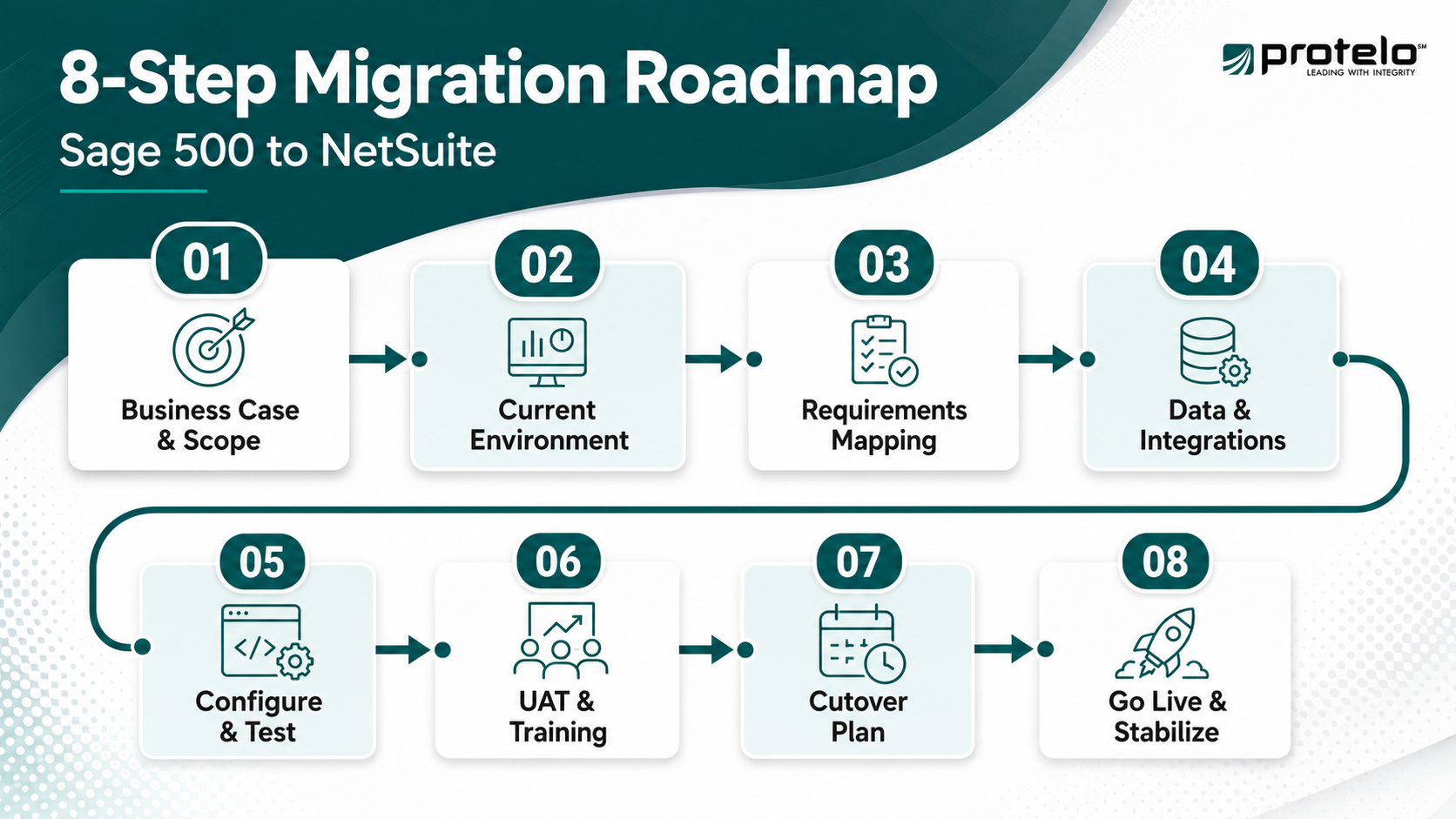
Step 1: Define the Business Case and Project Scope
Start by documenting what the company expects to improve by moving to NetSuite. That may include reducing system administration, simplifying integrations, improving reporting visibility, or supporting additional locations, entities, and operational requirements.
From there, define which processes, users, integrations, reports, data, and business units are included in the initial implementation. Clear boundaries help keep the project aligned with the original business case.
Step 2: Document the Current Sage 500 Environment
Create an inventory of the processes, customizations, reports, integrations, spreadsheets, and connected applications that depend on Sage 500.
This assessment should include both formal system functionality and the workarounds teams rely on every day. An undocumented spreadsheet or custom integration can become a significant migration issue if it is discovered late in the project.
Step 3: Map Business Requirements to NetSuite
Determine how finance, purchasing, inventory, order management, manufacturing, warehousing, and reporting should operate in NetSuite.
Focus on the requirement behind each Sage 500 process instead of recreating the existing workflow by default. Some processes may map closely to NetSuite, while others can be simplified or redesigned around its configuration and workflows.
Step 4: Prepare Data and Integrations
Identify the customer, vendor, item, inventory, financial, manufacturing, and transactional data that needs to move into NetSuite. Decide how much historical data is genuinely useful in the new ERP and clean source records before migration begins.
Integration planning should happen at the same time. Determine which connected applications will remain, which integrations need to be rebuilt, and whether any surrounding systems can be retired after the move.
Step 5: Configure and Test NetSuite
Configure NetSuite around the approved processes, organizational structure, roles, reporting needs, and integration requirements. Testing should follow realistic end-to-end scenarios. Manufacturers and distributors, for example, should validate how orders, purchasing, inventory, production, fulfillment, and financial postings work together rather than testing each function independently.
Step 6: Complete User Acceptance Testing and Training
Process owners across finance, operations, warehousing, manufacturing, and other affected teams should confirm that the configured system supports day-to-day work before go-live. Training should use the workflows employees will actually perform, including approvals and common exceptions. This helps distinguish true configuration issues from processes that simply require clearer instructions or additional training.
Step 7: Plan the Cutover
Define how the company will move active operations from Sage 500 to NetSuite, including transaction cutoffs, final data loads, reconciliation, user access, and integration activation.
Manufacturers and distributors should pay particular attention to open sales and purchase orders, inventory balances, work in process, receivables, payables, and transactions that may still be active during the transition.
Step 8: Go Live and Stabilize the New Environment
After cutover, closely monitor transaction processing, integrations, inventory activity, reporting, and user issues. Problems that affect orders, production, shipping, invoicing, purchasing, or financial close should receive priority during the stabilization period.
Once the environment is operating reliably, the company can begin refining workflows, dashboards, automation, and other improvements that were intentionally left outside the initial implementation. A well-planned Sage 500 to NetSuite migration should leave the company with a cleaner operating model, not simply reproduce years of accumulated complexity in a different ERP.
Read More: Sage 100 to NetSuite Migration Checklist for a Successful Go-Live
Sage 500 to NetSuite Migration Considerations for Manufacturers and Distributors
Manufacturers and distributors need to evaluate financial data alongside the operational records and workflows that keep inventory, production, purchasing, and fulfillment running. Inventory, production, purchasing, fulfillment, and costing processes often contain dependencies that can disrupt daily operations if they are mapped or migrated incorrectly.
Manufacturing Considerations
Manufacturers should document how Sage 500 currently handles items, bills of materials, routings, work orders, work in process, production planning, material consumption, and costing. From there, the implementation team needs to determine how those requirements should operate in NetSuite and which historical manufacturing records are necessary in the new environment.
The migration team should pay particular attention to item structures, units of measure, lot or serial tracking, costing methods, and open production activity. We help manufacturers configure and implement NetSuite around production, inventory, work orders, BOMs, routings, and related operational requirements through our NetSuite Manufacturing Services.
Distribution Considerations
Distributors should focus on inventory availability, warehouse locations, purchasing, order allocation, fulfillment, transfers, pricing, returns, and open sales and purchase orders.
The migration also needs to account for how inventory moves between locations and how customer orders flow from entry through fulfillment and invoicing. If warehouse, e-commerce, shipping, or other systems will remain in place, their integrations should be tested across the full order and inventory lifecycle. We support distributors implementing NetSuite across inventory, order management, fulfillment, purchasing, and warehouse operations through our NetSuite Wholesale Distribution Services.
For both manufacturers and distributors, the objective is to preserve operational continuity while improving the processes that no longer fit the business. A technically successful migration still falls short if inventory, production, purchasing, or fulfillment cannot operate reliably after cutover.
Read Next: Is It Time to Move from Sage 100 to NetSuite? A Guide for Distributors
How Should You Handle Sage 500 Customizations During Migration?
Sage 500 environments that have been in place for years often contain custom reports, screens, workflows, integrations, and business logic built around specific operating requirements. During a NetSuite migration, each customization should be evaluated based on the business need it serves rather than automatically recreated.
We generally recommend treating customizations as business requirements first and technical artifacts second. A custom process may have been critical when it was created, but that does not mean the same design still belongs in the new ERP.
Recreating every Sage 500 customization in NetSuite can increase implementation scope and leave the company supporting complexity it intended to remove. The migration should preserve what still creates business value while eliminating custom logic the business no longer needs.
How Long Does a Sage 500 to NetSuite ERP Migration Take?
The timeline for a Sage 500 to NetSuite ERP migration depends on the complexity of the business and how much change is included in the implementation. We generally avoid assigning a standard duration before discovery because two companies using Sage 500 can have very different configurations, data, integrations, and operational requirements.
Several factors have the greatest impact on the schedule:

-
Manufacturing and Distribution Complexity: Multi-location inventory, production workflows, BOMs, routings, work in process, warehouse operations, and industry-specific fulfillment requirements add configuration and testing effort.
-
Entities and Global Operations: Companies with multiple entities, currencies, consolidation requirements, or inter-company transactions may need additional design and validation, particularly when NetSuite OneWorld is part of the implementation.
-
Financial Management and Reporting: Changes to the chart of accounts, financial reporting, approval workflows, or management reporting can require additional input from the finance team before configuration is finalized.
-
Customizations and Integrations: Existing Sage 500 custom logic and connections to CRM, e-commerce, warehouse, shipping, payroll, banking, or other systems need to be evaluated and, where necessary, rebuilt or redesigned for NetSuite.
-
Data Migration Scope: Data volume, data quality, historical transaction requirements, and changes to the NetSuite data model can materially affect extraction, mapping, testing, and reconciliation.
-
Internal Availability: A NetSuite implementation moves more reliably when finance, operations, IT, and other process owners have enough time to review configuration, test workflows, validate data, and make decisions.
Companies planning for greater scalability should also account for requirements they expect to add soon after go-live. Known plans for a new entity, warehouse, currency, or operating requirement should be addressed during design to avoid reworking the NetSuite environment later.
The schedule should ultimately reflect the work required to reach a controlled go-live rather than an arbitrary target date. Compressing discovery, configuration, testing, data validation, or training can create operational issues that are harder and more expensive to resolve once the business is processing live transactions in NetSuite.
Read More: NetSuite Implementation Timeline & Milestones: From Planning to Go-Live
What Are the Biggest Risks of a Sage 500 to NetSuite Migration?
A Sage 500 to NetSuite migration affects financial management, inventory, orders, manufacturing, reporting, and other core processes, which makes early risk identification important. We recommend identifying the highest-risk areas early so they can be addressed during design and testing rather than after go-live.
Carrying Too Much Legacy Complexity Into NetSuite
One of the biggest risks is treating NetSuite as a new home for every Sage 500 customization, workflow, and workaround. Rebuilding unnecessary complexity can increase implementation effort, raise the total cost of ownership, and make the new environment harder to maintain.
We recommend preserving requirements that still create business value while simplifying processes that no longer need custom logic.
Underestimating Data and Reconciliation Requirements
Data can load successfully and still be wrong from a business perspective. Account balances, inventory quantities, open transactions, customer records, item structures, and other information need clear reconciliation criteria before the company begins processing live activity.
The finance team and operational process owners should both participate in validation. Financial reconciliation alone will not identify every issue affecting inventory, production, fulfillment, or reporting.
Missing Dependencies Between Systems
A Sage 500 environment may exchange data with CRM, ecommerce, payroll, warehouse, shipping, banking, or industry-specific applications. Missing one of those dependencies can interrupt a business process even when the NetSuite ERP configuration itself is working correctly.
We recommend testing integrations through complete workflows so teams can confirm that transactions move correctly between NetSuite and the systems that will remain in place.
Compressing Testing and Training
Aggressive timelines sometimes put pressure on user acceptance testing and training. That creates risk because configuration problems, unclear workflows, and user-adoption issues may not become visible until live transactions are being processed.
Testing should include common transactions, exceptions, approvals, and period-end requirements. Users also need enough time to understand how their responsibilities change in the new cloud ERP system.
Losing Sight of the Original Business Case
A NetSuite implementation can expand as teams request additional modules, reports, integrations, automation, or process changes. Some additions may be justified, but uncontrolled scope can increase cost and delay the benefits that supported the migration decision in the first place.
We recommend returning to the original business case throughout the project. New requirements should be evaluated based on their operational value, implementation impact, and whether they are necessary for the initial go-live. Managing these risks gives the project team stronger controls around scope, data, testing, integrations, and user readiness while reducing threats to business continuity during the transition.
Planning the Next Step from Sage 500 to NetSuite
Moving from Sage 500 to NetSuite requires deciding which ERP environment the business wants to operate over the next several years. For manufacturers and distributors dealing with growing integration complexity, reporting demands, additional locations, or changing operational requirements, NetSuite provides a path to bring more financial and operational processes into a cloud ERP platform.
The migration still needs to be justified by the business case. Data, customizations, integrations, manufacturing requirements, testing, and cutover all affect the scope and risk of the project.
At Protelo, we help companies evaluate those requirements and plan the transition through our NetSuite Implementation Services. If you are considering a move from Sage 500, we can help you determine what should carry forward, what should change, and what a realistic migration plan should look like.
Frequently Asked Questions
Is Oracle NetSuite a Good Replacement for Sage 500?
Oracle NetSuite is worth considering when a Sage 500 user wants to move to a SaaS ERP model, reduce infrastructure dependencies, and bring more financial and operational processes into one environment. NetSuite offers financial management, inventory, order management, procurement, manufacturing, CRM, and other business management capabilities within the same cloud ERP system. The fit still depends on the company’s manufacturing requirements, integrations, customizations, data, and plans for growth.
How Do You Know When You Have Outgrown Sage 500?
A company may have outgrown its current Sage 500 environment when growth repeatedly creates new integrations, customizations, spreadsheets, or applications that are increasingly difficult to maintain. We also look for signs such as greater reporting effort, additional warehouses or entities, rising support requirements, and difficulty adapting processes as the business grows. These conditions provide a stronger reason to evaluate whether a scalable ERP platform would better support future operations.
How Does NetSuite Support Scalability as a Business Grows?
NetSuite can support scalability by allowing companies to add users, locations, business processes, entities, and functionality within the same cloud ERP environment. NetSuite OneWorld can also support organizations managing multiple entities, currencies, consolidation, and intercompany transactions. For manufacturers and distributors, this can reduce the need to build a new collection of systems every time the business adds a warehouse, acquisition, operating entity, or sales channel.
How Should You Compare NetSuite Pricing With the Total Cost of Sage 500?
A useful comparison considers total cost of ownership rather than software licensing alone. For Sage 500, that may include infrastructure, upgrades, database administration, integrations, customizations, external support, and internal IT time. NetSuite pricing varies based on users, modules, configuration, implementation scope, integrations, and support requirements. We recommend comparing both environments over several years so leadership can weigh the cost of continuing to maintain Sage 500 against the investment required to migrate.
Read More: Oracle NetSuite Pricing In 2026: A Clear Pricing Guide For Licensing, Implementation and Budgeting
Should You Work With a NetSuite Partner When Migrating From Sage 500?
An experienced NetSuite partner can help translate existing Sage 500 requirements into an appropriate NetSuite design while managing data migration, configuration, integrations, testing, training, and cutover. This can be especially important for manufacturers and distributors with customized workflows or operational dependencies that may not be obvious during initial discovery. At Protelo, we work with finance, operations, and IT teams to plan the migration around how the business actually needs to operate after the switch.