

27 min read
.jpg)

NetSuite is widely adopted across growing businesses, but successful implementation depends far less on the software itself and far more on how well scope, data, integrations, and governance are managed.
Industry data shows that nearly 43% of ERP projects run over schedule due to technical issues, while another 40% are delayed by expanding scope, highlighting how execution discipline, not software capability, drives timelines.
A simple financial rollout can move quickly. But a broader NetSuite ERP implementation with inventory, approvals, custom workflows, and integrations usually slows down when milestones are unclear or when testing starts too late. Most delays show up during discovery sign-off, data cleanup, role design, and cutover planning.
A realistic implementation approach defines what each phase needs to produce, who owns it, and how it gets validated before go-live. That gives the team a timeline they can actually follow, more reliable reporting, and fewer fixes during the first close and early operations.
This guide covers:
- How long a NetSuite implementation take across different project types
- What each phase of the implementation involves, from discovery to go-live
- What affects the timeline, including scope, data, integrations, and testing
P.S. If your ERP implementation timeline is still unclear or starting to slip, it usually comes down to how milestones, dependencies, and cutover planning are structured. Protelo provides NetSuite Implementation support covering discovery, configuration, data migration, training, go-live, and post-go-live optimization.
Book a call to review your timeline, milestone sequencing, project dependencies, and cutover risks before they impact your implementation.
TL;DR
| Section | What to know |
|---|---|
| Typical NetSuite implementation timeline | Financial-first NetSuite implementations move faster. Adding inventory, multi-entity, approvals, custom workflows, or integrations extends the implementation timeline due to testing and dependencies. |
| Milestones matter more than target dates | A project timeline holds only when milestones have defined deliverables, owners, and sign-off criteria. “Configured” and “UAT-ready” must reflect validated workflows, transactions, and reporting. |
| Discovery sets the foundation for the entire implementation | Poor process mapping across order-to-cash, procure-to-pay, close, and reporting leads to rework. Key decisions should be finalized early, not near ERP go-live. |
| Data migration is a major schedule risk | Delays come from mapping issues, data cleanup, and reconciliation gaps. If data does not behave correctly within NetSuite, UAT slows, and the implementation timeline slips. |
| Testing has to cover real operations | Testing must include unit, integration, and UAT with real scenarios, including exceptions like credits, rejections, and failed integrations. |
| Phased implementation can reduce cutover risk | A phased implementation works when modules can go live independently. Finance-first is common when other areas are not ready. |
| ERP go-live requires cutover discipline | Go-live readiness includes validated data, user access, trained users, report tie-outs, and defined support ownership. |
| Stabilization is part of the entire implementation project | Hypercare, defect handling, training updates, and monitoring are required post-go-live to avoid operational issues during early use. |
How Long Does a NetSuite Implementation Take?
A NetSuite implementation timeline depends on scope, process complexity, and how quickly the project team can make and approve decisions. A standard NetSuite implementation focused on financials, core reporting, and limited integrations moves faster than a NetSuite ERP implementation that includes inventory, approvals, multi-subsidiary structure, CRM sync, ecommerce orders, and custom workflows.
Data migration also affects implementation time. Customer records, vendor data, item records, chart of accounts, open transactions, and historical balances all need to be cleaned, mapped, and validated before the NetSuite system can support accurate transactions and reporting.
In a cloud-based ERP like NetSuite, the software is rarely the constraint. Most delays come from reopened requirements, unclear ownership across the project team, role and permission conflicts, and incomplete integration design. A realistic implementation timeline should account for the entire implementation project, from discovery through ERP go-live and stabilization, not just the configuration phase.
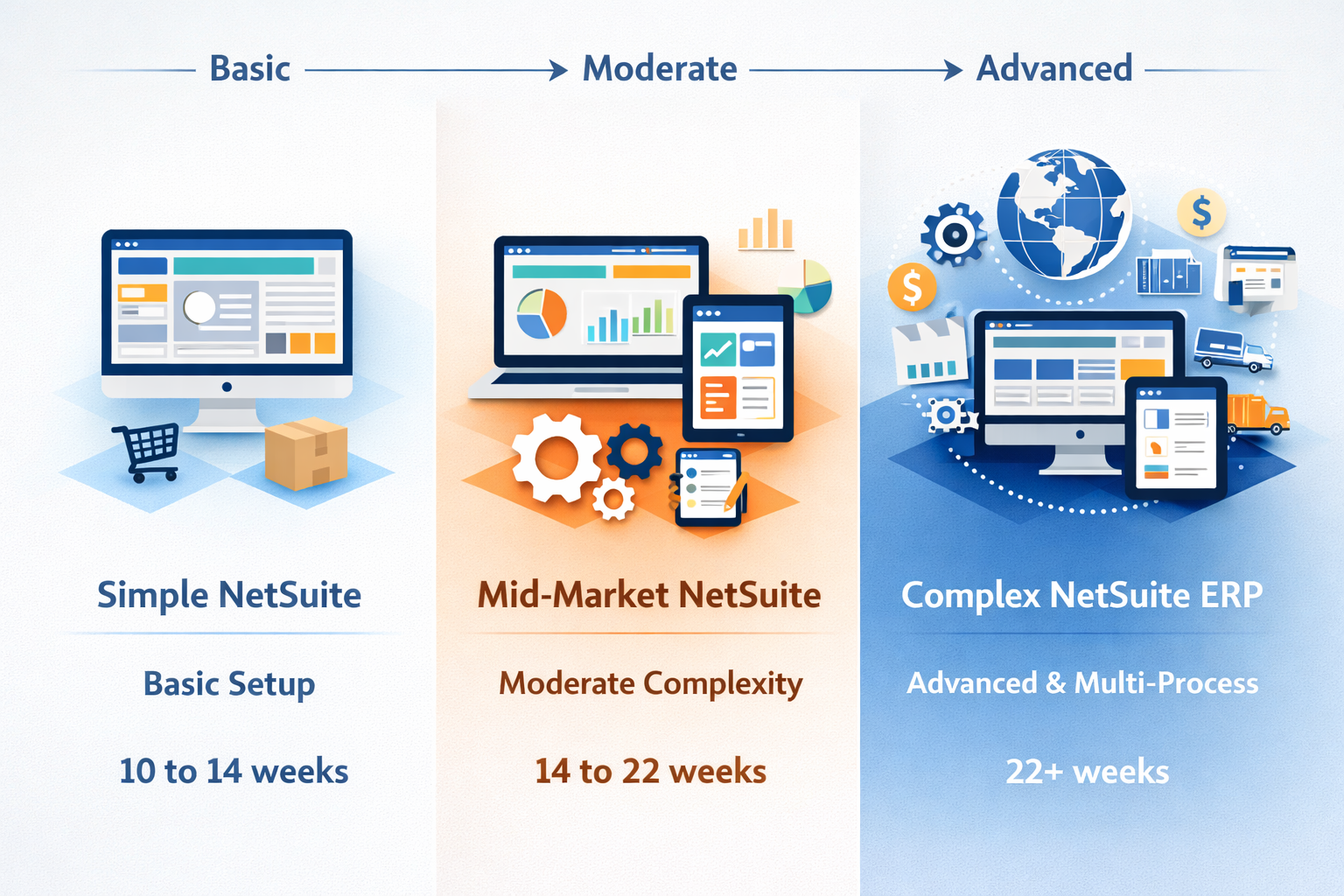
Typical NetSuite Implementation Timeline by Project Profile
A useful implementation timeline should separate simple, moderate, and complex deployment profiles because the difference between a financials-first rollout and a broader ERP solution is substantial. Reporting structure, approval hierarchy, data migration depth, and integration scope all affect the project plan. That is why “how long does a NetSuite implementation” never has one fixed answer.
| Project Profile | Typical Timeline Range | What is Usually in Scope | Milestones that Control the Timeline | What Usually Extends the Project |
|---|---|---|---|---|
| Simple/standard NetSuite | 10 to 14 weeks | Core financials, basic reporting, standard roles, limited workflows, minimal integrations | Discovery sign-off, chart of accounts finalized, first data migration, UAT sign-off, cutover readiness | Delayed decisions, incomplete data migration, late reporting changes, and limited user availability |
| Mid-market / moderate complexity | 14 to 22 weeks | Financials, approvals, basic inventory, reporting, CRM or ecommerce integration, expanded roles | Process design baseline, workflow validation, mock data migration, integration testing, UAT exit, go-live rehearsal | Item and data cleanup, integration defects, approval redesign, cross-team dependencies |
| Complex / multi-process NetSuite ERP | 22+ weeks | Multi-entity structure, advanced inventory, custom workflows, multiple integrations, complex reporting | Solution design sign-off, multiple mock migrations, end-to-end UAT, cutover plan approval, hypercare readiness | Scope expansion, third-party dependencies, custom scripts, reporting gaps, phased rollout coordination |
Factors That Affect NetSuite Implementation Timeline
Implementation time increases when dependencies across data, integrations, approvals, and reporting are not managed together. These areas overlap within the same implementation phases, so delays in one area affect the entire implementation project.
The project manager should track these dependencies in the ERP implementation plan to keep the project timeline controlled.
- Data migration: Customer, vendor, and item data, chart of accounts, tax settings, open AP and AR, and opening balances need to be cleaned and validated before import. Poor data migration leads to reconciliation issues, incorrect reporting, and rework during UAT, which extends the implementation timeline.
- Integration of NetSuite: CRM, ecommerce, warehouse, payroll, banking, and tax integrations require defined ownership, error handling, and retry logic. Without this, failed or duplicate transactions create downstream issues that delay the implementation process and affect reporting accuracy.
- Custom workflows within NetSuite: Approval routing, forms, saved searches, dashboards, and scripts must be stable before testing. Changes after testing begins impact permissions, reporting, and training, slowing the entire implementation project.
- Project team availability: The implementation depends on timely input from the project team. Delays occur when finance, IT, or operations cannot review and approve process design, test results, or data validation within the implementation process.
- Phased implementation choices: A phased implementation reduces cutover risk but extends the overall timeline. Financials-first rollouts are common when inventory or integrations are not ready. The implementation approach should balance risk against timeline impact.
- Testing depth: Unit testing is faster, but end-to-end testing, integration validation, role testing, and close rehearsal are required for a successful implementation. Weak UAT leads to defects, reporting issues, and manual work after ERP go-live.
When Phased Implementation Is the Better Approach
A phased implementation works when parts of the ERP system can go live without breaking reporting, transaction flow, or controls. This is useful when one area, usually finance, is ready, while others still need building and testing time. In a cloud ERP rollout, phased implementation is the better approach when a full cutover would overload the implementation team, compress training, or create too many dependencies at ERP go-live.
- Financials first: General ledger, AP, AR, bank management, and core reporting go live first when the priority is replacing accounting systems. This stabilizes the close while inventory, WMS, or operational processes continue testing.
- Inventory later: Inventory processes, including item setup, costing, and fulfillment, require full data validation and end-to-end testing. Delaying this phase reduces risk if inventory workflows are not stable.
- Multi-entity sequencing: Subsidiary structure, intercompany logic, and local process differences often require staged rollout. Launching by entity reduces risk in complex NetSuite ERP implementations.
- Acquisition or carve-out environments: A new ERP implementation tied to restructuring often involves changing data and ownership. Phasing by entity or process area gives the project team more control over data migration and access design.
Read Next: NetSuite ERP: Tailored Solutions for Every Business Size
NetSuite Implementation Phases and Milestones That Drive the Project Plan
A NetSuite implementation should define what each phase delivers, who signs it off, and what depends on it next. Timelines hold when milestones are tied to outputs, not just dates.
For a broader overview of the implementation process, including planning, configuration, data migration, and go-live preparation, explore Protelo's NetSuite implementation guide.
Each phase should end with something usable, for example:
- Discovery ends with approved process and reporting requirements
- Configuration ends with working workflows, roles, and reports
- Data migration ends with reconciled data
- UAT ends with tested processes and trained users
- ERP go-live confirms transactions and reporting in production
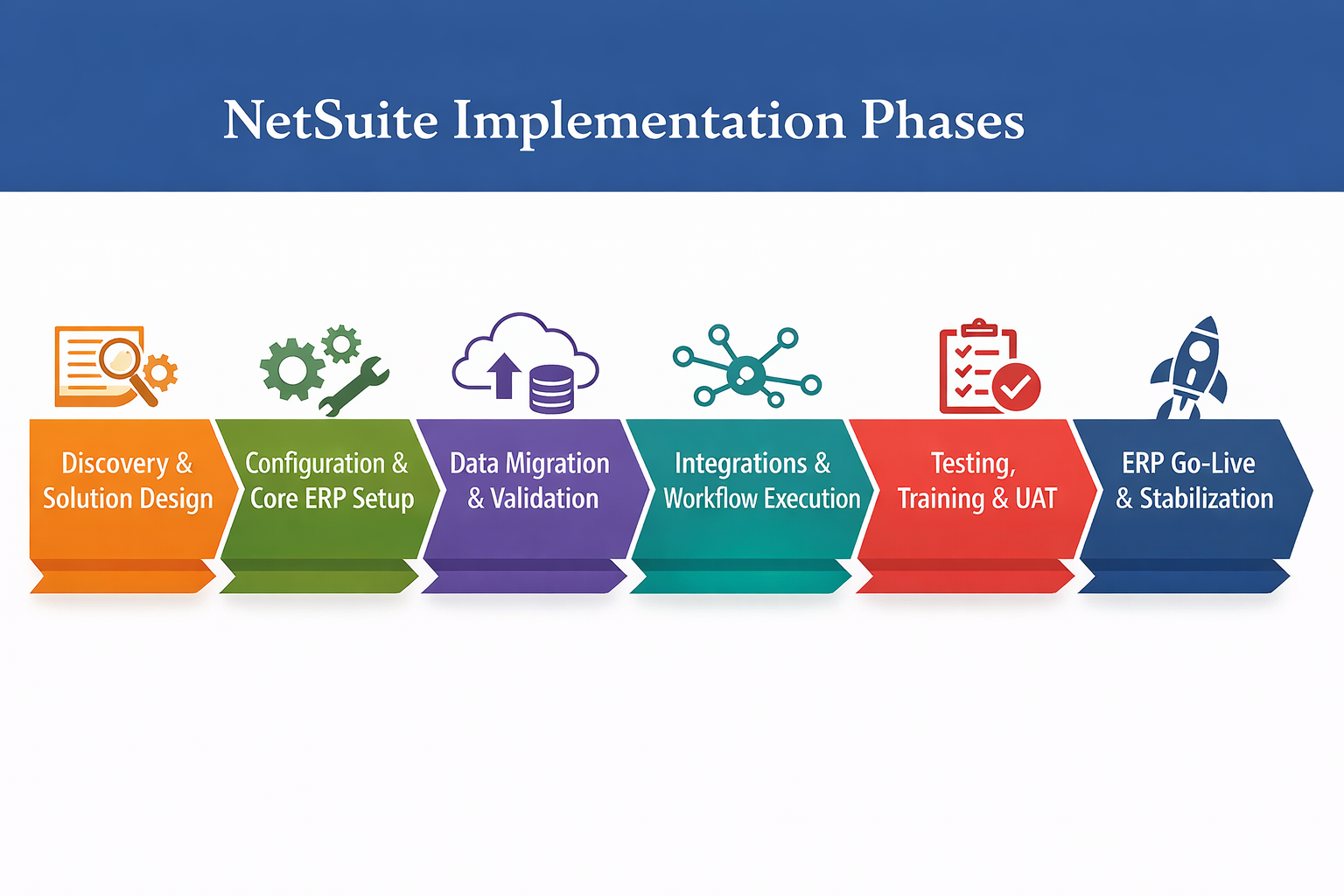
Phase 1: Discovery and Solution Design
Discovery defines how the ERP system will operate. This includes order-to-cash, procure-to-pay, close processes, reporting, integrations, and role-based access.
If these decisions are not finalized early, they get reopened during configuration or testing, which delays the implementation project.
The main output is a design baseline that the project team and implementation partner use to control scope and avoid rework.
- Business process mapping: Document current and future-state workflows for order entry, purchasing, approvals, billing, receipts, close, reporting, and exception handling. This ensures the NetSuite implementation reflects actual operations instead of assumptions.
- Requirements and gap decisions: Separate standard NetSuite functionality from custom workflows, scripts, and third-party integrations. This affects implementation time, testing scope, and long-term maintenance.
- Role and responsibility design: Define who creates, edits, approves, and reviews transactions, data, and reports. Unclear ownership at this stage leads to delays during UAT.
- Reporting requirements: Define saved searches, KPIs, close reports, and management reporting early. Segment structure, custom fields, and form design depend on these decisions.
- Project governance: Define the project manager, decision owners, escalation path, issue tracking, and meeting cadence. Without governance, dependencies are missed, and decisions are delayed.
Phase 2: Configuration, Security, and Core ERP Setup
Configuration translates approved requirements into a usable NetSuite ERP environment. Core accounting preferences, subsidiaries, forms, item setup, approval workflows, dashboards, and reporting logic are configured in this stage.
As configuration expands across finance, operations, and integrated systems, dependencies increase. Approval routing, reporting structure, and transaction logic must remain consistent. Changes in one area affect reporting, permissions, and downstream processes.
Configuration must also establish control design. Role-based access, transaction edit rights, approval chains, and field visibility should be defined and validated before testing. If these continue to change during UAT, results cannot be validated, and test cycles must be repeated.
Role-based access and approval hierarchy
Role design controls what users can create, edit, approve, and report on within NetSuite. If permissions are not defined correctly, users may bypass approvals, edit transactions after approval, or generate inconsistent reports.
The implementation team should validate segregation of duties, role permissions, dashboards, and approval routing before UAT.
Approval workflows should be tested against real transaction types, including purchase orders, vendor bills, journal entries, credits, and any custom workflows. This confirms that approvals, edits, and reporting behave as expected.
Reporting structure and saved search logic
Reporting design should be treated as part of the configuration, not deferred until later.
Saved searches, KPIs, dashboards, and close reports depend on consistent field usage, segment structure, and transaction logic. When reporting is defined late, UAT often exposes gaps between expected and actual results.
Reporting validation should include source-to-output testing. Finance should confirm balances and close reports against source data and imported balances. Operations should validate order, purchasing, and fulfillment reporting against real transaction scenarios. This ensures reporting is reliable before ERP go-live.
Phase 3: Data Migration and Data Validation
Data migration includes extraction, cleanup, mapping, import, and reconciliation. Importing records alone is not sufficient. Data must behave correctly in transactions, approvals, and reporting.
Migration design separates master data, open transactions, and historical balances. Customer and vendor records affect terms, tax, and posting behavior. Item records affect purchasing, inventory valuation, fulfillment, and reporting. Open balances affect the close process.
If data is incorrect, reports do not reconcile, transactions fail or behave incorrectly, and the first close cycle breaks.
| Data Category | What Must Be Cleaned First | Where Mapping Errors Appear | Who Validates | Impact If Incorrect |
|---|---|---|---|---|
| Chart of Accounts | Duplicate accounts, inactive accounts, inconsistent account usage, legacy segment structure | Account mapping, segment alignment, posting rules | Finance lead, implementation partner | Financial statements do not tie out, and the close reconciliation fails |
| Customers | Terms, tax settings, billing/shipping addresses, credit rules, hierarchy structure | Customer status mapping, terms configuration, tax setup, and custom fields | AR owner, sales ops, project team | Incorrect invoices, aging reports unreliable, tax calculated incorrectly |
| Vendors | Payment terms, remit-to details, tax attributes, approval requirements | Vendor setup, tax configuration, payment processing rules | AP owner, finance lead | Payment runs fail, vendor balances are inaccurate, and compliance issues |
| Items | SKU structure, units of measure, costing method, and item categorization | Item type setup, costing configuration, fulfillment, and location settings | Operations lead, inventory owner | Inventory valuation incorrect, fulfillment errors, margin reporting unreliable |
| Open Transactions | Open AR/AP balances, invoice and bill status, open POs and SOs, applied amounts | Transaction dates, status mapping, entity linkage | Finance and operations owners | AR/AP does not reconcile, order processing status is incorrect, and cash flow reporting is distorted |
| Historical Balances | Cutoff date, retained earnings treatment, and balance validation rules | Journal structure, import timing, subsidiary mapping | Controller, project manager | First close cycle fails, comparative reporting cannot be trusted |
Phase 4: Integrations and Workflow Execution
Integrations define how data moves between systems. A connection alone is not enough. The implementation must define what data moves, what triggers it, how failures are handled, and who owns them.
If this is not defined, issues surface during operations instead of testing.
Workflow execution within NetSuite must be validated under real conditions. This includes approvals, scripts, sync jobs, order imports, payment updates, and status changes.
- CRM integration: Opportunity, customer, quote, and sales order handoff should be tested with ownership rules, duplicate prevention, and field-level validation. If sales and finance see different status values, forecasting and order reporting break early.
- E-commerce and order capture: Web orders, payment results, item availability, tax outcomes, shipping statuses, and fulfillment updates should be reviewed across the full order-to-cash cycle. Failed order imports should have a named owner and a queue process.
- Banking and payment tools: Bank feeds, payment files, and reconciliation support should be tested before ERP go-live. If cash posting or payment handling is unstable, the first close cycle becomes manual immediately.
- Tax and external compliance systems: Tax engines, address validation, or jurisdiction tools should be tested on different transaction types. A clean invoice test does not prove tax logic is correct for credits, returns, or state-specific edge cases.
- Middleware and retry handling: Middleware can hide failures until volume increases. The implementation team should inspect retry rules, duplicate prevention, timestamp logic, and alerting so that failed records are not discovered days later during reconciliation.
Phase 5: Testing, Training, and User Acceptance
Testing determines whether the system supports real business operations. A successful NetSuite implementation should validate complete transaction flows, including approvals, exceptions, and reporting outcomes, within the same test cycle.
This includes scenarios such as returns, credit memos, rejected approvals, partial receipts, tax adjustments, and integration failures. Testing limited to standard transactions does not confirm whether the system will hold up under actual operating conditions.
Training should follow the defined business processes, not just system navigation. End-users need to understand which forms to use, how transactions move through approval workflows, which fields affect reporting, how exceptions are handled, and when issues should be escalated. In a NetSuite implementation, weak training often surfaces during UAT as avoidable errors, which are then misclassified as system defects and delay the implementation timeline.
- Unit testing: Admins, consultants, and functional leads should confirm that each workflow, form, field rule, approval route, report, and role behaves as designed. This catches configuration errors before users start broader UAT.
- Integration testing: External connections should be tested using real transaction scenarios with success and failure paths. The implementation project should log what happens when a sync fails, duplicates data, or sends incomplete field values.
- User acceptance testing: UAT scripts should cover order entry, purchasing, receiving, billing, cash application, journal entry approval, inventory movement, and close tasks. A useful NetSuite implementation checklist for UAT includes expected outputs, approver behavior, and report validation after each transaction.
- Exception testing: Credit memos, returned goods, voided payments, approval rejections, tax variance, split shipments, and edited records after submission should all be tested. These are the cases that usually damage a successful implementation after go-live when they are skipped.
- Role-based training: Finance, operations, admins, and approvers should be trained in their own process context. Training should include form selection, dashboard usage, saved searches, error resolution, and handoffs to other teams.
- Defect management: The project manager should separate true defects from training gaps, process design decisions, and enhancement requests. That keeps the implementation phases moving and prevents the overall implementation from being delayed by issues that do not block go-live.
Phase 6: Cutover, ERP Go-live, and Stabilization
ERP go-live moves the system into production, but readiness depends on how well the cutover is executed. Cutover planning should define the data freeze point, final data loads, user access checks, support coverage, escalation ownership, and who confirms the first transactions across each process. Projects often hit the go-live date and still run into issues because these checks were incomplete or assigned too late.
The first week and the first close cycle expose most problems. Teams should focus on resolving defects, validating reports, monitoring integrations, and correcting user errors. Issues at this stage usually relate to data behavior, approval routing, or reporting logic. If these are not addressed quickly, teams fall back on manual workarounds.
| Milestone | What to Confirm | Owner | If Skipped |
|---|---|---|---|
| Final migration approved | Balances, open transactions, and key records reconcile to source data | Finance lead, data owner | Opening balances are incorrect, and AR/AP does not tie out |
| User access validated | Users can log in, enter transactions, approve, and access required reports | Admin lead, process owners | Users blocked, approvals fail, and missing data in reports |
| First transactions posted | Sales, purchasing, billing, and journal entries post correctly | Process owners | Posting errors, incorrect transaction status |
| Integration monitoring active | Error queues, alerts, and ownership are active | IT lead, integration owner | Failed transactions not detected or resolved |
| First close tasks verified | Reconciliations and key reports match expected results | Controller, finance team | Close delays, reports not trusted |
| Hypercare exit approved | Open issues reduced, ownership assigned, users supported | Project manager, business leads | Ongoing defects, unclear support ownership |
Read Next: Off-track ERP project? Steps to rescue a NetSuite implementation.
NetSuite Implementation Plan Components
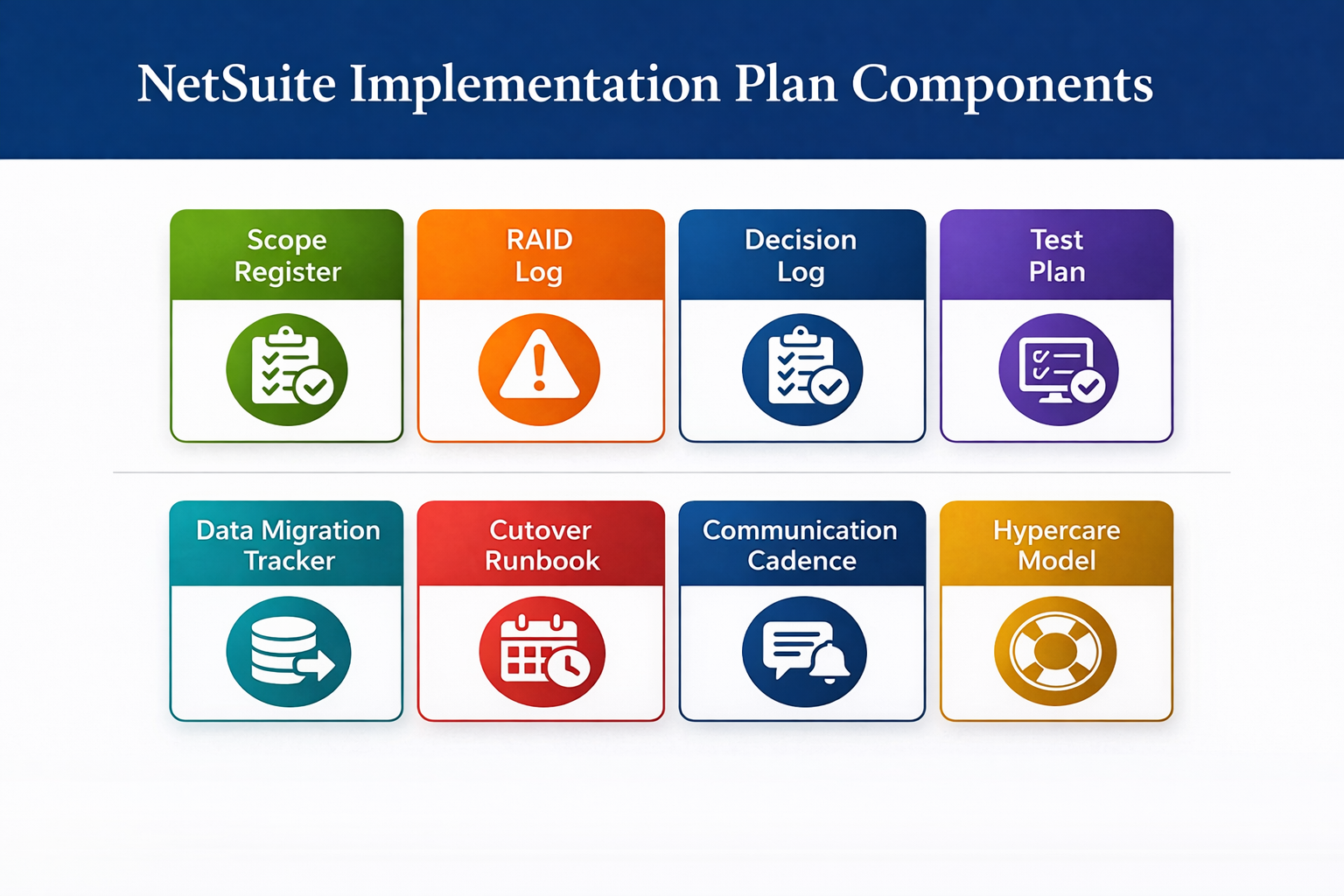
Implementation plans usually break in the same places: scope expands after discovery, UAT starts before data is ready, and cutover tasks lack ownership. A NetSuite implementation plan needs to capture decisions, dependencies, data readiness, role validation, and the conditions required to move from one phase to the next. A plan built only around workshops, build timelines, and a go-live date does not provide enough control over the implementation timeline.
The plan should also show how workstreams depend on each other. Discovery outputs define configuration, which in turn drives test scripts, roles, and reporting. Data migration affects both UAT and first-close reporting, while integration issues can delay cutover. These dependencies need to be visible in the project plan, especially in ERP projects that include approvals, saved searches, external systems, item master cleanup, and multiple process owners.
| Plan Component | What It Tracks | Primary Owner | If Missing |
|---|---|---|---|
| Scope register | In-scope modules, approved changes, integration boundaries, and planning assumptions | Project manager, executive sponsor | Scope changes during build, design rework, and timeline slips |
| RAID log | Risks, actions, issues, decisions, owners, due dates | Project manager | Blockers remain unresolved, dependencies slip without visibility |
| Decision log | Approved workflows, approval routing, reporting logic, form usage, and system ownership | Project manager, process leads | Decisions reopen during UAT, training, and configuration change late |
| Test plan | Test cycles, scripts, environments, severity rules, sign-off criteria | Functional leads, testing lead | UAT lacks coverage, exception scenarios are missed, and defects are found late |
| Data migration tracker | Source data, mapping status, mock loads, reconciliation results, and ownership | Data lead, implementation partner | Data does not reconcile, transactions fail, and reports are not trusted |
| Cutover runbook | Freeze timing, final loads, access checks, first transactions, support coverage | Project manager, system owner | Go-live becomes reactive, ownership is unclear, and steps are missed |
| Communication cadence | Meeting schedule, status reviews, escalation timing, decision checkpoints | Project manager | Decisions delayed, sign-offs slip, issues carry into later phases |
| Hypercare model | Support routing, severity levels, ownership, and post-go-live monitoring | Business leads, partner team | Issues accumulate, users rely on workarounds, reporting unstable |
Project Roles That Impact NetSuite Implementation Timeline
Unclear ownership and slow decisions are two of the most common reasons a NetSuite implementation timeline slips. Each phase depends on approvals, data validation, and issue resolution across finance, operations, and IT. When those responsibilities are not defined early, work stalls between phases instead of progressing through them.
The project plan should clearly assign ownership. It should show who approves design decisions, who validates data, who owns testing outcomes, and who has the authority to move a milestone forward.
- Executive Sponsor: Resolves scope conflicts, approves major timeline changes, and removes resource constraints that block progress. When this role is active, decisions that would otherwise stall get cleared quickly, keeping discovery, testing, and cutover on track.
- Project Manager: Maintains the implementation plan, tracks dependencies, and drives issue resolution across teams. By pushing unresolved items to the right owners and enforcing milestone criteria, this role keeps phases from overlapping or slipping.
- Finance Lead: Defines financial structure, reporting, and approval controls, and validates open balances and first-close readiness. Strong ownership here ensures data migration reconciles correctly and financial reporting works during UAT and after go-live.
- IT Lead: Coordinates integrations, manages environments and access, and tracks technical dependencies across external systems. Clear ownership prevents integration issues from surfacing late and allows testing to proceed without rework.
- Operations Lead: Defines item master standards and transaction flows across purchasing, receiving, and fulfillment, and validates them during testing. This ensures operational processes work end-to-end and reduces failures in UAT and early production.
- System Owner or NetSuite Admin: Manages roles, permissions, forms, dashboards, and workflows, and supports testing and post-go-live updates. Consistent ownership here keeps the system stable during UAT and allows issues to be resolved quickly without delaying progress.
- Implementation Partner: Handles configuration, supports migration and testing, and identifies risks across the implementation. When aligned with internal owners, the partner helps maintain momentum by flagging issues early instead of reacting late.
- Integration Owner: Manages field mapping, error handling, retry logic, and monitoring for third-party systems. This ensures integration failures are identified and resolved quickly, preventing delays during testing and after go-live.
Milestone Exit Criteria
Milestones fail when teams mark them complete without validating the underlying work. This happens when tasks are finished, but the system has not been tested in real scenarios.
Each milestone in a NetSuite implementation timeline needs clear exit criteria tied to system behavior. Completion should be based on what works inside NetSuite, not what was built or loaded. That includes transaction accuracy, reporting output, permission controls, and reconciliation results.
Discovery should end with approved future-state workflows, reporting requirements, and integration scope, with no open design decisions left unresolved. From there, configuration needs to produce a working system where roles, workflows, forms, and saved searches behave correctly in a test environment, including approvals and reporting outputs.
Before moving into UAT, data migration has to reconcile with the source data, and transactions created from migrated records should behave as expected. UAT then confirms that both standard transactions and exception scenarios work, with defect levels within agreed thresholds. By the time of ERP go-live, initial transactions should post correctly, reports should reflect live activity, and production issues should already be tracked and managed through a defined support process.
Read Next: How to Choose the Best NetSuite Partner for a Successful ERP Implementation
Common NetSuite Implementation Delays
Delays often start when the project moves forward with unresolved decisions. Discovery may leave gaps in approval logic, reporting, data ownership, or integrations, but configuration continues anyway. When testing begins, those gaps show up as defects in workflows, data behavior, or integrations that should have been addressed earlier. Fixing them at that stage requires rework across multiple areas, which pushes the implementation timeline out.
Delays also occur when the project plan tracks completed tasks instead of system readiness. Finishing workshops, building scripts, or loading data does not confirm that the ERP system works as expected. What matters is whether transactions process correctly, reports produce accurate results, approvals hold, and exceptions behave as expected.
Weak Discovery
When discovery leaves decisions open, those gaps reappear during configuration and testing. Approval routing may need to be redesigned after initial workflows are built. Reporting requirements often expand once finance sees actual outputs. Integration mappings change when real data flows between systems. Item setup rules shift after operations tests, receiving, and fulfillment.
These issues usually come from unclear ownership and missing decisions. Approval thresholds, reporting drivers, edit permissions, master data ownership, and responsibility for failed integrations need to be defined early. Without that, configuration proceeds on assumptions, and the system keeps changing as those decisions get made later.
Bad Data Migration
Data migration issues come from source data that was not cleaned or structured correctly. Customer terms, tax settings, item definitions, units of measure, account mappings, and open transactions all affect how NetSuite behaves after go-live. When this data is incorrect, the impact shows up immediately in AR and AP reporting, inventory valuation, fulfillment, and the first close.
Mock loads should expose these issues before UAT. Customer records should support invoicing without errors. Vendor records should move through the approval and payment processes correctly. Item records should work across purchasing, receiving, and reporting. Opening balances should reconcile to the source data. If testing begins with unstable data, the issue log fills with noise, and real defects become harder to isolate.
Incomplete UAT Coverage
UAT focuses on standard transactions and misses scenarios that involve exceptions or cross-team handoffs. That is where most issues appear. Returns, credit memos, partial receipts, split shipments, approval rejections, tax edge cases, and integration failures all need to be tested before ERP go-live. Otherwise, those scenarios surface in production.
Returns and credit memos affect both financial posting and inventory, so tax handling and reporting should be validated together. Partial receipts and split fulfillment need testing across multiple steps to confirm receiving, accruals, and billing remain consistent. Approval rejections and resubmissions should follow the correct path without creating duplicate approvals or losing context.
Tax scenarios should include adjustments and jurisdiction-specific cases, not just standard invoices. Role permissions should confirm who can edit transactions after submission. Integration testing should include failure cases such as duplicate records, missing fields, and delayed syncs to confirm how the system responds.
Unowned Post-Go-Live Stabilization
After go-live, issues come from unclear ownership rather than system gaps. Users raise tickets, reports need adjustment, saved searches require updates, integrations generate errors, and access changes are requested. Without defined ownership, these issues move slowly or get handled inconsistently, and teams start working around the system.
Stabilization depends on clear ownership before go-live. Finance needs support for closing and reporting. Operations need support for transactions and item behavior. IT needs to monitor integrations and resolve failures. When ownership is clear, issues move through triage and resolution. When it is not, the first few weeks after go-live become reactive, and the system does not stabilize properly.
For businesses that need assistance after deployment, Protelo's NetSuite support services can help with troubleshooting, administration, system optimization, and ongoing operational support.
NetSuite Go-Live Checklist
Go-live checklists need to validate transaction flow, access, reporting, and support coverage. A task marked complete is not enough. The checklist has to confirm that users can post live transactions, approvals route correctly, balances reconcile, integrations are monitored, and support teams can respond when the first production defects appear.
- Open Defect Review: Resolve the status of every open defect before ERP go-live. Separate production blockers, such as posting failures, broken approvals, missing permissions, failed integrations, or incorrect tax results, from lower-risk items that can move to hypercare. Each item needs an owner, a target fix date, and a note on whether it affects transactions, reporting, close, or access.
- Role and Login Validation: Test production access using final role permissions, not admin access or temporary overrides. Confirm that logins, forms, dashboards, saved searches, approval rights, and edit restrictions all behave as expected. This step catches missing menu access, broken dashboard visibility, segregation conflicts, and unintended permissions before live processing starts.
- Approval Routing Validation: Run purchase orders, vendor bills, journal entries, credits, and custom approval records through the final workflow logic. Check approval sequence, threshold rules, rejection paths, notifications, and post-submission edit behavior. If routing fails in production, transactions stall immediately, and audit history becomes unreliable.
- Master Data Validation: Validate a sample of customer, vendor, item, account, tax, and payment-term records inside actual test transactions. Imported records need to be posted, billed, received, fulfilled, and reported correctly, not just exist in NetSuite. This step exposes source data defects, mapping errors, and record-level inconsistencies before go-live.
- Integration Monitoring Setup: Confirm that every live integration has queue visibility, error alerts, retry rules, duplicate detection, and a named owner for failed records. Test both successful and failed payloads for CRM, ecommerce, banking, tax, warehouse, or other connected systems. A live connector without monitoring becomes a hidden production risk.
- Reporting Tie-Outs: Validate aging reports, dashboard KPIs, saved searches, inventory reports, and close-related outputs against approved source balances or expected results. This review should confirm formulas, filters, status logic, and migrated data behavior. If tie-outs are skipped, the first reporting cycle usually shifts into spreadsheet reconstruction.
- Cutover Communications: Document the full cutover sequence with owners, timing windows, and completion checkpoints. Include legacy transaction stop time, final migration approval, import timing, login release, and launch-status communication. Weak cutover communication usually creates duplicate entries, missed handoffs, or uncertainty around production readiness.
- Hypercare Coverage: Define ticket routing, severity levels, escalation contacts, review cadence, and ownership for workflow defects, access changes, report fixes, and integration failures before launch. Early production issues usually hit transaction posting, approvals, dashboards, and exception queues first. Without structured hypercare, small defects turn into manual workarounds quickly.
Read Next: Is your NetSuite ERP instance healthy?
Building The NetSuite Timeline Around Validation
A NetSuite implementation rarely fails because of the system itself. It slips when teams move forward without confirming that each phase actually works. The difference shows up at the end, in how clean the first close is, how many issues surface after go-live, and how much rework the team carries into production.
- Milestones Need Exit Criteria: Labels like configured, tested, or ready are too broad unless they are tied to workflow validation, reconciled data, permission checks, and approved reporting outputs.
- Timeline Risk Usually Starts Before Go-Live: Discovery gaps, unstable migrated data, incomplete UAT coverage, and unclear integration ownership create delays long before the cutover date is at risk.
- Go-Live Depends On Operational Validation: Login access, approval routing, master data behavior, reporting tie-outs, cutover sequencing, and hypercare ownership all need to be confirmed before live transactions begin.
Protelo is a NetSuite Partner, offering NetSuite implementation, training, support, and post-go-live optimization services. Book a timeline review to identify milestone gaps, test dependencies, and cutover risks before they affect launch timing or first-close reporting.