

25 min read


If you're considering switching from Sage 100 to NetSuite, your business has likely outgrown parts of its current system. Reporting may depend on spreadsheets, teams may have limited visibility across locations, and inventory or warehouse processes may require separate tools and manual reconciliation.
NetSuite can address many of these limitations, but the quality of the implementation depends heavily on the work completed before go-live. Your team will need to decide which records to migrate, how existing workflows should change, which systems must remain integrated, and how employees will be trained on the new processes.
Data preparation deserves particular attention. In Panorama Consulting Group’s 2025 ERP Report, 63.6% of organizations whose projects ran over schedule cited data issues, including problems with accuracy, consistency, and integrity. For a Sage 100 migration, unresolved duplicate customers, inconsistent item codes, inactive records, or incorrect inventory balances can delay testing and create errors after launch.
This guide explains when it makes sense to move from Sage 100 to NetSuite, what to expect during implementation, and how to prepare your data, processes, integrations, and users for the transition.
Why Companies Switch from Sage 100 to NetSuite
Most companies don't replace Sage 100 because it stops working. They migrate because the business has changed.
Sage 100 remains a reliable ERP for many small and mid-sized organizations, particularly those with relatively straightforward accounting, inventory, and distribution requirements. As companies grow, however, they often add new locations, expand product lines, increase transaction volumes, or connect additional systems such as CRM, ecommerce, payroll, and warehouse management software. These changes can make day-to-day operations more difficult to manage within an on-premise ERP.
The decision to move to NetSuite usually develops over time. Finance teams spend more time reconciling reports, operations teams rely on spreadsheets to bridge gaps between systems, and managers struggle to get a current view of inventory or business performance. Rather than one major limitation, it's often a collection of small inefficiencies that signal it's time to evaluate a different ERP platform.
Common Signs You've Outgrown Sage 100
Every organization reaches this point differently, but several patterns appear consistently during ERP evaluations.
-
Financial reporting requires manual consolidation across locations or business units.
-
Inventory data isn't always up to date, making it difficult to plan purchasing or fulfill orders with confidence.
-
Employees export data to spreadsheets to complete reporting or operational tasks.
-
Existing integrations require ongoing maintenance or manual intervention.
-
Supporting remote users or multiple locations becomes increasingly difficult.
-
Growth plans involve capabilities that aren't easily supported by the current ERP.
Consider a wholesale distributor operating three warehouses and selling through multiple channels. Inventory quantities may exist in Sage 100, while ecommerce orders, shipping information, and customer data reside in separate applications. Teams spend time reconciling information before they can make purchasing decisions or answer customer questions. As transaction volume grows, those manual processes consume more time and increase the risk of errors.
These challenges don't necessarily mean Sage 100 is the wrong ERP. They often indicate that the organization has reached a level of operational complexity where a cloud ERP can provide better visibility and support future growth.
Read More: Gartner Analysis: Why Companies Choose NetSuite
How NetSuite Addresses Those Challenges
NetSuite brings financial management, inventory, purchasing, sales, CRM, and reporting together in a single cloud-based ERP. Instead of relying on separate applications and manual data transfers, organizations can manage core business processes on a single platform using shared operational data.
For growing manufacturers and wholesale distributors, that often translates into better visibility across locations, more timely financial reporting, and improved coordination between finance, operations, sales, and warehouse teams.
Technology alone doesn't solve operational problems. Organizations typically see the best results when they review existing business processes, clean master data, define reporting requirements, and prepare users before implementation begins. Those activities lay the groundwork for a smoother migration and help ensure the new ERP supports the way the business operates today and where it's headed next.
Read More: NetSuite Beginner's Guide for 2026
What to Expect During a Sage 100 to NetSuite Migration
Every implementation follows its own path, but most Sage 100 to NetSuite projects move through the same five stages. Each phase has a specific purpose, and decisions made early in the project often determine how smoothly the implementation progresses later.
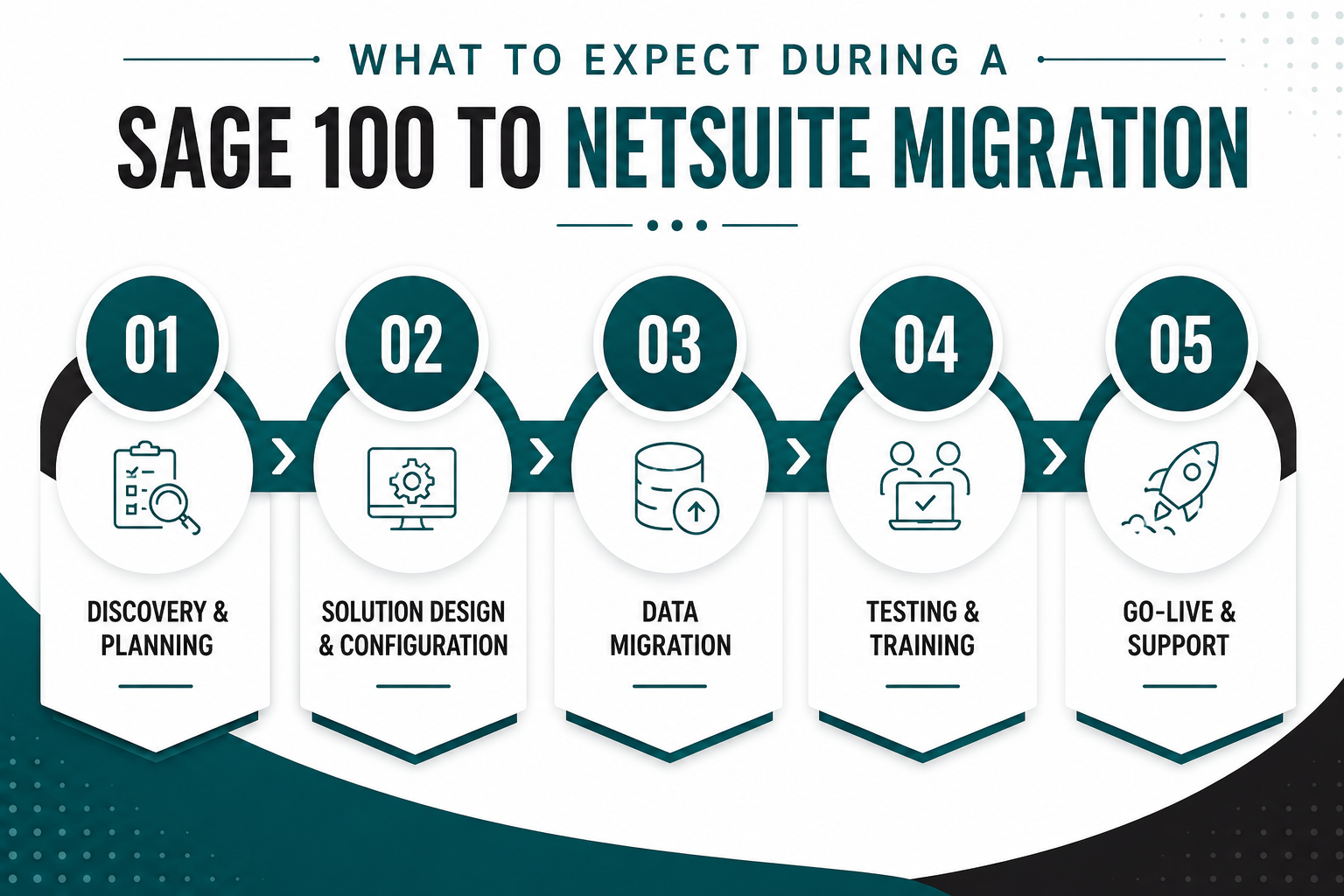
1. Discovery & Planning
A successful implementation starts with understanding how the business operates today. During discovery, the implementation team works with stakeholders across finance, operations, purchasing, inventory, sales, and IT to document existing processes and identify where improvements are needed.
This is also when the project scope is defined. Decisions are made about which modules will be implemented, what integrations are required, how reporting should work, and what historical data needs to be migrated. Establishing these requirements early helps prevent unexpected changes once configuration is underway.
For many organizations, discovery also reveals opportunities to simplify existing processes. Approval workflows, purchasing procedures, and inventory controls often evolve over time, leaving behind workarounds that no longer serve the business.
2. Solution Design & Configuration
Once requirements are documented, the project moves into system design. NetSuite is configured to support your chart of accounts, financial reporting, inventory management, purchasing, order management, user roles, and business workflows.
This phase involves more than selecting system settings. Every configuration decision affects how employees perform their daily work. For example, changing the purchasing approval process may improve financial controls, but it also changes how buyers create and approve purchase orders. These operational impacts should be reviewed with the people who use the system every day, not just project sponsors.
3. Data Migration
Data migration is often one of the most time-consuming parts of an ERP implementation. Before information is imported into NetSuite, customer records, vendors, inventory items, open transactions, and financial balances should be reviewed for accuracy.
It's common to find duplicate customer records, inactive inventory items that haven't been used in years, or inconsistent naming conventions that have accumulated over time. Migrating unnecessary or inaccurate data carries those problems into the new system, making reporting and day-to-day operations more difficult after go-live.
Many organizations use the migration as an opportunity to improve data quality rather than simply move everything from one ERP to another.
4. Testing & User Training
Testing verifies that the system supports real business processes before employees begin using it in production. Finance teams may validate month-end close procedures, warehouse staff confirm inventory transactions, and purchasing teams test approval workflows and vendor management.
Training should happen alongside testing whenever possible. Users learn more effectively when they're working through realistic scenarios using their own business data instead of generic demonstrations. This also allows the implementation team to identify areas where additional configuration or process changes are needed before launch.
5. Go-Live & Post-Implementation Support
Go-live marks the point where the business begins operating in NetSuite, but the implementation isn't finished. During the first several weeks, users adapt to new processes, questions arise, and small configuration adjustments are often needed as real-world transactions begin flowing through the system.
Most implementation partners schedule a stabilization period after launch to resolve issues quickly, refine reports, and help users become comfortable with the new ERP. Once daily operations have stabilized, organizations can shift their focus toward longer-term improvements such as additional automation, dashboards, or functionality that wasn't included in the initial implementation.
Read Next: Guide for Successful ERP Software Implementation
Is Your Organization Ready to Move to NetSuite?
An ERP implementation begins long before data is migrated or users log into a new system. The planning phase is where organizations define project goals, evaluate existing processes, and identify the requirements that will shape the implementation.
The questions below reflect the topics that implementation teams typically cover during discovery. They can help identify potential gaps before the project begins and provide a stronger foundation for a successful migration.
You don't need every answer before selecting an implementation partner, but having a clear understanding of these areas makes it easier to define project scope, establish realistic timelines, and avoid unexpected challenges during the implementation.
How Long Does a Sage 100 to NetSuite Migration Take?
One of the first questions organizations ask is how long it takes to migrate from Sage 100 to NetSuite. The honest answer is that every implementation is different, but most projects are measured in months rather than weeks.
The overall timeline depends less on the software itself and more on the complexity of your business. The number of users, legal entities, warehouse locations, integrations, customizations, and the quality of your existing data all influence how quickly a project can move forward.
While these timelines provide a general benchmark, no two implementations follow exactly the same schedule. A company with clean data and well-defined business processes may move faster than a smaller organization that is still deciding how key workflows should operate.
Read More: Top 3 ERP Implementation Mistakes (And How to Avoid Them in NetSuite)
What Usually Affects the Timeline?
Instead of the software itself, implementation schedules are typically influenced by a handful of practical factors.
-
Data quality. Cleansing duplicate records, standardizing inventory data, and validating financial information often takes longer than organizations expect.
-
Internal availability. Subject matter experts still have day-to-day responsibilities. When key stakeholders have limited time for workshops, testing, or decision-making, projects naturally slow down.
-
Integrations. Connecting NetSuite to ecommerce platforms, CRM systems, payroll providers, or third-party logistics software adds planning, testing, and validation.
-
Process changes. Replacing manual workflows or redesigning approval processes takes more time than simply replicating the way Sage 100 works today.
-
User testing. Allowing employees enough time to validate real business scenarios helps identify issues before go-live and reduces disruption afterward.
Rather than focusing on the shortest possible implementation, most organizations benefit from a realistic schedule that allows enough time for planning, testing, and user adoption. Finishing a project a few weeks earlier rarely offsets the cost of resolving avoidable issues after go-live.
How to Switch From Sage 100 to NetSuite
Switching ERP systems is a business initiative as much as it is a technology project. While every implementation differs, organizations that experience the smoothest transitions tend to follow the same practical sequence of activities.
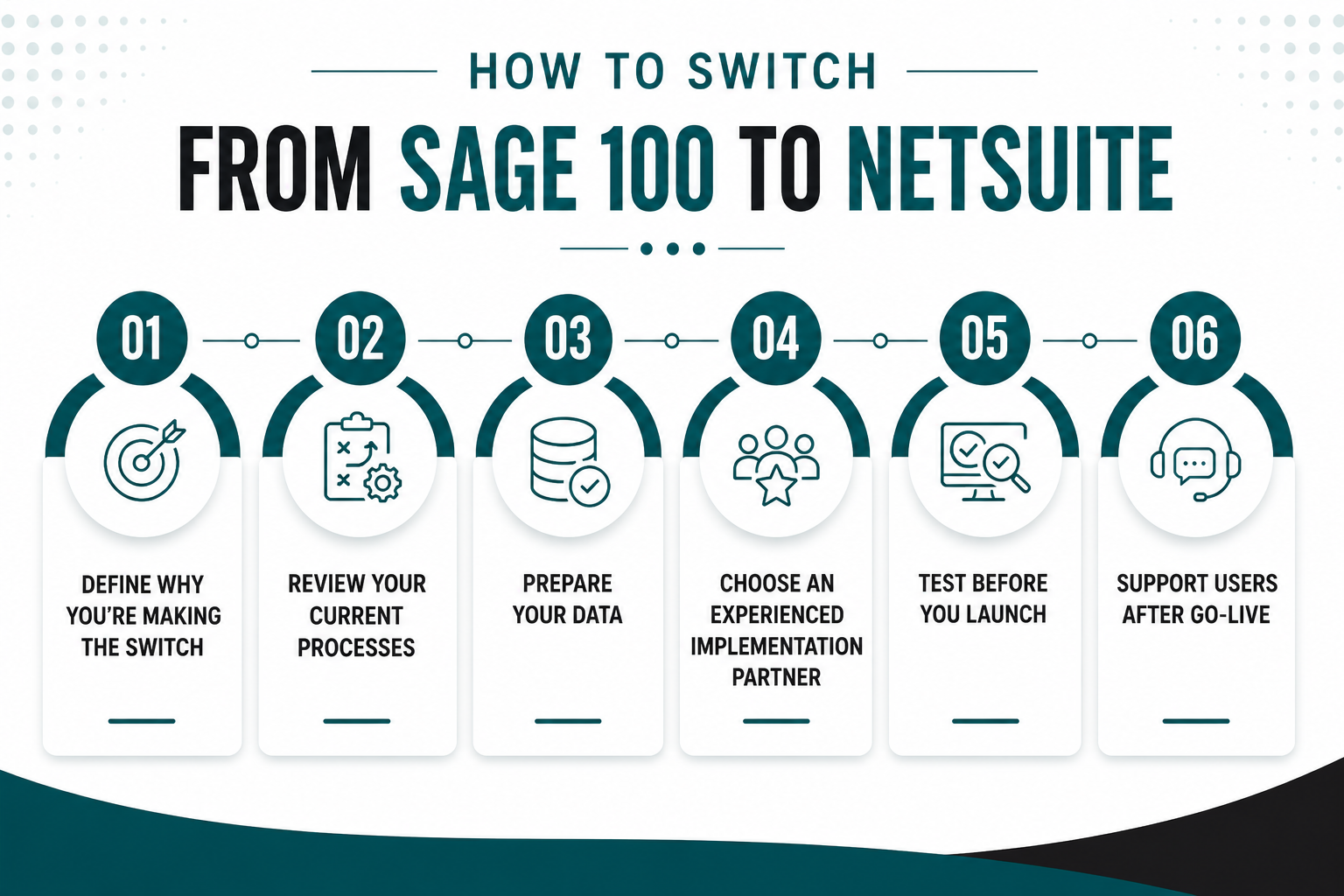
Step 1: Define Why You're Making the Switch
Before evaluating implementation partners or planning a migration, establish what success looks like.
Perhaps finance wants to shorten the month-end close, operations needs better inventory visibility, or leadership wants consolidated reporting across multiple entities. Documenting these objectives creates a common set of priorities that can guide decisions throughout the implementation.
If the project goals aren't clearly defined, it's difficult to determine whether the migration was successful once NetSuite goes live.
Step 2: Review Your Current Business Processes
Moving to a new ERP is an opportunity to evaluate how work gets done across the organization. Document workflows for purchasing, order management, inventory, financial reporting, approvals, and any other business-critical processes. Some may transfer directly into NetSuite, while others can often be simplified or automated.
Many companies discover they've built manual workarounds over the years to accommodate limitations in their existing ERP. Those workarounds don't always belong in the new system.
Step 3: Prepare Your Data
Data preparation often takes longer than organizations expect, especially when years of operational data have accumulated in Sage 100.
Before migration begins, review customer and vendor records, inventory items, open transactions, and financial data. Remove duplicate records, archive obsolete information, standardize naming conventions, and confirm that key fields are complete and accurate.
Cleaning data before importing it into NetSuite reduces the risk of reporting errors, duplicate records, and user confusion after go-live. Teams can spend less time correcting data issues and more time using the system with confidence from day one.
Step 4: Choose an Experienced Implementation Partner
The implementation partner plays an important role in project planning, solution design, data migration, testing, training, and post-go-live support.
When evaluating partners, ask about their experience with Sage 100 migrations, industry expertise, implementation methodology, and the level of support provided after launch. Every organization has different operational requirements, so it's important to choose a partner whose experience aligns with your business.
Protelo has helped organizations across manufacturing, wholesale distribution, retail, and other industries successfully migrate from legacy ERP systems to NetSuite. Our consultants work closely with project stakeholders to plan implementations, address operational challenges, and support teams from discovery through post-go-live optimization.
Step 5: Test Before You Launch
Before NetSuite becomes your production ERP, validate the processes your teams perform every day. Finance should test reporting and month-end activities, warehouse teams should verify inventory transactions, purchasing should confirm approval workflows, and integrations should be tested using realistic business scenarios.
Resolving issues before go-live is significantly less disruptive than correcting them after employees begin working in the new system.
Step 6: Support Users After Go-Live
The first few weeks after launch are focused on helping employees adapt to new processes and resolving questions as they arise.
Monitor system performance, collect user feedback, and schedule time to review reports, workflows, and dashboards once the business has settled into its new operating rhythm. Many organizations continue refining their NetSuite environment long after the initial implementation is complete.
What Data Should You Migrate From Sage 100?
One of the first decisions during an ERP implementation is determining what information should move into NetSuite. While it may be tempting to migrate everything, that approach often increases project complexity without providing much business value.
Most organizations focus on the records employees need to operate the business on day one, while older historical information is archived for reference.
If inventory accuracy is one of the primary reasons you're replacing Sage 100, it's also worth understanding how NetSuite Inventory Management supports multi-location inventory, replenishment, and inventory visibility after the migration is complete.
Every implementation is different, but one principle remains consistent: only migrate data that supports future operations or reporting requirements. Carrying years of unused records into a new ERP increases validation effort, extends testing, and can make reporting more difficult after go-live.
Read Next: NetSuite Beginner's Guide for 2026
Don't Overlook Master Data
When people think about data migration, they often focus on financial transactions. In practice, implementation teams usually spend more time reviewing master data because it affects almost every process in the new ERP.
For example:
-
Inventory items should have consistent naming conventions and units of measure.
-
Customer and vendor records should be free of duplicates and inactive accounts.
-
Product categories, locations, and departments should follow a logical structure that supports reporting.
-
The chart of accounts should reflect how the business wants to report going forward, not simply how it has reported in the past.
Organizations that invest time in improving master data before migration typically spend less time correcting records after go-live and gain more confidence in their financial and operational reporting from the outset.
Planning Integrations Before You Go-Live
For most organizations, NetSuite won't operate as a standalone system. Even after migrating from Sage 100, it will likely exchange data with other business-critical applications such as CRM platforms, e-commerce sites, shipping software, payroll providers, and warehouse management systems.
One of the first tasks during implementation is identifying every system that currently sends or receives data from Sage 100. Missing an integration can create manual work, inconsistent reporting, or operational disruptions after go-live.
Rather than rebuilding every integration exactly as it exists today, use the implementation as an opportunity to evaluate whether existing processes can be simplified. Some integrations may no longer be necessary, while others may benefit from NetSuite's native capabilities or pre-built connectors.
Organizations with multiple business applications often benefit from reviewing their NetSuite Integrations & Customizations options during planning so integration requirements can be incorporated into the implementation rather than addressed after go-live.
Before go-live, each integration should be tested using real business scenarios. An order placed through your ecommerce site should create the correct sales order. Inventory updates should be reflected across systems. Financial transactions should post to the appropriate accounts. Validating these workflows before launch helps ensure business operations continue with minimal disruption once NetSuite becomes your system of record.
Read More: Explore the Capabilities of NetSuite WMS
Choosing the Right NetSuite Implementation Partner
Selecting a NetSuite implementation partner is about more than comparing proposals or implementation timelines. The right partner should understand how your business operates, help you improve existing processes, and guide your team through every stage of the migration—from discovery and data migration to testing, training, and post-go-live support.
Experience matters, particularly if you're moving from Sage 100. An implementation partner that has completed similar migrations will be familiar with common challenges such as chart of accounts mapping, inventory conversion, reporting requirements, and system integrations. They'll also know where organizations typically encounter obstacles and how to avoid them before they impact the project.
Industry knowledge is equally important. Manufacturers, wholesale distributors, retailers, and service organizations all have different operational requirements. A partner that understands your industry can recommend proven approaches instead of designing every process from the ground up.
If you're evaluating implementation partners, reviewing what's included in a professional NetSuite Implementation Services engagement can help you compare methodologies, project scope, and post-go-live support before making a decision.
Read Next: Top 3 ERP Implementation Mistakes (And How to Avoid Them in NetSuite)
Why Organizations Choose Protelo
At Protelo, we view a NetSuite implementation as more than a software deployment. Our consultants work closely with finance, operations, and executive teams to understand how the business functions today and where there are opportunities to improve efficiency, visibility, and reporting.
Our NetSuite Implementation Services cover the entire migration lifecycle, including project planning, system configuration, data migration, integrations, user training, testing, and post-go-live support. Whether you're replacing Sage 100 because you've outgrown its capabilities or preparing your business for future growth, our team helps ensure your implementation is aligned with your long-term business objectives.
If you're evaluating a move to NetSuite, learn more about Protelo's NetSuite Implementation Process and how we help organizations plan, implement, and optimize their ERP investment.
Ready to Switch from Sage 100 to NetSuite?
A successful ERP migration starts well before the first data import. Organizations that invest time in defining requirements, cleaning data, testing critical business processes, and preparing users typically experience a smoother transition than those that treat implementation as a software installation.
If you're evaluating a move from Sage 100 to NetSuite, it's worth taking the time to understand how your current processes, reporting requirements, and integrations will translate to the new system. Those decisions affect everything from implementation timelines to user adoption after go-live.
Protelo helps organizations plan and execute NetSuite implementations with a structured approach that includes discovery, solution design, data migration, integrations, testing, training, and post-launch support. Whether you're replacing Sage 100 because your business has become more complex or you're preparing for future expansion, our team can help you build an implementation plan that fits your operational requirements.
If you're ready to discuss your migration strategy, explore Protelo's NetSuite Implementation Services or contact our team to schedule a consultation.
Frequently Asked Questions
Is migrating from Sage 100 to NetSuite the same as upgrading my ERP?
No. Moving from Sage 100 to Oracle NetSuite is a full ERP migration rather than a software upgrade. In addition to migrating data, you'll review business processes, redesign reports, rebuild integrations, and train users on the new system. Most organizations also take the opportunity to retire outdated workflows instead of carrying them into their new ERP.
Can I migrate my chart of accounts and general ledger (GL) to NetSuite?
Yes. Your chart of accounts and GL balances can be migrated to NetSuite, but they don't always need to be copied exactly as they exist in Sage 100. Many organizations use the implementation to simplify account structures, improve financial reporting, or align their chart of accounts with current business operations.
How is NetSuite different from Sage 100?
One of the biggest differences in a NetSuite vs. Sage 100 comparison is deployment. Sage 100 is traditionally deployed on-premises, while NetSuite is cloud-based and designed to support organizations with multiple locations, entities, and growing operational requirements. NetSuite also includes native capabilities for financial management, inventory, CRM, and workflow automation, reducing the need for separate applications as businesses grow.
Can NetSuite support manufacturing and distribution businesses?
Yes. Many manufacturers and wholesale distributors migrate to NetSuite to gain better visibility into inventory, purchasing, and production. Depending on your requirements, NetSuite can support manufacturing workflows, work orders, demand planning, and warehouse operations while providing finance and operations teams with shared, real-time data.
How much does it cost to migrate from Sage 100 to NetSuite?
Pricing varies depending on the size of your organization, the number of NetSuite users, the modules being implemented, the complexity of your integrations, and the amount of historical data being migrated. Projects that require custom development, multiple business entities, or extensive data conversion typically require more implementation effort than a standard deployment. A NetSuite implementation partner can provide a more accurate estimate after reviewing your business requirements and project scope.