

25 min read


Companies planning to move from Xero to NetSuite need to prepare for more than an accounting data transfer. A Xero-to-NetSuite migration may involve financial management, inventory, billing, reporting, multiple entities, integrations, and related workflows that must be mapped to the new ERP environment.
The warning signs often include more spreadsheet-based reporting, manual reconciliation, disconnected systems, and slower access to reliable information. PwC’s March 2026 SEE CFO Compass Survey found that 56% of surveyed finance professionals still use spreadsheets to reconcile and consolidate financial and management data.
This guide explains what to evaluate before migration, which Xero data should move, how to plan the implementation, and which risks to address before go-live.
Read More: NetSuite vs Xero: Why Growing Businesses are Making The Switch
What Should You Evaluate Before Migrating from Xero to NetSuite?
Before migrating from Xero to NetSuite, document how financial and operational processes work today and what the new ERP environment needs to support after go-live. This includes the work performed in Xero as well as the spreadsheets, applications, integrations, and manual steps surrounding it.
The goal is to identify requirements that should carry forward, processes that need to change, and workarounds that should not be recreated in NetSuite. These decisions will shape configuration, data migration, integrations, testing, and the overall implementation scope.
1. Reporting and Consolidation Requirements
Document how financial and management reporting is produced today, including any exports, spreadsheets, reconciliations, or manual adjustments required before leadership can review performance. These steps help determine what data structures, reporting dimensions, dashboards, and consolidation requirements need to be addressed in the new NetSuite environment.
Reporting becomes more difficult when requirements expand by entity, department, location, product line, or other business dimensions. Identify which reports are required at go-live, who uses them, what data they depend on, and which manual preparation steps the migration should eliminate or reduce.
2. Inventory and Operational Requirements
Inventory and operational requirements should be documented carefully when they extend beyond the processes supported by the current setup.
This can happen as a distributor, retailer, or ecommerce company adds warehouses, purchasing workflows, fulfillment processes, sales channels, or more complicated inventory requirements. Xero includes stock-tracking capabilities, but growing operational complexity may lead companies to rely on additional applications and manual handoffs between finance and operations.
At that point, the business should evaluate whether maintaining those separate systems still makes sense or whether more of the process should be managed through an ERP.
Read More: NetSuite WMS: Smarter Inventory & Fulfillment
3. Entity and Consolidation Requirements
Adding subsidiaries or legal entities introduces new requirements around intercompany activity, consolidation, currencies, reporting, and financial controls.
Xero supports multi-currency accounting, so international transactions alone are not necessarily a reason to migrate. The case for NetSuite becomes stronger when a company needs to manage multiple entities as part of a coordinated financial and operational structure. NetSuite OneWorld is designed to manage multiple subsidiaries, business units, and legal entities while supporting consolidated reporting across them.
4. Integrations and Connected Systems
Connected applications can extend an accounting system effectively. Problems arise when employees spend significant time moving information between applications or resolving inconsistent data. Look for processes where teams routinely:
- Re-enter the same information in multiple systems
- Export and import files between applications
- Reconcile conflicting versions of data
- Depend on spreadsheets to bridge workflow gaps
- Wait for another department to update information before continuing a process
These are signs that the system landscape itself may be creating unnecessary work.
5. Process Controls, Roles, and Approvals
Growth can also expose weaknesses in approvals, responsibilities, and process controls. A company may need clearer purchasing approvals, more consistent billing workflows, defined user permissions, standardized processes across locations, or better visibility into where transactions get stuck. Define these requirements before configuration begins so they can be incorporated into NetSuite roles, workflows, testing scenarios, and user training.
What Data Should You Migrate From Xero to NetSuite?
A Xero to NetSuite migration should focus on the records and balances needed to operate accurately in NetSuite after cutover. The migration scope should be defined before extraction begins so the team knows which Xero data will be transferred in detail, summarized, archived, or excluded.
Historical transactions usually require the most judgment. Moving several years of detailed Xero data into NetSuite can increase mapping, import, testing, and reconciliation effort. The team should determine what users actually need inside NetSuite for comparative reporting, audits, customer or vendor history, and day-to-day reference.
The objective is to begin operating in NetSuite with clean, reconciled data that supports the new system design, rather than reproducing the entire Xero database by default. For organizations that need additional support preparing legacy records for the move, Protelo's NetSuite Data Extraction and Migration Services can assist with extracting, cleansing, mapping, and validating data before it is loaded into the new environment.
How to Migrate From Xero to NetSuite in 8 Steps
A Xero to NetSuite migration should follow a clear sequence from planning and system design through data migration, testing, and cutover. For growing businesses, the goal is to move beyond the current accounting setup without carrying unnecessary manual work, weak data, or outdated business processes into the new ERP environment.
The following eight steps provide a practical framework for preparing, testing, and completing the migration.
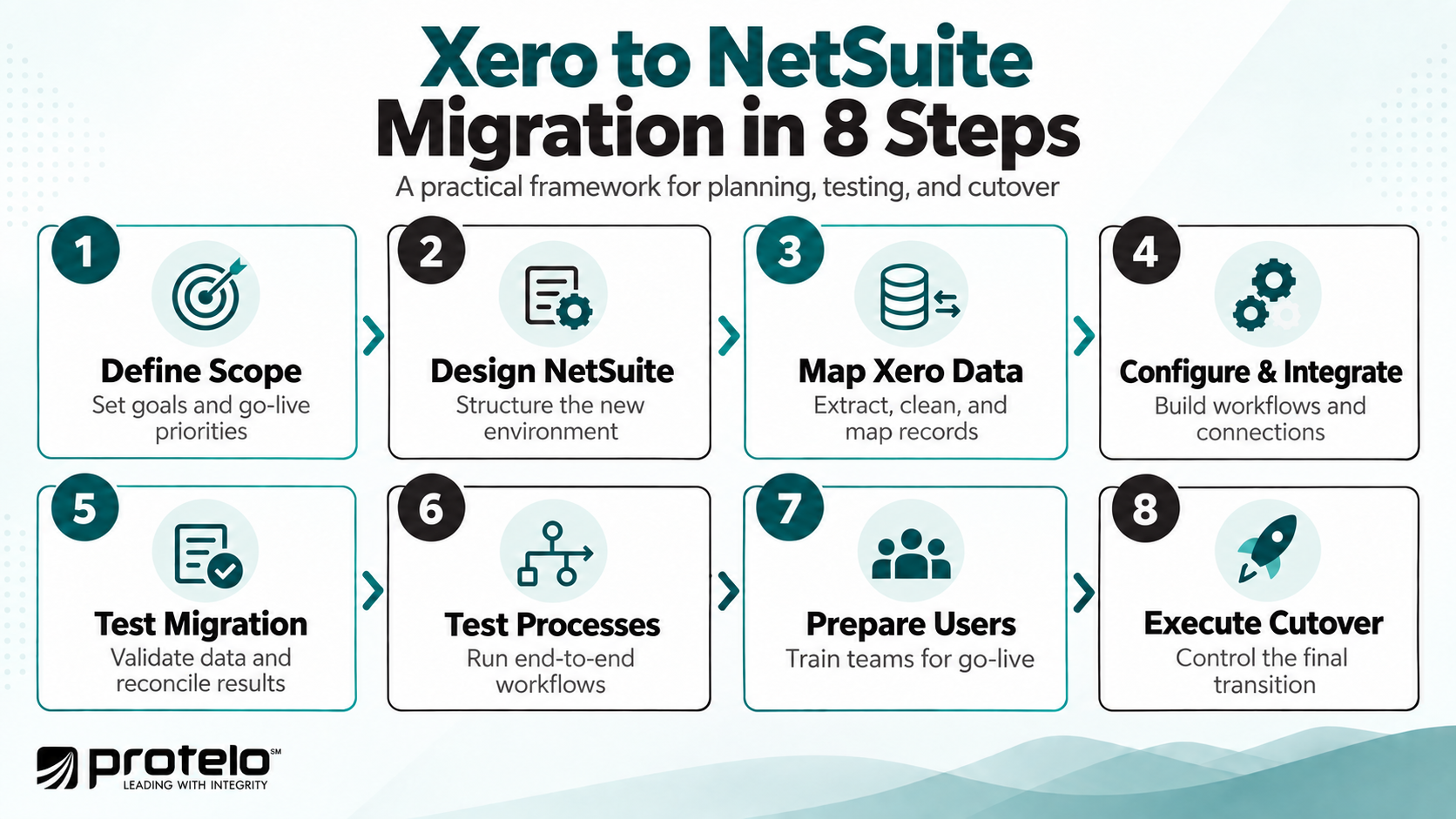
Step 1: Define the Migration Scope
Start by documenting what the business expects NetSuite to support at go-live. This includes finance and accounting, reporting requirements, entities, integrations, inventory management, approvals, and other operational processes.
The team should also decide which Xero data will move, how much history is required, and which connected applications will remain. Separate essential launch requirements from enhancements that can be handled later so the project stays focused.
Step 2: Design the NetSuite Environment
Before moving data, determine how the NetSuite instance will be structured. This may include the chart of accounts, subsidiaries, departments, locations, classes, customers, vendors, items, user roles, and approval workflows.
This stage is especially important because Xero and NetSuite organize some information differently. Decisions made here will affect data mapping, financial reporting, permissions, and how business performance is viewed after go-live.
Step 3: Extract, Clean, and Map the Xero Data
Export the Xero data included in the approved scope and review it before import. Depending on the business, this may include customers, suppliers, accounts, open invoices and bills, items, balances, and selected historical transactions.
Map each important Xero field to its destination in NetSuite and document any required transformations. Use this stage to remove duplicates, correct incomplete records, standardize naming, and leave behind information that no longer has operational or reporting value.
Step 4: Configure NetSuite and Build the Integrations
Configure NetSuite around the future-state processes approved during discovery rather than recreating the current Xero environment exactly. This may include accounting rules, reporting structures, workflows, user permissions, billing, inventory, and other operational requirements.
At the same time, build integrations for applications that will remain after the migration. For each connection, define which system owns the data, what information moves between systems, how often it moves, and how failed transactions will be identified and resolved. When existing applications need to remain connected after cutover, Protelo's NetSuite Integrations and Customizations services can support the design and implementation of the connections required between NetSuite and those systems.
Step 5: Run Test Migrations and Reconcile the Results
Do not wait until cutover to complete the first full migration from Xero to NetSuite. Run test migrations early enough to identify and correct mapping errors, missing records, incorrect balances, and other issues before cutover.
Finance and operational teams should compare NetSuite results against agreed Xero control totals, including general ledger balances, receivables, payables, inventory, and other relevant records. Any differences should be understood before the final migration is approved.
Step 6: Test End-to-End Business Processes
Once configuration, integrations, and representative data are available, test how users will actually work in NetSuite. This can include invoicing, vendor bills, customer payments, purchasing, inventory transactions, order fulfillment, intercompany activity, and financial reporting.
Testing should also cover exceptions such as credits, returns, failed integrations, and transaction corrections. These scenarios often expose workflow or configuration issues that standard transaction testing misses.
Step 7: Prepare Users for NetSuite
Implementing NetSuite changes how employees complete everyday work, so training should be based on actual roles and processes. Finance, operations, warehouse, management, and other users may each need different guidance.
Before go-live, users should know which processes are moving out of Xero, where they will perform their work in NetSuite, how approvals function, and where to find the reports or dashboards they need. The cutover schedule should also make clear when Xero stops being the production system and NetSuite becomes the new ERP environment.
For organizations that need structured role-based preparation before go-live, Protelo's NetSuite Training services can help finance, operations, warehouse, and management users learn the workflows they will use in the new system.
Step 8: Execute Cutover with Xero-Specific Controls
Cutover requires clear controls because Xero remains the accounting source until final transaction entry stops and the last data extract is completed. Set a firm cutoff date and time, reconcile key balances, account for bank feeds and automated imports, and review transactions entered close to the cutoff.
Integrations should stop writing to Xero at the appropriate point and begin operating with NetSuite only after the new environment is ready. Final Xero balances should be retained as reconciliation control totals so the team can confirm that the new NetSuite data is accurate before go-live.
Once NetSuite becomes the production system, restrict Xero access to prevent users from entering live transactions in both systems. Maintain the historical access needed for audit, tax, compliance, and reference purposes, then monitor balances, integrations, reporting, and user issues closely during the stabilization period.
Read More: How to Switch from Sage 500 to NetSuite
How Long Does a Xero to NetSuite Migration Take?
A Xero to NetSuite migration can take several months, but the timeline depends on how much of the business is moving into NetSuite. A finance-focused implementation with clean Xero data and limited integrations may move relatively quickly, while multi-entity accounting, inventory, complex billing, historical data, and connected applications add design and testing work.
For context, ERP Research’s September 2026 analysis of published ERP case studies found a four-month median implementation duration across 28 Oracle NetSuite projects that disclosed a timeline. Because the dataset is based on published vendor and partner case studies, the figure is best used as directional context rather than a typical or guaranteed implementation timeline.
Practical Xero to NetSuite Timeline Range
For early planning, some Xero to NetSuite projects may fall into ranges such as the following, depending on scope, data quality, integrations, and organizational complexity:
-
Illustrative 2–4 Month Range: Finance-focused migration with one or a small number of entities, relatively clean Xero data, limited integrations, and mostly standard NetSuite configuration.
-
Illustrative 4–6 Month Range: Broader implementation involving multiple entities, inventory, more complex reporting, several integrations, or greater data-migration requirements.
-
Illustrative 6+ Month Range: Projects involving substantial process redesign, multiple subsidiaries, advanced billing, complex inventory or order management, significant customization, or numerous business-critical integrations.
These ranges are illustrative planning estimates, not published Xero-specific benchmarks or guaranteed implementation timelines. The actual schedule should be established during discovery because two companies using Xero can have very different migration requirements.
Typical Xero to NetSuite Migration Phases
Most migration schedules can be organized into five overlapping phases:
These phases frequently overlap. Data cleanup can continue while NetSuite is being configured, for example, and integration testing may begin before every report is finalized. The schedule should reflect those dependencies rather than treating each phase as a separate block of time.
What Can Extend the Migration Timeline?
-
Data Condition and History. Clean customer, supplier, account, and transaction data is easier to migrate and reconcile. Moving several years of detailed Xero history also requires more work than migrating open transactions, opening balances, and selected comparative data.
-
Implementation Scope. A project centered on finance and accounting has fewer dependencies than one that also includes inventory management, order processing, multiple subsidiaries, billing, or other business operations.
-
Integrations. Applications currently connected to Xero may need to be replaced, redirected, or integrated with the new NetSuite instance. Each connection adds design, testing, and cutover dependencies.
-
Decision-Making and Resource Availability. Finance, operations, and IT teams need time to approve designs, validate data, complete testing, and reconcile results. Delayed decisions can hold up several downstream activities at once.
For planning purposes, companies should establish the migration schedule after discovery rather than selecting a go-live date first and forcing the project into it. A realistic plan leaves enough time for at least one test migration, reconciliation, end-to-end testing, user preparation, and a controlled Xero cutover.
Read Next: NetSuite Implementation Timeline & Milestones: From Planning to Go-Live
Common Xero to NetSuite Migration Risks
Most migration problems are not caused by the data transfer itself. They usually come from unclear scope, poor data quality, weak process design, incomplete testing, or decisions that are made too late in the project. Addressing these risks early can make the move from Xero to NetSuite far more predictable.
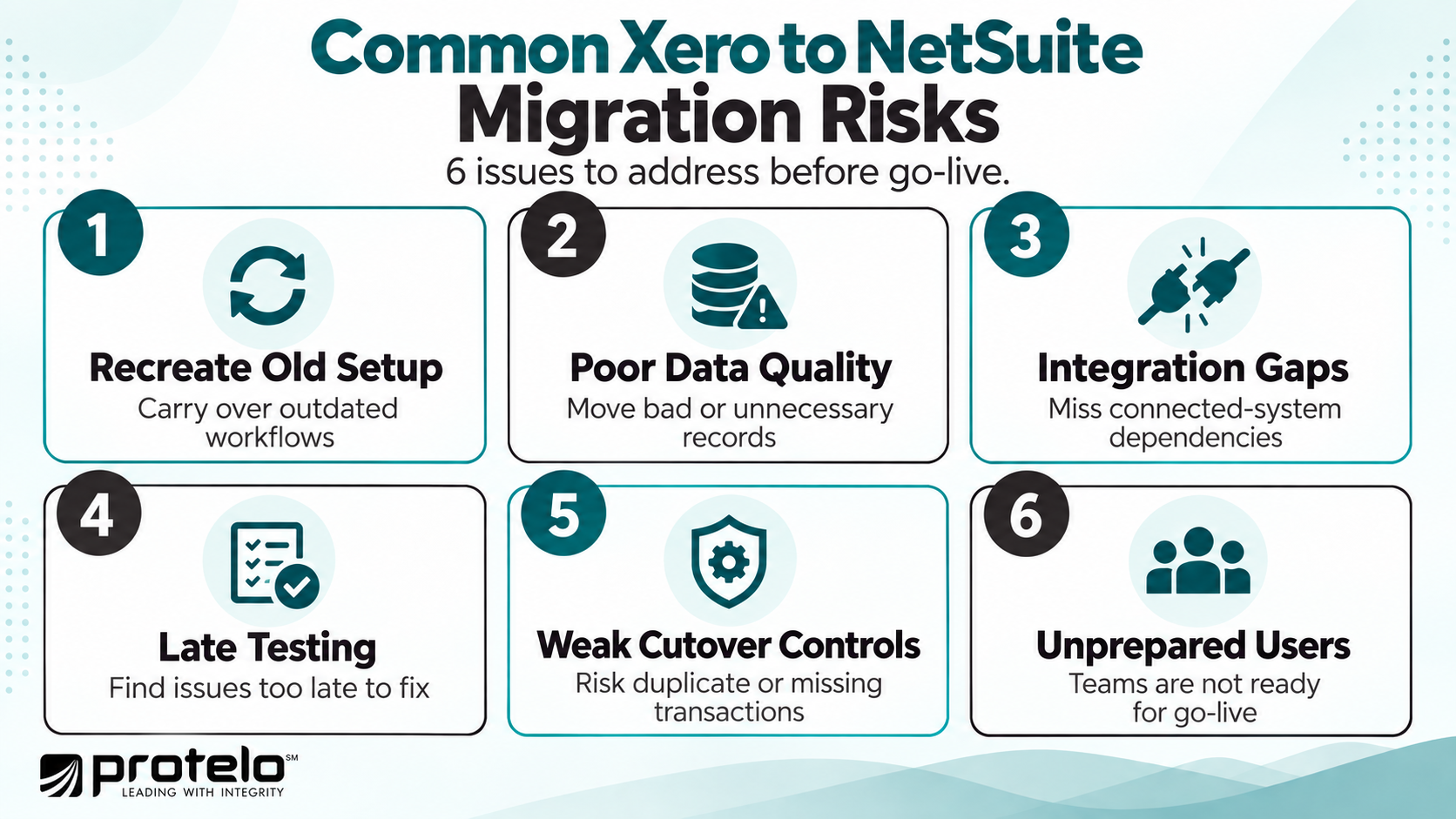
1. Recreating the Existing Xero Setup Too Closely
A common mistake is treating NetSuite as a larger version of the current accounting system and rebuilding existing processes without reassessing whether they still make sense.
Some Xero-era workflows may exist because teams needed spreadsheets, third-party applications, or manual workarounds to complete the process. Reproducing those same steps in NetSuite can preserve unnecessary complexity. Before configuration begins, identify which processes should remain, which should change, and which can be eliminated.
2. Migrating Poor-Quality or Unnecessary Data
Duplicate customers, inactive suppliers, outdated accounts, inconsistent item records, and unreconciled balances can create problems as soon as users begin working in NetSuite.
Historical data can create a different risk. Moving more Xero history than the business actually needs increases mapping, testing, and reconciliation work without necessarily improving reporting or operations. Set clear migration rules before extraction and assign owners to validate each major data set.
3. Underestimating Integration Dependencies
A Xero environment may depend on ecommerce, payroll, CRM, payment, expense, tax, or industry-specific applications that continue to exchange data in the background.
If those dependencies are discovered late, they can delay testing and cutover. Each integration should be identified during discovery, with clear decisions about whether it will be replaced, rebuilt, or connected to NetSuite.
4. Leaving Testing Until Too Late
A migration can appear successful when records import correctly even though important business processes still fail in practice.
Testing should cover complete workflows using migrated data, including invoices, payments, vendor bills, inventory activity, approvals, reporting, and any relevant integrations. Exceptions such as credits, returns, failed transactions, and corrections should also be tested before go-live.
5. Weaker Cutover and Integration Controls
The final transition from Xero to NetSuite creates a period where even small timing issues can produce duplicate or missing transactions.
A clear cutoff is needed for Xero entry, bank feeds, integrations, payments, invoices, and other activity. Final Xero control totals should then be reconciled against NetSuite before the new system is treated as the accounting source.
6. Insufficient User Preparation
Users may understand Xero well but still struggle with a new NetSuite workflow, approval process, role, or reporting structure.
Training should focus on how people will complete their actual responsibilities after migration. Finance and operational teams should also know how to handle common exceptions and where to escalate problems during the first weeks after go-live.
Practical Migration Risk Checklist
A successful migration from Xero depends on controlling these risks throughout the project rather than addressing them only during cutover. The earlier the team identifies data, process, integration, and adoption issues, the more time it has to resolve them before they affect the launch.
What Should Success Look Like After a Xero to NetSuite Migration?
A successful Xero to NetSuite migration should improve how the business operates after go-live by addressing the processes, data, and controls that created problems in the previous environment. The clearest signs of success are improvements in reporting, reconciliation, process consistency, and the amount of manual work required across finance and operations.
-
Less Manual Reconciliation and Spreadsheet Work: Finance teams should spend less time exporting data, combining spreadsheets, and reconciling information from multiple sources. Some manual work may remain, but the migration should reduce the effort required to produce reliable financial and management information.
-
More Consistent Financial and Operational Data: Customers, vendors, items, transactions, and reporting structures should follow clearer standards in NetSuite. This is especially important when several departments or entities previously maintained different versions of the same information.
-
Better Reporting and Visibility: Finance and management should be able to access the information they need without rebuilding recurring reports manually. Depending on the implementation, this may include financial reporting by entity, department, location, product line, or other dimensions established during system design.
-
Stronger Process Control: Approvals, user permissions, billing workflows, purchasing processes, and other business activities should operate more consistently after migration. Users should understand where transactions are in the process, who is responsible for the next action, and how exceptions are handled.
-
Greater Capacity for Business Complexity: The NetSuite environment should be able to support planned growth in areas such as additional entities, locations, inventory, integrations, users, or transaction volume without requiring another major system redesign.
Measurable Post-Go-Live Success Criteria
Success measures should be defined before implementation so the business can compare results against its pre-migration baseline.
The measures should reflect the problems that originally drove the migration. If month-end close required too much manual work in Xero, track close time after go-live. If disconnected inventory and accounting data created reconciliation issues, measure how much manual correction remains after the move.
A successful migration is easier to demonstrate when post-go-live performance can be compared against a clear baseline established before the project began.
Plan Your Xero to NetSuite Migration Around Business Requirements
A successful Xero to NetSuite migration depends on the decisions made before cutover. Companies need to define what should move, how NetSuite should be structured, which processes should change, how integrations will work, and what users need to do differently after go-live.
The project should also establish clear measures for success. That may mean a faster close, fewer manual reconciliations, more reliable reporting, better control over inventory or entities, and less dependence on spreadsheets and disconnected systems.
For companies that need help planning or implementing the move, an experienced NetSuite partner can support discovery, system design, data migration, integrations, testing, training, cutover, and post-go-live stabilization.
Frequently Asked Questions About Migrating From Xero to NetSuite
What accounting data should be moved when migrating to NetSuite?
A Xero to NetSuite migration typically includes the accounting data needed to operate accurately after go-live, such as customers, suppliers, accounts, open invoices and bills, balances, and selected historical transactions. The exact scope depends on reporting, audit, compliance, and operational requirements, so not every record in Xero needs to move into the new NetSuite instance. For many companies, the better approach is to migrate useful data while archiving older information that no longer needs to exist inside the ERP.
Can Xero and NetSuite be used at the same time during migration?
Yes. Xero and NetSuite may both remain active during testing and migration preparation, but the business should establish a clear cutoff before go-live. Once NetSuite becomes the production accounting solution, controls should prevent users, bank feeds, or integrations from creating live transactions in both systems. Running both indefinitely can create duplicate records, reconciliation problems, and uncertainty over which system contains the authoritative financial data.
What should growing businesses evaluate before migrating from accounting software to NetSuite?
Growing businesses may consider an ERP when finance and accounting requirements begin extending into multiple entities, inventory management, billing, operational reporting, integrations, and workflow automation. Xero offers accounting capabilities that can work well for businesses with relatively straightforward requirements, while NetSuite provides a broader environment for companies that need to unify more financial and operational processes. The decision should be based on business complexity rather than company size alone.
If your team is still validating the ERP decision before committing to migration, compare the available options in Protelo’s Top 14 NetSuite Competitors for ERP Buyers in 2026.
What automation opportunities should be evaluated when implementing NetSuite?
Migrating to NetSuite provides an opportunity to review manual approvals, recurring transactions, data entry, reporting, billing, and other business processes that may benefit from automation. NetSuite supports configurable workflows and automation capabilities, but those tools should be applied to processes that are already well-defined. Automating a poorly designed workflow can make errors harder to identify and correct.
What should happen after a successful migration to NetSuite?
After go-live, the focus shifts to stabilization, reconciliation, user support, and monitoring integrations, reporting, and business performance. A successful migration to NetSuite should give users reliable data, functioning workflows, and clearer access to the financial and operational information they need. Over time, the company can refine dashboards, streamline additional processes, and use NetSuite data to support more consistent decision-making as the business grows.