

17 min read

If you're comparing NetSuite vs. Sage 100, you're probably trying to determine whether your ERP can support the next stage of your business. Many distributors start evaluating NetSuite after opening additional warehouses, expanding into ecommerce, increasing inventory, or adding software to handle reporting, shipping, CRM, or warehouse management.
These changes don't usually happen all at once. A distributor adds another location, implements a shipping platform, connects an ecommerce storefront, or introduces warehouse software. Over time, employees begin working across several systems to complete tasks that once happened inside the ERP. Reporting takes longer, inventory data lives in multiple places, and maintaining integrations becomes part of day-to-day operations.
According to IDC's 2025 Future Enterprise Resiliency and Spending Survey, 32% of organizations say deploying AI-ready digital infrastructure is their top modernization priority, while 24% plan to move more workloads to the public cloud. For many distributors, reviewing their ERP is part of that broader effort to simplify operations and support future growth.
This guide explains where Sage 100 continues to fit, the operational signs that often lead distributors to evaluate NetSuite, and the planning considerations that can help make an ERP migration successful.
Why Distributors Are Moving Away from Sage 100
Sage 100 continues to support many distributors effectively. Companies often begin evaluating alternatives after the business adds warehouses, sales channels, product lines, or supporting applications that were not part of the original ERP environment.
A distributor may add ecommerce, warehouse management, CRM, shipping, or reporting software as new requirements emerge. Each system can solve a legitimate problem, but the overall environment becomes harder to manage when product, customer, order, and inventory data must move between several applications.
This is a common issue across the industry. Distribution Strategy Group’s 2026 research found that 55% of North American wholesale distributors had invested in core technology systems without fully integrating them. The result is often delayed inventory information, duplicate data, manual reconciliation, and more time spent maintaining connections between systems.
For some distributors, that complexity becomes the reason to evaluate a unified cloud ERP. The objective is to reduce the number of systems involved in routine processes and give finance, sales, purchasing, and warehouse teams access to the same operational data.
Read More: NetSuite vs. Sage Intacct: Comparison Guide
What NetSuite Changes for Distribution Companies
NetSuite gives distributors a single system for managing financials, inventory, purchasing, sales orders, and customer information. That shared data structure can reduce the reconciliation work that develops when each department relies on a different application.
For example, a sales representative can review available inventory before confirming an order, purchasing can see demand across locations, and finance can report on the transaction without waiting for data to be transferred from another system. The practical benefit is fewer handoffs between applications and less uncertainty about which report contains the most current information.
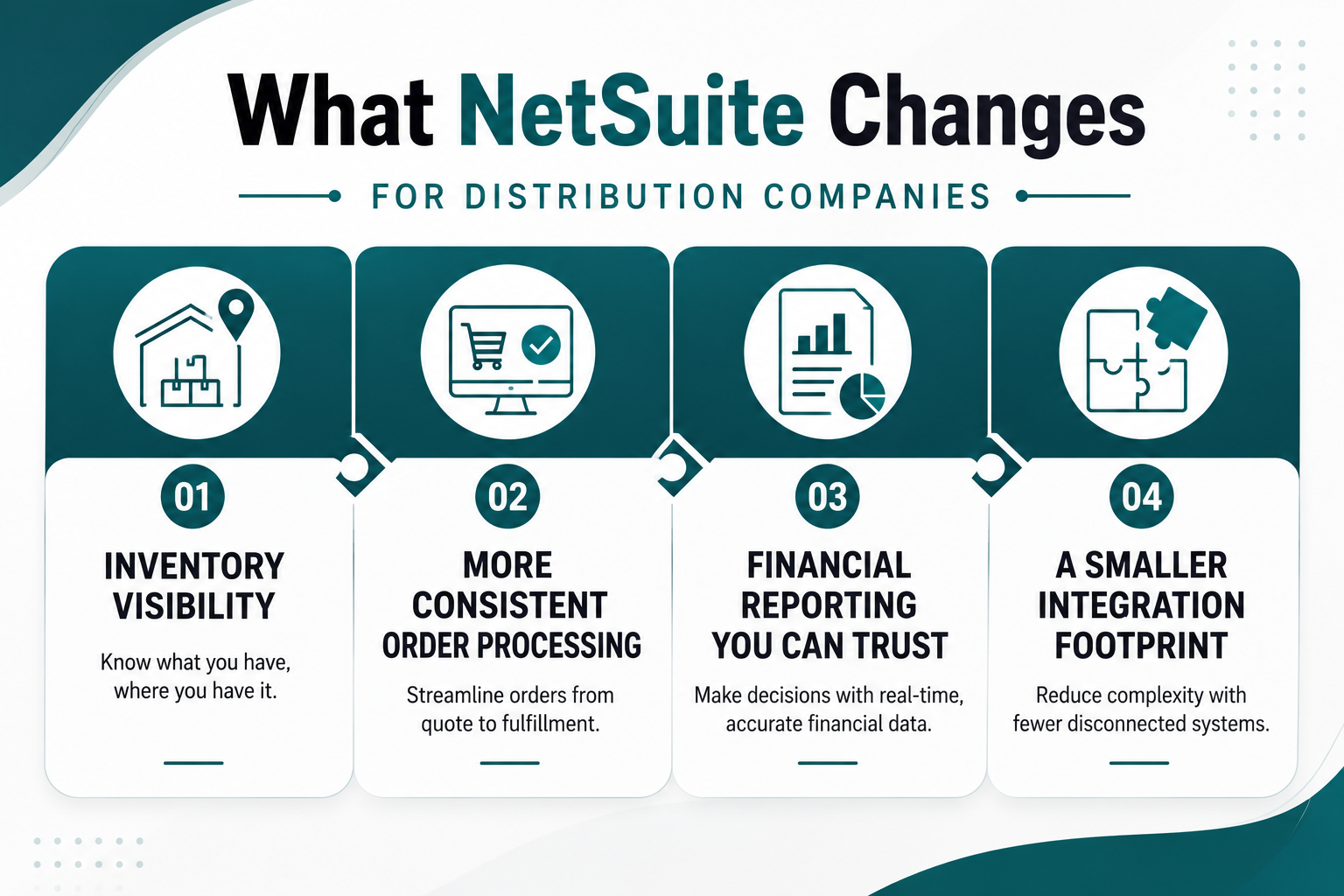
Inventory Visibility Across Locations
Distributors with multiple warehouses need more than a company-wide inventory total. They need to know which location holds an item, how much is committed to open orders, what is expected from suppliers, and whether stock should be transferred between facilities.
NetSuite can provide that information within the same system used for order management and purchasing. This helps teams make allocation and replenishment decisions using current transaction data rather than spreadsheets or reports assembled from several sources.
Better visibility does not eliminate inventory problems on its own. Item records, units of measure, warehouse processes, and replenishment rules still need to be configured correctly. A migration provides an opportunity to standardize those practices before they are carried into the new ERP.
Read Next: QuickBooks and Fishbowl to NetSuite: Why Distributors Choose NetSuite
More Consistent Order Processing
Order processing becomes harder to manage when pricing, inventory, fulfillment, and customer information are maintained in separate systems. Employees may need to verify stock in one application, confirm pricing in another, and then monitor fulfillment through a warehouse or shipping platform.
NetSuite can bring more of that process into one workflow. Sales orders, inventory commitments, fulfillment activity, invoices, and customer records remain connected as the transaction moves through the business.
This can reduce manual data entry and make order status easier to track. It also gives customer service teams better information when responding to questions about availability, backorders, shipments, or invoices.
Financial Reporting Based on Operational Data
Finance teams often feel the effects of disconnected systems during month-end close. Inventory adjustments, sales activity, freight costs, and warehouse transactions may need to be imported or reconciled before reports can be completed.
Because NetSuite records financial and operational transactions in the same environment, finance teams can report from a common set of data. Distributors with multiple entities can also manage consolidations, intercompany activity, and location-level reporting without maintaining separate accounting files.
The reporting structure still requires planning. Accounts, departments, classes, locations, and other reporting dimensions should reflect how management reviews the business. Poorly designed reporting structures can reproduce many of the same spreadsheet dependencies that existed before migration.
Read More: NetSuite Beginner's Guide for 2026
A Smaller Integration Footprint
Moving to NetSuite does not mean every third-party application should be removed. Specialized warehouse automation, ecommerce, tax, shipping, or industry-specific systems may still provide capabilities the business needs.
The opportunity is to review each application and determine whether it still serves a necessary purpose. Some systems can be replaced by native NetSuite functionality. Others should remain integrated because they support a specialized process better than the ERP.
Reducing unnecessary integrations lowers the number of connections that must be monitored, tested, and repaired after software updates. It can also reduce duplicate records and clarify which system owns customer, item, pricing, and inventory data.
Systems Commonly Replaced During a Sage 100 to NetSuite Migration
Every migration is different. Some distributors replace only Sage 100, while others use the project to simplify a broader collection of business applications.
The objective isn't to eliminate every third-party system. It's to determine which applications still provide unique value and which exist because they filled gaps in the previous ERP. Many distributors discover they can reduce the number of systems they maintain while keeping specialized software where it continues to support the business.
When evaluating your technology stack, these are the areas most commonly reviewed:
-
Warehouse Management (WMS): Distributors using a standalone warehouse management system should evaluate whether NetSuite WMS can support receiving, putaway, picking, packing, cycle counting, transfers, and mobile warehouse operations. Companies with advanced automation or highly specialized warehouse workflows may still benefit from a dedicated WMS.
-
Customer Relationship Management (CRM): Many Sage 100 environments rely on a separate CRM for managing customer interactions, sales opportunities, and quotes. NetSuite includes native CRM capabilities, allowing sales, finance, and operations teams to work from the same customer record while reducing duplicate data entry.
-
Reporting and Business Intelligence: Manual spreadsheets and reporting tools often become necessary as data is spread across multiple systems. NetSuite's dashboards, saved searches, and reporting capabilities can replace many manual reporting processes, while organizations with advanced analytics requirements may continue using a dedicated BI platform.
-
Ecommerce: Many distributors connect Sage 100 to ecommerce platforms through custom integrations. During a migration, it's worth evaluating whether to continue using the existing storefront, adopt SuiteCommerce, or integrate NetSuite with platforms such as Shopify, Adobe Commerce (Magento), or BigCommerce.
-
Shipping, Tax, and Industry Applications: Shipping software, tax automation, EDI, product information management (PIM), and industry-specific applications often continue to provide specialized functionality after migration. The goal is to eliminate unnecessary overlap while keeping systems that support essential business processes.
A migration is also an opportunity to review the broader application landscape. Many distributors retire redundant software, simplify integrations, and establish a clearer source of truth for operational and financial data. At the same time, specialized applications that provide measurable business value can remain an important part of the technology stack.
Read Next: NetSuite Beginner's Guide for 2026
What Growing Distributors Should Consider Before Migrating
A Sage 100 to NetSuite migration should begin with business requirements rather than software features. The goal is to understand how the business operates today, where current processes create unnecessary work, and what the organization expects from its next ERP. Time spent planning before implementation often reduces rework later in the project.
The planning areas above often determine how smoothly an ERP implementation progresses. The following sections explain each consideration in more detail.
If you're beginning to plan a migration, Protelo's NetSuite Implementation Guide explains what to expect during each phase of implementation, including discovery, data migration, testing, user training, and go-live preparation.
Define What Success Looks Like
Before discussing implementation timelines or selecting NetSuite modules, define what the project should accomplish.
For one distributor, success may mean reducing the month-end close from ten days to five. Another may prioritize inventory visibility across multiple warehouses, faster order fulfillment, or eliminating manual data entry between ecommerce and accounting.
Establishing measurable objectives gives the implementation team a clear direction and makes it easier to evaluate whether the project delivered the expected business outcomes after go-live.
Evaluate Existing Business Processes
A migration provides an opportunity to examine how work is completed across purchasing, inventory management, warehouse operations, sales, customer service, and finance.
Many distributors have developed workarounds over several years. Some are the result of business growth, while others were introduced to compensate for system limitations. Employees may maintain spreadsheets alongside the ERP, manually reconcile inventory between systems, or re-enter the same information into multiple applications.
Not every existing process should be carried into the new system. Reviewing workflows before implementation helps identify opportunities to simplify operations rather than recreating the same inefficiencies in NetSuite.
Review Customizations and Integrations
Many Sage 100 environments include custom reports, scripts, third-party extensions, or integrations that have accumulated over time.
Each customization should be evaluated individually. Some may support a critical business process and should be recreated or replaced with native NetSuite functionality. Others may no longer be necessary because the business has changed or because NetSuite provides similar capabilities out of the box.
Taking inventory of these customizations early helps define project scope, reduce implementation risk, and avoid unexpected development work later in the project.
Clean Your Data Before Migration
Data migration is often one of the most time-consuming phases of an ERP implementation because every record should be reviewed before it becomes part of the new system.
Customer and vendor records, inventory items, pricing, bills of material, charts of accounts, and open transactions should all be evaluated for accuracy and consistency. Duplicate customers, inactive inventory items, inconsistent naming conventions, and outdated supplier information are common issues that can affect reporting and user adoption after go-live.
Many distributors use the migration project as an opportunity to improve data quality rather than simply transferring existing records into NetSuite.
Identify Required Integrations
Few distributors operate entirely within a single application. Shipping software, ecommerce platforms, EDI providers, payroll systems, tax engines, warehouse automation, and customer portals often remain important parts of the technology landscape after migration.
Each integration should have a clearly defined purpose. Determine which system owns the data, how information will move between applications, and how those integrations will be monitored and maintained after implementation. Planning integrations early reduces surprises during testing and helps ensure critical business processes continue without interruption after go-live.
If your organization relies on ecommerce platforms, shipping software, EDI, or other third-party applications, reviewing your NetSuite Integrations and Customizations options early can help define the appropriate integration strategy before implementation begins.
Prepare Employees for Change
An ERP implementation changes more than software. It changes how people perform their daily work.
Warehouse teams may adopt new receiving or picking procedures. Sales representatives may enter quotes and orders differently. Finance teams may approve transactions through new workflows or rely on different reporting structures during month-end close.
Involving department leaders throughout the implementation gives employees an opportunity to validate new processes before go-live. Training should focus on the tasks each team performs every day rather than demonstrating every feature available in the system.
Choose the Right Implementation Approach
Technology alone does not determine whether an ERP project succeeds.
Implementation planning affects data quality, user adoption, reporting, testing, and the overall pace of the project. Distributors should evaluate how the implementation partner approaches discovery, process design, data migration, testing, training, and post-go-live support.
The most successful implementations begin with a thorough understanding of the business rather than a predefined implementation template. An implementation partner that understands distribution workflows can help configure NetSuite around the way the business operates while identifying opportunities to simplify processes that have become unnecessarily complex.
Businesses evaluating implementation partners can also review Protelo's NetSuite Implementation Services to better understand the implementation methodology, project phases, and support available throughout the migration process.
Read More: Guide for a Successful ERP Software Implementation
When Has a Distributor Truly Outgrown Sage 100?
Most distributors don't replace Sage 100 because of one missing feature. The decision usually comes after several operational challenges begin affecting day-to-day performance. Looking at those challenges together often provides a clearer picture than evaluating them individually.

Operational Complexity Continues to Increase
As distributors add warehouses, sales channels, product lines, or legal entities, the business becomes more interconnected. Purchasing, inventory, warehouse operations, finance, and customer service all rely on timely, accurate information.
If employees regularly switch between systems, reconcile inventory manually, or rely on spreadsheets to complete routine work, the ERP may no longer support the level of coordination the business requires.
Reporting Takes More Effort Than It Should
Reporting should help management make decisions, not require hours of manual preparation.
When finance teams combine spreadsheets from multiple systems, reconcile conflicting reports, or wait for operational data before closing the books, leadership receives information later than it needs it. That can delay purchasing decisions, inventory planning, and financial analysis.
Growth Adds Work Instead of Capacity
Adding a warehouse, launching ecommerce, or acquiring another distributor should strengthen the business.
If every growth initiative introduces another integration, another spreadsheet, or another manual process, employees spend more time managing complexity than supporting customers or improving operations. Over time, those workarounds become difficult to maintain.
The Technology Environment Has Become Difficult to Manage
Many Sage 100 environments have evolved over years through customizations, third-party applications, and integrations. Each solution may have addressed a specific need, but together they can increase maintenance and make future changes more difficult.
Reviewing the technology stack often reveals opportunities to simplify processes, retire redundant software, and reduce ongoing administrative effort.
Ultimately, deciding whether to move from Sage 100 depends on how well the ERP supports the business today and where the company expects to grow next. For many distributors, the decision comes when maintaining the existing environment requires more effort than investing in a platform designed to support the next stage of the business.
Read More: Guide for a Successful ERP Software Implementation
Is NetSuite the Right Next Step for Your Distribution Business?
Moving from Sage 100 to NetSuite is a significant decision. Before making that investment, it's worth evaluating how your current ERP supports inventory management, financial reporting, order processing, and future growth. That assessment provides a stronger foundation for an ERP decision than comparing feature lists alone.
Key Takeaways
-
Focus on operational fit. Review the processes your teams use every day and identify where manual work, reporting delays, or disconnected systems are affecting efficiency.
-
Treat migration as a business initiative. Successful ERP projects begin with well-defined processes, clean data, realistic project goals, and a clear implementation plan.
-
Plan for the future. Consider how your ERP will support additional warehouses, new sales channels, acquisitions, or increased transaction volumes as your business grows.
If you've decided NetSuite is the right fit, learn more about Protelo's NetSuite Implementation approach and how we guide distributors through planning, data migration, configuration, testing, training, and post-go-live support. Our team has extensive experience implementing NetSuite for distribution companies, helping businesses reduce implementation risk and build a solution that supports the way they operate.
Ready to explore your options? Schedule a Consultation with Protelo to learn how our NetSuite Implementation Services can help your distribution business make a successful transition from Sage 100 to NetSuite.
Frequently Asked Questions
Is NetSuite better than Sage 100 for wholesale distributors?
There isn't a single answer for every business. Sage 100 remains a capable ERP for many wholesale distributors with stable operations and relatively straightforward requirements. Oracle NetSuite is often evaluated when companies need stronger multi-location inventory management, consolidated financial management, or a cloud ERP that supports continued growth across multiple entities or sales channels. The right choice depends on how well the ERP supports your day-to-day operations and long-term business plans.
What's the difference between NetSuite and Sage 100?
One of the biggest differences is deployment. Sage 100 is traditionally an on-premise ERP, although hosted options are available, while Oracle NetSuite is a cloud-native ERP designed to be accessed through a web browser. NetSuite also combines financials, inventory, CRM, purchasing, and other business functions in a single ERP software platform, reducing the need for separate applications in many environments.
How long does a Sage 100 to NetSuite implementation take?
Implementation timelines vary based on the size of the business, the number of users, required modules, data quality, and integrations. A distributor with multiple warehouses, custom workflows, or third-party systems will typically require more planning than a straightforward deployment. Working with an experienced NetSuite implementation partner helps establish a realistic project plan and identify potential challenges before implementation begins.
Read More: Top 3 Implementation Mistakes (And How to Avoid Them in NetSuite)
Can NetSuite integrate with existing business applications?
Yes. Many distributors continue using specialized warehouse automation, ecommerce platforms, shipping software, EDI providers, or other industry applications after moving to NetSuite. These systems can often connect through APIs, middleware, or other integration tools. During implementation, it's important to determine which applications should remain part of the ERP environment and which can be retired.
Should I compare NetSuite with other ERP solutions besides Sage 100?
Yes. Many organizations evaluating NetSuite also research Sage Intacct, Sage X3, Microsoft Dynamics 365, Acumatica, and other ERP solutions. ERP comparisons should focus on your operational requirements, reporting needs, inventory processes, and future growth plans rather than feature checklists alone. Talking with implementation partners who understand distribution can also provide practical insight into which ERP software best fits your business.