

12 min read

As a NetSuite user, you already know how powerful your system can be, but sometimes it’s tough to determine if you’re using everything to its full potential.
With so many features and modules available, it’s easy to wonder: “Am I missing out on something that could improve my operations?” That’s exactly why we’re launching this comparison series—to help you navigate the many options in NetSuite and figure out whether you need to explore add-ons or if the native functionality is enough to support your business needs.
In today’s post, we’ll break down the native functionality of SuiteProjects vs. Project Management, as well as NetSuite Analytics Warehouse vs. SuiteAnalytics Connect, so you can better understand what’s included in your current package and when it might be time to consider additional modules.
Projects in NetSuite:
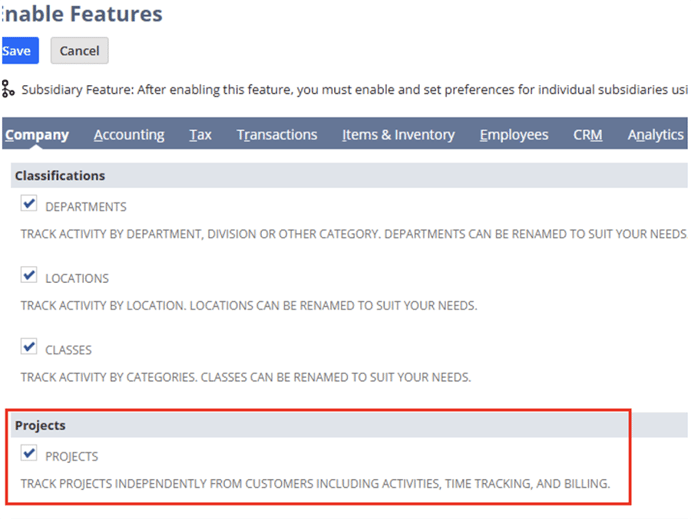
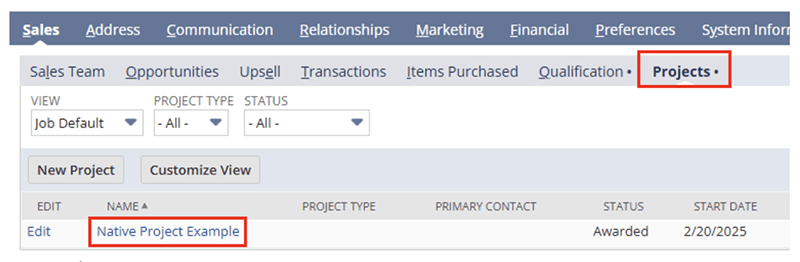
1. Projects (Native Functionality):
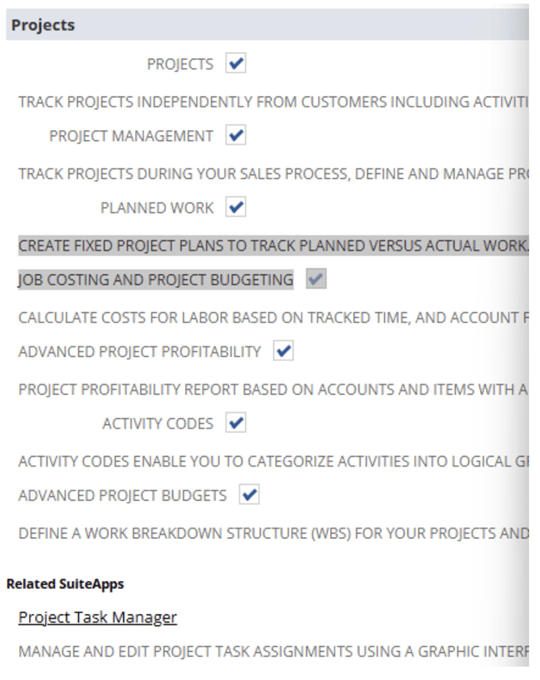
Track projects independently from customers including activities, time tracking, and billing. Track projects for customers. A project is a sub-record of a customer record that shows costs and revenues for a particular project.
2. Project Management Cloud Service:
- Estimated Costing
- Project Time Tracking
- Project Task Management
- Utilization & Backlog Reporting
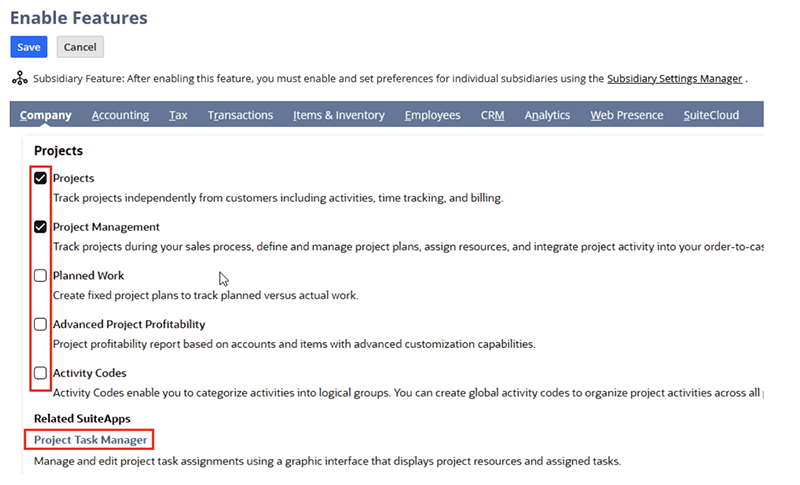
NetSuite Project Management Overview
3. NetSuite SuiteProjects Cloud Service
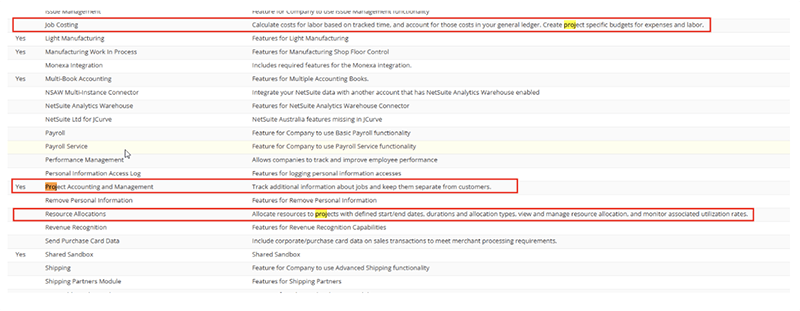
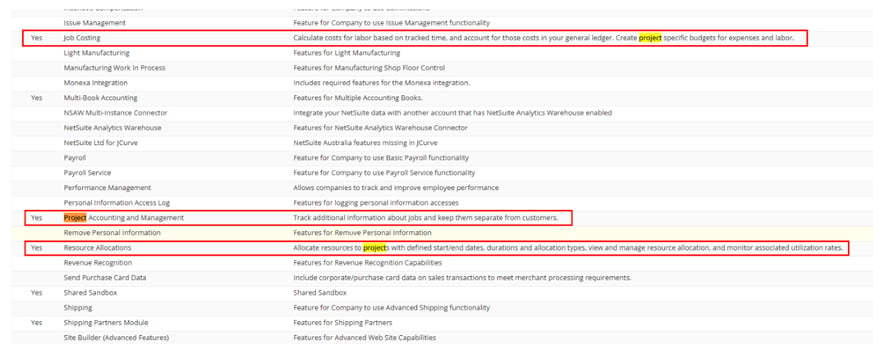
- Manage project schedules with phases, tasks, and milestones, including the ability to: track time to project tasks; create and maintain project templates; configure and report on project profitability; and automate project billing with billing types such as charge-based billing and milestone billing.
- Customize and automate Customer’s customer billing process with advanced billing schedules.
- Allocate resources to projects with defined start/end dates, track resource skill sets, and monitor availability on the resource allocation chart.
- Create project specific budgets for cost and revenue by activity code.
- Calculate costs for labor based on tracked time and account for these costs in the general ledger.
Learn More About NetSuite SuiteProjects
Analytics within NetSuite:
In NetSuite, the primary difference between analytics tools lies in their level of complexity and data integration capabilities, with "SuiteAnalytics" being the built-in reporting tool offering basic analysis within NetSuite, while "NetSuite Analytics Warehouse (NSAW)" is a more advanced add-on that allows for combining data from multiple sources, including external data, for deeper insights and complex analysis.
Key points about NetSuite analytics tools:
SuiteAnalytics Workbook:Pricing plans allow your business to define pricing according to different pricing models:

- Basic functionality: Comes pre-built within NetSuite, providing easy access to standard reports and dashboards directly from the platform.
- Data source: Primarily analyzes data stored within NetSuite.
- User level: Suitable for most users within the organization who need to quickly access basic performance metrics and insights.
- Advanced analytics: Enables pulling data from multiple sources (including external data like Salesforce, Google Analytics) to create comprehensive reports and analysis.
- Data integration: Offers robust data consolidation capabilities, allowing for complex data manipulation and analysis across various systems.
1. Analytics Workbook (Native Functionality):
SuiteAnalytics Workbook is an analytical tool available in NetSuite. With SuiteAnalytics Workbook, you can create customized workbooks that combine datasets, tables, pivot tables, and charts using a single tool that leverages the new analytics data source. The analytics data source is designed to ensure that fields are consistently exposed in Workbook, with consistent results across all workbook visualizations.
Additionally, support for multilevel joins has been added to Workbook, enabling you to author workbooks and datasets using field data from multiple record types, including custom records. Custom formula fields are also supported in Workbook, so you can create and add fields with dynamically calculated values to your workbooks. Finally, you can also link datasets in Workbook, enabling you to compare metrics from different datasets in one workbook visualization.
The SuiteAnalytics Workbook user interface has been designed so that even users with limited knowledge of record schemas and query language can still create complex workbooks and datasets through actions such as drag-and-drop editing. When you create a workbook or workbook visualization, you can base it on any dataset that you have access to in your account. You can also connect multiple datasets to the same workbook, enabling you to analyze different metrics without switching browser tabs or workbooks. When you connect multiple datasets to a workbook, you can then link them to analyze their metrics in a pivot table or chart.
Note: You currently cannot edit how datasets are linked using the Workbook user interface, but you can use linked datasets to create new workbook visualizations. For more information, see Dataset Linking in SuiteAnalytics Workbook.
The Workbook user interface makes it ideal for ad hoc diagnostic analysis, with options for instant formula validation, data refresh, and drilling down through query results. A range of customization options have also been added to the interface to enable rich formatting, filtering, and visualizations of your data.
The latest iteration of SuiteAnalytics Workbook enables you to create workbooks and datasets for a variety of record types. You can also use analytical record types created specifically for Workbook, such as the sales (invoiced) record type.
2. SuiteAnalytics Connect SAC:
NetSuite SuiteAnalytics Connect provides real-time Saved Searches, Reporting, Key Performance Indicators (KPIs) Dashboard and Workbook features that are built into the NetSuite solution. Clients have been using this product through an ODBC connection to Excel.
3. NetSuite Analytics Warehouse (NSAW):
With NetSuite Analytics Warehouse, you can broaden the analyses of your NetSuite data beyond what is currently available in SuiteAnalytics Workbook. The Analytics Warehouse enables businesses to analyze historical data from multiple sources and determine how to improve their business. When enabled, you can begin transferring your data to the Analytics Warehouse. You can then blend your NetSuite data with data from other sources, and analyze it with a wide set of visualizations.
NetSuite Analytics Warehouse is the only pre-built analytics platform and data warehouse built to work with NetSuite. Leveraging the Oracle Analytics Cloud, a machine learning-powered analytical tool, and Oracle Autonomous Data Warehouse, a data warehouse that automatically tunes, scales, provisions and patches itself, NetSuite Analytics Warehouse brings together multiple sources of data, including NetSuite data, CSV files and other business system data, to discover patterns and insights that unlock new opportunities to drive growth. Also BI tool.
NetSuite Add-On Modules Guide 2025
Are you interested in learning more about a specific NetSuite module?
Get On-Demand NetSuite Assistance Today!
Protelo’s certified NetSuite experts are here to help with seamless configuration and support. With decades of experience, we provide hassle-free guidance to customize, integrate, and enhance your operations. Contact us today to schedule a consultation and see how we can transform your business!
Protelo’s experts can help with NetSuite projects such as:
- NetSuite Customizations, Development, and Integrations
- NetSuite Reporting, Analytics and Saved Searches
- NetSuite Business Process Optimization
- NetSuite Performance Optimization
- NetSuite Training & ACS Alternatives