

8 min read


Looking for ways to make your finance team’s work a little easier?
NetSuite offers AI-powered features that can help flag unusual transactions, manage the financial close, and predict when customers are likely to pay, without additional feature licensing costs for eligible functionality.
In this guide, we’ll explore three features worth knowing about: Exception Management, Intelligent Close Manager, and Payment Date Prediction. You’ll learn what each feature does, how to enable it, where to find it in NetSuite, and how your finance team can put it to work.
NetSuite AI Finance Features:
Setup Guide & Use Cases
1. Payment Prediction
Introduced: NetSuite 2026.1
What Is Payment Date Prediction?
Payment Date Prediction uses machine learning to analyze historical customer payment behavior and estimate when outstanding invoices are likely to be paid.
How to Enable It:
Navigate to Setup > Company > Enable Features > Accounting > Payment Date Prediction, then save your changes.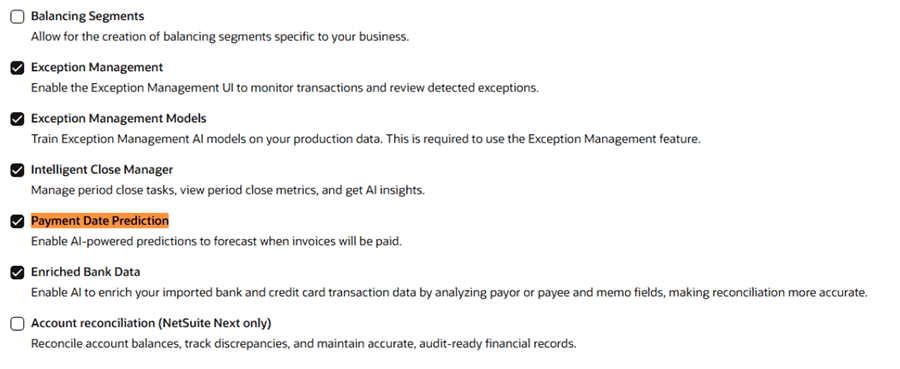
Requirements and Configuration:
- Activation: Confirm whether your account needs to request feature activation through NetSuite Support before enabling it.
- Payment history: At least 12 weeks of payment history, plus 50 paid invoices preceding that period.
- Prediction schedule: Predictions are generated automatically each week.
- Initial results: Predictions may take up to 24 hours.
- Configuration: There is no separate configuration page or dedicated native dashboard.
Where to Find Payment Predictions:
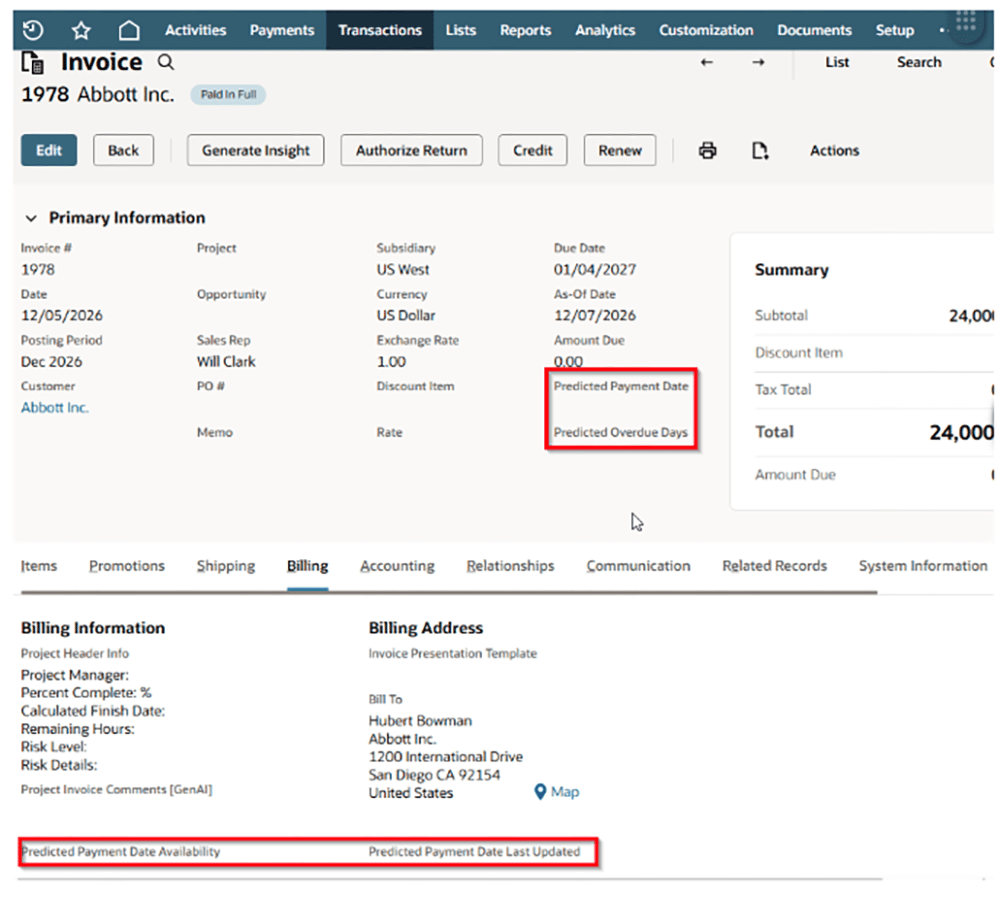
Open an eligible customer invoice and review these read-only fields:
- Predicted Payment Date: When NetSuite expects payment.
- Predicted Overdue Days: How many days beyond the due date payment is expected.
- Predicted Payment Date Availability: Whether a prediction exists.
- Predicted Payment Date Last Updated: When the estimate was last updated.
The first two fields appear in Primary Information; the other two appear on the Billing subtab.
How Finance Teams Can Use It:
- Prioritize collections based on expected payment timing.
- Forecast incoming cash receipts.
- Identify customers who regularly pay later than their agreed terms.
Key takeaway: Payment Date Prediction predicts expected cash receipts, but does not automatically change due dates or initiate collections.
2. Intelligent Close Manager (ICM)
Introduced: NetSuite 2026.1. Custom close tasks were added in the 2026.2 release in August 2026.
What Is Intelligent Close Manager?
Intelligent Close Manager provides a centralized view of financial close tasks, progress, key financial indicators, and exceptions, helping accounting teams coordinate close activities and identify outstanding work.
How to Enable It:
Navigate to Setup > Company > Enable Features > Accounting > Advanced Features, enable Intelligent Close Manager, and save your changes.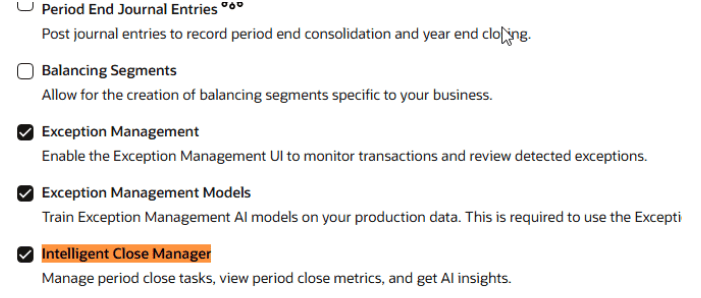
Where to Find the Dashboard:
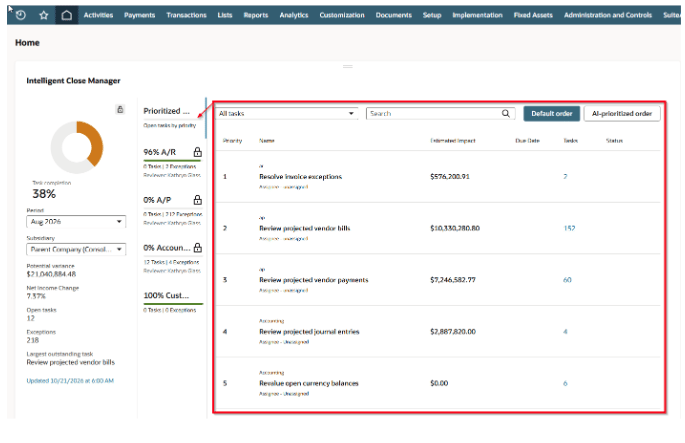
The Close Manager portlet is added automatically to the Home dashboard when the feature is enabled. If it is not visible, navigate to Home > Personalize > Standard Content > Close Manager.
Understanding the Dashboard:
- Task Completion: Shows progress associated with posted and outstanding A/R and A/P amounts.
- Potential Variance: Estimates the impact of outstanding close activities.
- Open Tasks: Highlights activities that still require attention.
- Exceptions: Displays anomalies identified through Exception Management.
- A/R, A/P, Accounting, and Custom: Categories used to organize close activities.
How to Create Custom Tasks:
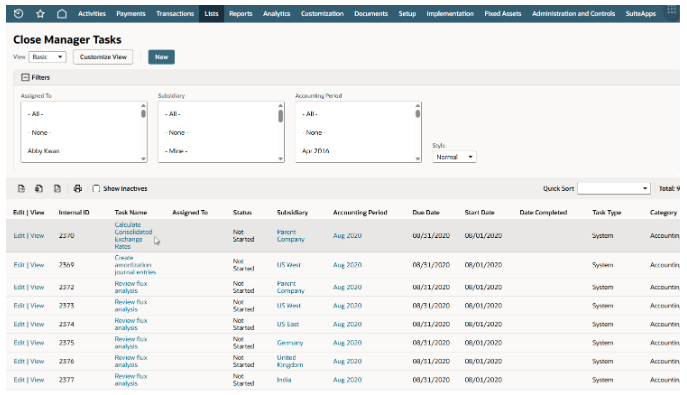
Navigate to Lists > Accounting > Close Manager Tasks > New.
Enter the task name, assignee, status, category, accounting period, start date, and due date. Select a subsidiary if applicable. You can also add email notifications, instructions, and attachments before saving.
Custom tasks appear under the Custom tab for the corresponding accounting period and subsidiary. Appropriate Close Manager Tasks permissions are required.
Configuration and Customization:
There is no separate central dashboard for configuring all close tasks. Available system-generated tasks depend on the accounting features enabled in your NetSuite account. AI-generated narrative insights are controlled through AI Preferences.
How Finance Teams Can Use It:
- Coordinate financial close activities across teams.
- Improve task ownership and accountability.
- Identify bottlenecks and incomplete work.
- Review outstanding exceptions before closing a period.
Key takeaway: Intelligent Close Manager organizes financial close work and provides visibility; it does not replace NetSuite's accounting period controls or reconciliation processes.
3. Exception Management (EM)
Introduced: NetSuite 2025.2
What Is Exception Management?
Exception Management uses AI to identify financial activity that may require further investigation, including unusual transactions, potentially incorrect accounts or amounts, expected transactions that appear to be missing, and certain suspicious vendor information changes.
How to Enable It:
Navigate to Setup > Company > Enable Features > Accounting > Advanced Features.
Enable Exception Management Models first, followed by Exception Management, then save your changes.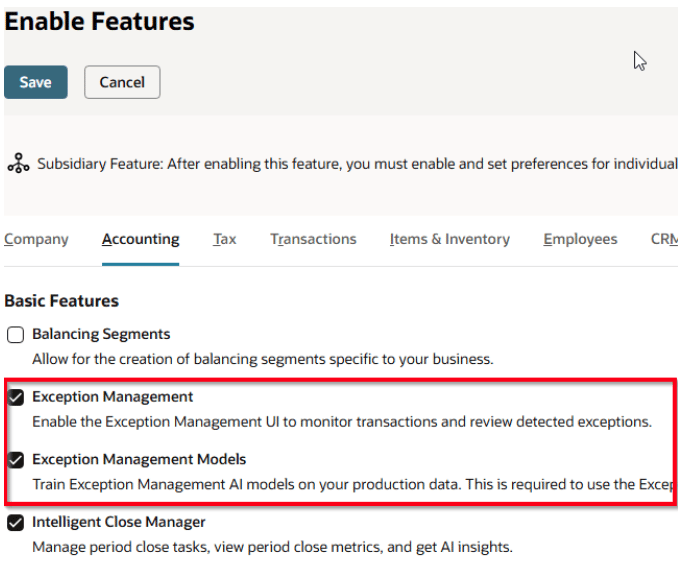
Configure Exception Management:
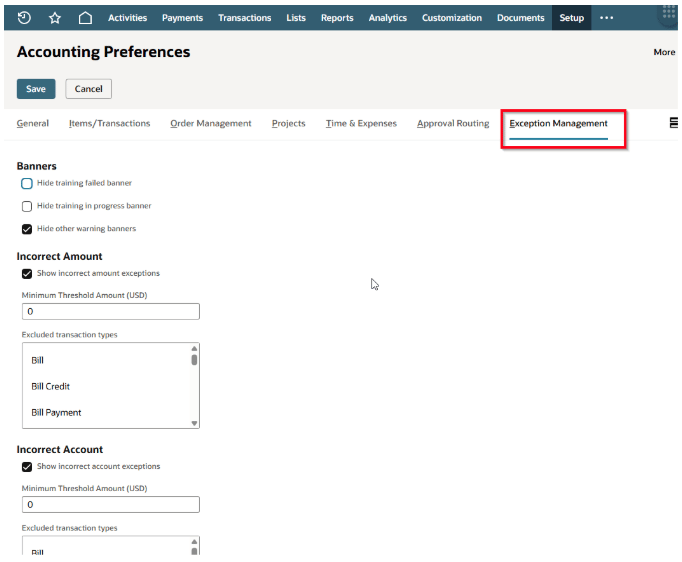
Navigate to Setup > Accounting > Accounting Preferences > Exception Management.
Administrators can configure exception categories, excluded transaction types, minimum dollar thresholds, and preferences for vendor information changes.
These settings control which exceptions are generated or displayed. They do not involve manually training the AI model.
Where to find Exceptions:
Navigate to Lists > Accounting > Exception Management.
Understanding the Main Workspace
- Transaction Errors: Highlights unusual amounts, account assignments, and relevant vendor changes.
- Expected Transactions: Identifies activity NetSuite anticipates but cannot find.
- Confidence/Sensitivity: Helps users assess exception signals and focus their review.
- View Details: Displays detected and expected values alongside relevant transaction information.
- Resolution actions: Depending on the exception, users may be able to select Review Transaction, I Resolved This, No Action Needed, or Create Transaction.
Dashboard: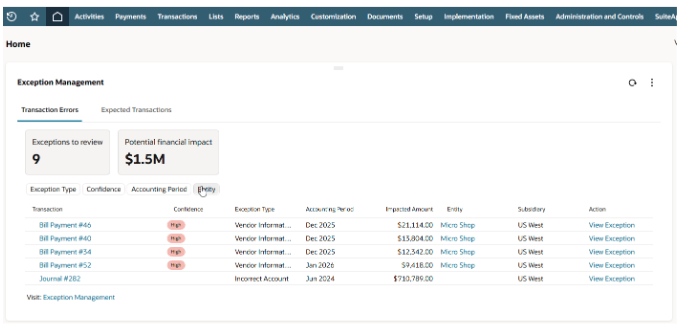
Page: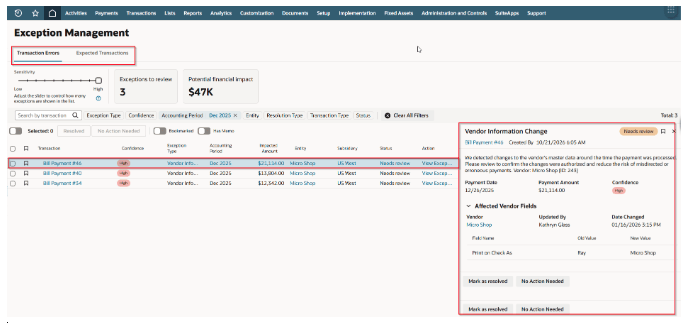
How Finance Teams Can Use It:
- Investigate unusual financial activity.
- Identify potential transaction errors and omitted activity.
- Review potentially suspicious vendor information changes.
- Resolve or dismiss exceptions and provide feedback through the available actions.
Key takeaway: Exception Management highlights activity worth investigating. Finance users remain responsible for reviewing exceptions and deciding whether corrective action is necessary.
Get More Out of NetSuite With Protelo
Knowing which NetSuite features are available is just the beginning. Protelo’s NetSuite experts help businesses configure, optimize, and support NetSuite around their processes and goals, from improving financial workflows to identifying opportunities to work more efficiently.
Whether you want to get more from existing functionality or explore additional ways to improve your system, Protelo can help you determine what makes sense for your business.
Let’s Talk About Your NetSuite Goals Today!