

3 min read
.jpg)

The Unsung Hero of the Finance Department
While many NetSuite users are familiar with the manual "Match Bank Data" tool, the Bank Statement Parsers SuiteApp is the engine that transforms reconciliation from a tedious chore into a strategic advantage. This tool acts as the bridge between your bank’s complex data and NetSuite’s general ledger, ensuring your financial information is accurate and timely.
Key Benefits of the Parser SuiteApp
The Universal Translator:
Banks often provide data in complex formats like BAI2, MT940, or CAMT.053. These files are designed for computers, not humans, and are often unreadable in a standard spreadsheet. The Parser reads this data fluently, translating bank codes and nested structures into clear transactions within NetSuite.
Multi-Account Efficiency:
A single bank file often contains data for multiple accounts. Rather than requiring you to split these out manually, the SuiteApp can identify and distribute transactions to the correct bank accounts in NetSuite automatically from a single upload.
For example:
Your Financial Institution has 10 different account numbers and they all need to translate to 10 different NS GL accounts. NetSuite will parse the and map the bank transaction in the Match Bank Data page automatically.
Zero-Entry Accuracy:
Manual data cleansing is one of the most common sources of financial errors. The Parser helps eliminate the need to "fix" your bank file in Excel before importing it. By capturing every decimal point and reference code exactly as the bank intended, your reconciliation process shifts from a "typing" exercise to a "checking" exercise.
Automated Data Delivery:
When you pair the Parser with an SFTP connection, your bank data no longer waits for a manual upload. It can be scheduled to load into NetSuite automatically overnight, ensuring that your records are updated while you sleep.
Real-Time Cash Visibility:
Automation changes the frequency of your reporting. Instead of waiting for month-end to see your true cash position, you can have a clear, accurate view of your liquidity every single morning.
Pro-Tips for NetSuite Power Users
Leverage Automated Rules
Once the Parser brings the data in, don’t settle for manual matching. Use the specific Bank Transaction Codes translated by the Parser to create automated rules.
For example, you can configure NetSuite so that any transaction with "Bank Code 475" automatically generates an Interest Income entry.
Clean Data at the Gate
Use the Parser’s configuration to "strip" unwanted characters or repetitive strings. If your bank adds unnecessary prefixes like "INC" or "ID:999" to every description, the Parser can remove them during the import process. This keeps your NetSuite records clean, professional, and easy to search.
Financial Institutions and Format Profiles
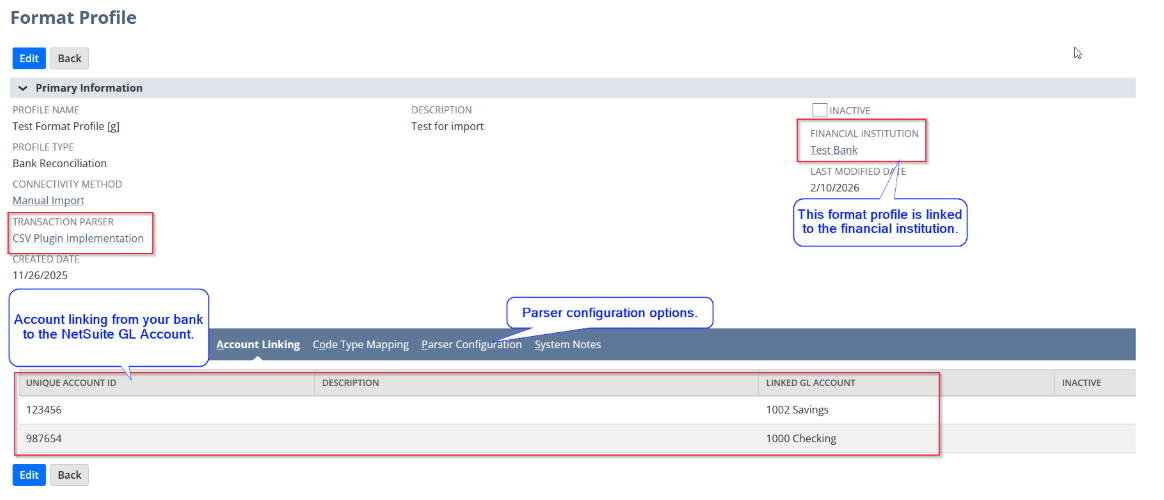
The Bank Feeds SuiteApp provides the ability to set up financial institutions and format profiles. A format profile may link multiple accounts from your bank to NetSuite GL accounts.
When the financial institution and format profile are selected during import, accounts in the file will map automatically and follow the account linking you specified in the account linking setup in the format profile, turning several imports into one import!
Monitor Import History
If a file fails to import, the Bank Import History is your first line of defense. Usually, a failure simply means the bank has introduced a new transaction code that hasn't been mapped yet. Update the configuration once, and the system will handle that code correctly forever.

Protelo is Here to Help!
The Bank Statement Parser is more than just a technical utility; it is a productivity engine. It moves your team away from manual data entry and toward high-level financial analysis. By letting the Parser handle the grunt work, you free up your finance team to act as true strategic partners to the business. Reach out to our team to help you improve your reconciliation processes.
Check out our extensive NetSuite services list, we work on-demand, when you need us!