

14 min read

Being "go-live ready" on Acumatica means validating that your licensing matches real workloads, your data migration has been tested and reconciled, your integrations perform under load, and your cutover plan has clear owners and timelines.
Acumatica's resource-based licensing and modular architecture offer flexibility, but they also introduce risk if edition scope, transaction limits, or module access aren't mapped to actual usage before activation.
This checklist consolidates licensing validation and operational readiness into a single framework so implementation teams can make confident go/no-go decisions without missing critical items.
Quick Readiness Snapshot: Are You Actually Ready to Go Live?
-
Licensing coverage validated: Correct edition, modules, and resource tiers mapped to real user workloads.
-
Environment defined and stable: Clear separation and sync between sandbox and production tenants, no last-minute changes.
-
Data migration tested: Trial runs completed, balances reconciled, legacy data cleansed, rollback path defined.
-
Integrations verified under load: APIs, connectors, and third-party apps tested with real-world transaction volumes.
-
Users trained in live workflows: Role-based training done, approvals tested, support path known, no shadow processes.
-
Cutover plan rehearsed: Timed activation, blackout windows, communication, and contingency plans all documented and owned.
-
Post-go-live support ready: Clear owner for issue triage, metric tracking, and rapid fixes in week one.
Why Acumatica Licensing & Go-Live Readiness Matter More Than You Think
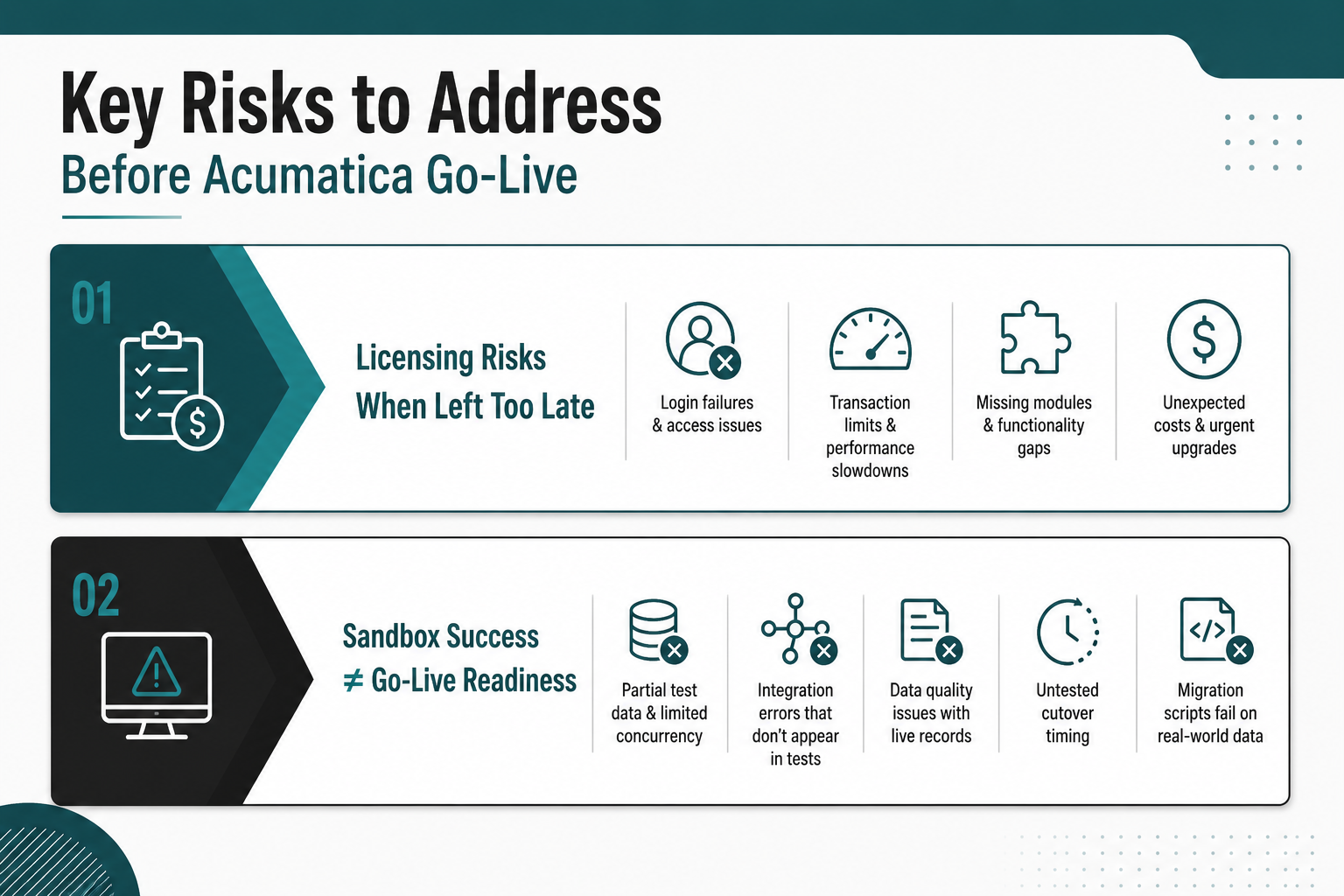
Acumatica's resource-based licensing and modular design can scale efficiently, but only if mapped carefully to real usage before go-live. Under-scoped licensing, missing modules, or poorly configured tenants can cause login failures, transaction limits, or surprise costs at the worst possible time.
Go-live failures typically stem from data quality issues, integration gaps, user adoption friction, and cutover planning breakdowns rather than from Acumatica itself. Treating licensing as a late-stage procurement task and assuming sandbox success translates directly to production creates avoidable risk that surfaces when it's hardest to fix.
The Hidden Risks of Treating Licensing as a Late-Stage Task
Many teams start with demo assumptions and add modules or adjust edition tiers at the last minute, often because initial scoping didn't account for real transaction volumes, concurrent user patterns, or department-specific functionality. This creates friction: queue limits that slow order processing, missing functionality that forces manual workarounds, or misaligned editions that require emergency upgrades during cutover windows.
Licensing validation belongs in readiness planning, not just in procurement. When edition scope, module access, and resource capacity are confirmed early and tested under realistic load, teams avoid the scenario where users can't log in on day one or critical workflows fail because a required module wasn't enabled in production.
Why "We Tested in the Sandbox" Isn't Enough for Go-Live
Sandbox success doesn't guarantee production readiness. Sandbox environments typically use partial test data, limited user concurrency, and simplified integration scenarios. However, production introduces variables that a test environment rarely captures.
Once real users, live records, and connected systems begin moving through the platform at the same time, issues tend to surface in new ways. Data quality problems become more visible, heavier usage can strain performance, and integrations may return errors that never appeared during controlled testing. Approval workflows can also slow down or behave differently when teams are working under actual business pressure.
Common gaps include untested cutover timing, missing error handling for API failures, and data migration scripts that worked on clean test data but fail when legacy systems contain duplicates, incomplete records, or formatting inconsistencies. A structured readiness checklist forces teams to validate the dimensions that sandbox testing alone can't cover.
Read Next: Acumatica Implementation Process: Your 8-Step Path to ERP Success
The Acumatica Go-Live & Licensing Readiness Checklist
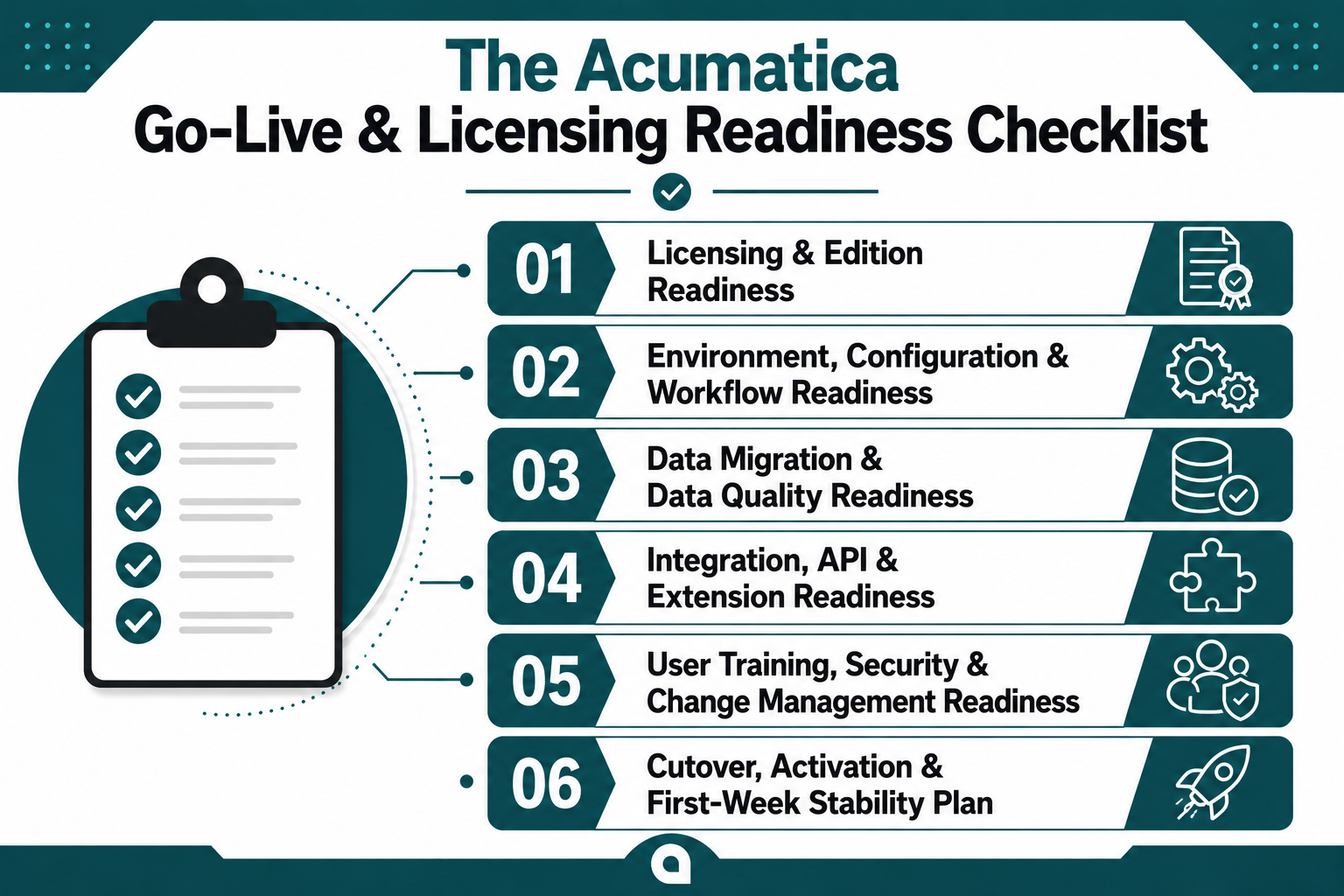
Licensing mismatches block users on day one, untested integrations create customer-facing errors, and poorly planned cutovers force teams into emergency rollback decisions. What follows is a consolidated framework that validates licensing, configuration, data, integrations, training, and cutover as interconnected readiness dimensions, not isolated tasks.
Licensing & Edition Readiness
Acumatica's resource-based pricing and modular architecture create flexibility, but they also introduce risk if edition scope, transaction capacity, and module access aren't mapped to actual usage patterns before production activation.
Validating licensing readiness means confirming that the edition, modules, user access, tenant structure, and third-party extensions all align with day-one requirements and have been tested under realistic load.
Anything flagged "At Risk" should be resolved before cutover dates are locked. If you're uncertain about edition fit or module scope, a free ERP consultation with an Acumatica partner can help you validate licensing decisions before they become expensive post-go-live corrections.
Environment, Configuration, and Workflow Readiness
Sandbox testing proves that workflows can work under controlled conditions. Production demands that they work consistently under real business pressure, with full user concurrency, live approval chains, and no manual intervention when edge cases appear.
-
Sandbox and production tenants aligned: Configuration, workflows, and customizations are synchronized, not manually re-created. Any drift between environments creates the risk that tested processes behave differently in production.
-
Core workflows fully tested: Quote-to-cash, procure-to-pay, project billing, and inventory flows run end-to-end without manual patches. Each workflow should be tested with realistic transaction volumes and edge cases.
-
Approval chains validated: Role-based approvals for purchasing, expenses, and journals behave correctly under test data. Approval routing failures are a common day-one issue that disrupts operations.
-
Localization and compliance settings confirmed: Tax, currencies, and calendars configured correctly for each entity in scope. Incorrect tax settings or currency revaluation rules can create compliance and reporting issues.
-
Automation rules reviewed: Scheduled tasks, notifications, and AI-driven suggestions are configured and do not create noise. Overly aggressive automation can overwhelm users or trigger unintended actions during the first week.
Data Migration & Data Quality Readiness
Being "data-ready" for Acumatica means clean master data, reconciled balances, and tested migration scripts that have been validated in a production-like environment. Data migration should include at least one full trial migration, reconciliation in a test tenant, and a final cutover migration plan with clear timing and ownership.
Key migration passes must cover customer, vendor, item, and chart of accounts mappings that are stable and won't require rework after go-live. Historical transactions should be included only where necessary to protect performance, and data validation reports must agree with legacy systems within defined tolerances.
A rollback plan is essential if the cutover data exposes critical issues. This plan should define how quickly the team can revert to legacy systems, what data would be lost, and who makes the rollback decision. Without a rollback plan, teams are forced to troubleshoot data issues in production while users wait, creating disruption and eroding confidence in the new ERP system.
Integration, API, and Extension Readiness
Acumatica often sits at the center of a broader app stack, so integrations can make or break go-live. Each integration needs functional testing, error handling validation, and basic performance checks with realistic transaction volumes.
Any integration not fully ready at go-live should be explicitly deferred with a manual workaround plan. Trying to stabilize integrations during cutover creates unnecessary risk.
User Training, Security, and Change Management Readiness
Users who don't understand their new workflows will revert to spreadsheets, bypass approvals, or flood the support queue with questions that training should have answered. Preventing that outcome requires role-specific training, clear security boundaries, and a support structure that answers questions before frustration sets in.
-
Role-based training completed: End-users trained using live or near-live workflows, not just watching a generic demo. Training should cover the specific screens, reports, and approval steps each role will use daily.
-
Security roles aligned to real responsibilities: No shared admin accounts; sensitive functions restricted by least privilege. Overly permissive roles create compliance risk and make it harder to troubleshoot errors.
-
Support model defined: Users know where to log tickets, what to expect for response times, and how issues are prioritized. Without a clear support path, users will escalate every question to managers or the implementation team.
-
Change champions identified: Each department has at least one power user who can triage simple issues and reinforce new processes. Change champions reduce the support burden and help maintain momentum after go-live.
-
Communication cadence set: Regular updates before and after go-live so no one is surprised by cutover or UI differences. Communication should include what's changing, when, and where to get help.
Cutover, Activation, and First-Week Stability Plan
Cutover execution determines whether your Acumatica launch feels controlled or chaotic. Missing timing details, unclear communication, or absent decision authority turn technical readiness into operational confusion. A documented plan with named owners, rehearsed timing, and defined escalation paths keeps activation on track.
-
Cutover timeline documented: Clear start/stop times for last legacy transactions, data migration, and Acumatica activation. The timeline should include buffer time for unexpected issues and define who can authorize delays.
-
Blackout windows communicated: Customers, vendors, and internal teams know about any brief downtimes or manual workarounds. Lack of communication creates confusion and erodes trust in the new system.
-
Parallel run decision made: If applicable, defined the scope and duration of any limited dual-entry period. Parallel runs reduce risk but also create extra work, so the decision should be explicit and time-bound.
-
Go-live command center defined: Named decision-makers and technical leads on call during the first days. The command center should have the authority to make real-time decisions about rollback, workarounds, or escalation.
-
Stabilization metrics tracked: Daily monitoring of transaction counts, error rates, and key operational KPIs in the first week. Metrics help the team distinguish between normal learning curve issues and systemic problems that require immediate fixes.
Interpreting Your Acumatica Readiness Scorecard
Some checklist gaps are manageable with clear owners and workarounds. Others create unacceptable risk that will surface as data loss, compliance failures, or customer-facing disruption the moment you activate. Knowing which gaps justify delay and which can be managed through the first week determines whether you proceed confidently or create avoidable rework.
When You Should Delay Go-Live (and Fix Gaps First)
Delaying go-live is the right decision when critical gaps would create data loss, compliance risk, or operational disruption that can't be managed with workarounds.
.png?width=1536&height=1024&name=When%20You%20Should%20Delay%20Go-Live%20(and%20Fix%20Gaps%20First).png)
-
Licensing or edition uncertainty: If you're not confident that the licensed edition and modules support day-one workflows, delay until licensing is confirmed and tested. Discovering module gaps after cutover forces emergency upgrades or manual workarounds.
-
Major data reconciliation gaps: If trial migration balances don't match legacy systems within defined tolerances, delay until data quality issues are resolved. Going live with bad data creates reporting problems that take months to fix.
-
Unready critical integrations: If integrations that directly impact customer orders, payments, or fulfillment aren't stable, delay until they're tested under load. Integration failures during cutover create customer-facing disruption.
-
No defined cutover plan: If timing, ownership, and communication aren't documented, delay until the cutover plan is clear and rehearsed. Ad hoc cutover execution creates confusion and increases the likelihood of rollback.
Signs You're Ready for a Confident Go-Live
A "green" readiness profile means most checklist items are marked "Ready" across licensing, environment, data, integrations, training, and cutover. Minor open items can be managed with clear owners and timelines as long as they don't block core workflows or create compliance risk.
Ready teams have tested data migration multiple times, validated integrations under realistic load, trained users on live workflows, and documented a cutover plan with named decision-makers and contingency steps. They also have a post-go-live support model in place so that issues can be triaged and resolved quickly without overwhelming the implementation team.
Read Next: Acumatica ERP Implementation Pitfalls & Recovery: Getting a Troubled Project Back on Track
Turn Readiness Checks Into Reliable Acumatica Launches
A disciplined checklist is often the difference between a smooth Acumatica launch and months of cleanup. Licensing, data, integrations, and people all have to align, not just the core ERP software. This checklist helps you validate licensing and edition decisions, check environment and workflows, test data and integrations, and build a concrete cutover and stabilization plan.
-
Licensing and environment must be validated together so users and modules align with real workloads from day one.
-
Data, integrations, and training are where most go-lives fail, so treat their checklists as non-negotiable, not optional extras.
-
A second set of expert eyes reduces risk, especially when you're days or weeks from flipping the switch on a new ERP system.
Protelo is an Acumatica Gold Certified Partner that helps clients review Acumatica go-live and licensing readiness, help fix issues before cutover, or rescue implementations that are already in motion. Schedule a consultation to review your Acumatica licensing and go-live plan and reduce avoidable launch risk.
FAQs
How do I know if my Acumatica licensing is correctly sized for go-live?
Your licensing is correctly sized if your selected edition supports projected monthly transaction volumes, all required modules are enabled in production, user licenses align with actual roles and access patterns, and sandbox and production tenants are both licensed with no configuration drift. If any of these areas show gaps, your licensing needs adjustment before cutover.
What should be included in an Acumatica go-live checklist?
An Acumatica go-live checklist should include licensing and edition validation, environment and workflow configuration, data migration and quality testing, integration and API readiness, user training and security setup, and a detailed cutover and stabilization plan. Each area should have clear checkpoints, owners, and status tracking.
How many trial data migrations do I need before the Acumatica cutover?
You need at least one full trial migration that includes reconciliation in a test tenant and validation that balances match legacy systems within defined tolerances. Most teams benefit from two or three trial runs to refine scripts, resolve data quality issues, and confirm timing before the final cutover migration.
Which integrations must be live on day one, and which can wait?
Integrations that directly impact customer orders, payments, fulfillment, or financial close must be live on day one. Integrations for reporting, analytics, or secondary workflows can often be deferred with manual workarounds as long as the deferral is explicit and time-bound.
How much user training is enough before an Acumatica go-live?
User training is enough when end-users have completed role-based training using live or near-live workflows, tested approval chains, and know where to log support tickets and what to expect for response times. Training should cover the specific screens, reports, and daily tasks each role will use, not just generic demos.
What are the biggest last-minute risks before Acumatica activation?
The biggest last-minute risks are licensing gaps that block user access, data reconciliation failures that create reporting errors, integration issues that disrupt customer-facing workflows, and unclear cutover timing or communication that creates confusion. Each of these risks can be mitigated with structured readiness validation.
When should I bring in an Acumatica partner like Protelo to review readiness?
Bring in an Acumatica partner when you've completed your internal readiness checklist and want an independent review before final sign-off, when you've identified gaps but aren't sure how to prioritize fixes, or when you're days or weeks from cutover and need expert help to stabilize licensing, data, or integrations quickly.
Can I go live on Acumatica without completing every checklist item?
You can go live with minor open items as long as they don't block core workflows, create compliance risk, or lack clear owners and timelines. However, critical gaps in licensing, data quality, integrations, or cutover planning should be resolved before activation to avoid disruption and rework.